
GICT knowledge base
Installing Zabbix Agent on Windows
Published

This tutorial will help you install and configure the Zabbix agent on Windows Server.
Step 1:
Download the agent: https://www.zabbix.com/download_agents/
Step 2:
Extract the zip file.
Step 3:
Make a new directory c:\zabbix\ (or any other path you may find convenient.
Step 4:
Copy the contents of the bin file and the config file into the new folder you created. I like to merge both the bin and the config folder together.
Step5:
Open the zabbix_agentd_win.conf file.
modify the server= line and add the ip address of the Zabbix server that will monitor this agent. here is my example:
Server=66.45.240.98
ServerActive=66.45.240.98
modify the hostname= line and set it to match the name of your server.
Hostname=server.somdomain.com
Step 6:
Next the agent needs to be registered into windows as a service using this command
c:\zabbix\zabbix_agentd.exe -c c:\zabbix\zabbix_agentd.win.conf -i
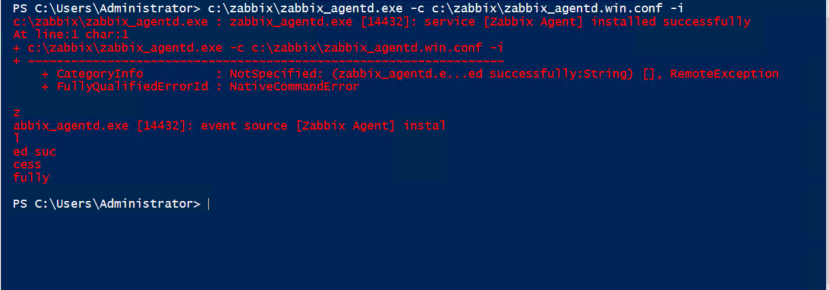
Step 7:
Now you can go to windows services and start the agent just like any other service.
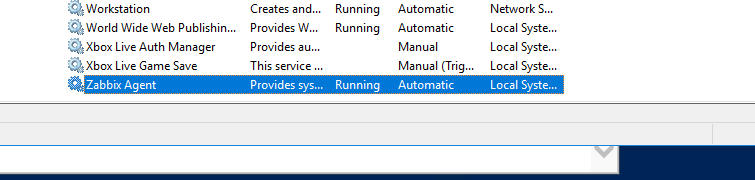
The installation of agent is now complete. Your Zabbix server should now be able to monitor the agent.
TIPS:
Enable ICMP on windows server firewall in power shell:
netsh advfirewall firewall add rule name="ICMP Allow incoming V4 echo request" protocol="icmpv4:8,any" dir=in action=allow
Open port 10050 for zabbix agent
netsh advfirewall firewall add rule name="Open Port 10050" dir=in action=allow protocol=TCP localport=10050
Monitoring HP SmartArray with Zabbix Agent
Download the HP Raid CLI.
(the above link maybe out dated. Click on “releases” to see if there are newer versions available.)
copy file the agent file into the Zabbix folder
https://github.com/asand3r/zbx-hpsmartarray/blob/master/Zbx-HPSmartArray.ps1
add this into zabbix_agentd.win.conf
UserParameter=hp.smartarray[*],powershell -NoProfile -NoLogo -File “c:\zabbix\Zbx-HPSmartArray.ps1” $1 $2 $3 $4
restart the service
Restart-Service “Zabbix Agent”
See if your controller is detected
.\Zbx-HPSmartArray.ps1 lld ctrl
Check the health of the first drive on contorler 0
.\Zbx-HPSmartArray.ps1 health pd 0 “1I:1:1”
Related guides
Optimizing MetaTrader on Your GICTServer VPS
Optimizing MetaTrader on Your GICTServer VPS Running MetaTrader 4 or 5 (MT4/MT5) on a Virtual Private Server (VPS) is the gold standard for traders who need 24/7 uptime...
WindowsUnderstanding the db_owner Role in Plesk Windows Hosting
If you have ever managed a database on a Windows-based hosting plan using Plesk, you might have noticed that your database user doesn’t always start with "full"...
WindowsHyper-V Windows VPS: Password Security & Reset Policies
When you provision a Windows VPS (Hyper-V) with GICTServer, you are granted full Administrator access.
WindowsChange RDP port on Windows server
How do you Change the RDP port on a Windows server? Remote Desktop Protocol is a secure network protocol developed by Microsoft that provides a user interface with good...