
GICT knowledge base
How to cancel your VPS
Published
Hello,
At any time you can cancel your VPS from you’re account https://my.GICTServer.net
First, log into https://my.GICTServer.net with your email address and password.
On the left side of the page click on VPS the fourth op0tion from the menu.
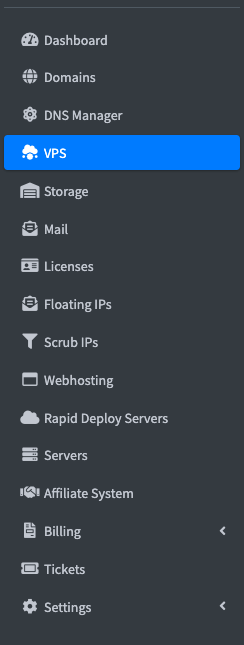
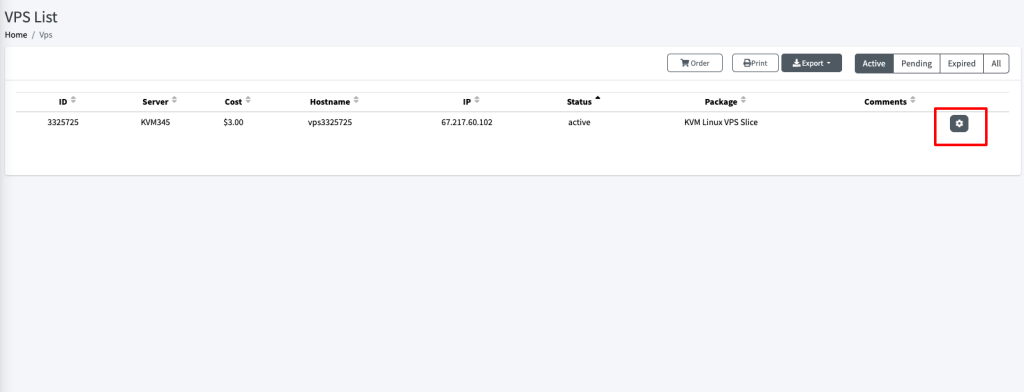
Which will redirect to https://my.GICTServer.net/view_vps_list
Now click on the gear button for the VPS you wish to cancel.
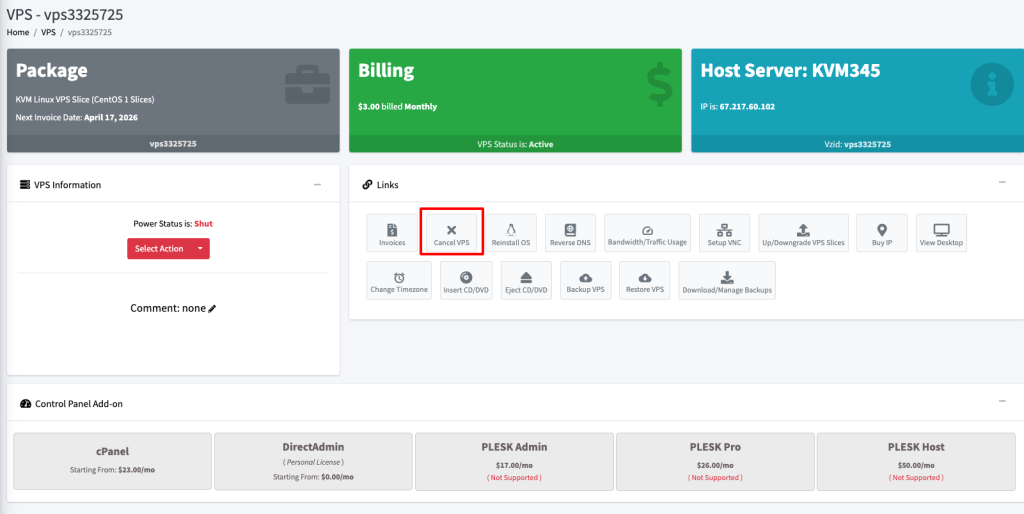
You will see cancel VPS button click on it, and you will see a pop up Are you sure want to cancel your vps?
Click yes cancel and you will see
Success! VPS is canceled.
Generally, there are 30 days to reactivate a VPS before the data is removed completely.
Related guides
Billing Refunds Availability
GICTServer Refunds: A Clear Guide for Our Customers Whether you’re just joining the GICTServer family or you’ve been hosting with us for years, we know that clarity is...
InterServer BillingPayment methods
GICTServer accepts a wide variety of payment methods to make paying for your hosting as easy as possible.
InterServer BillingHow do I cancel my account?
Hello, Virtual Hosting, Mailbaby, Storage packages, and Licensing services can typically be canceled directly from your end.
InterServer BillingHow do I update my billing information?
For Dedicated Server Clients: Billing information can be updated through https://GICTServer.net/cms.