
GICT knowledge base
Payment methods
Published
GICTServer accepts a wide variety of payment methods to make paying for your hosting as easy as possible.
How to pay your bill
Login to https://my.GICTServer.net/
Go to Billing > view balance. Or click here: https://my.GICTServer.net/cart
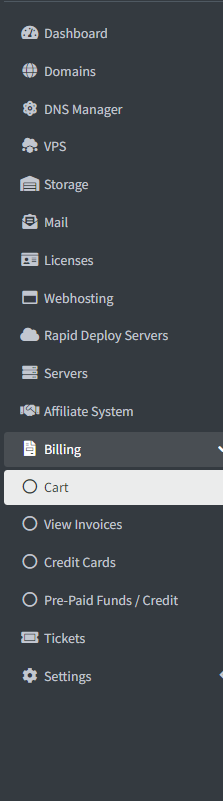
On the view balance page, you will see all unpaid invoices and the available payment methods.

Making Payments using Cryptocurrency
Login to https://my.GICTServer.net/
Go to Billing > view balance. Or click here: https://my.GICTServer.net/cart
Now you can Pay with Coinbase or BTCPAY.
Coinbase:
You can use Coinbase | Wallet to make the payments:
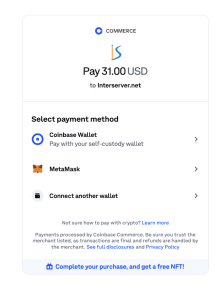
There are mutiple wallet options to make payment under Coinbase, you can connect the wallets and proceed to make payments.
BTCPAY:
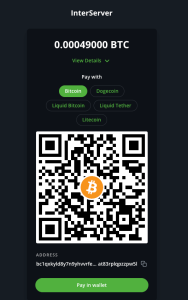
Multiple options are available under BTCPAY, you can make the payment depending on your convience.
Countries and the payment method’s supported:
United States


- Currency: USD
- PayPal
- Visa Card
- Master Card
- American Express
- Discover Card
- Wire Transfer / ACH
- Check / Money Order
China


- Currency: USD
- PayPal
- Union Pay
- Alipay
- Tenpay
- Visa Card
- Master Card
- American Express
- Discover Card
- Wire Transfer
Russia, Ukraine, Kazakhstan, Azerbaijan, & Uzbekistan.



- Currency: USD, EUR, RUB
- PayPal
- Webmoney
- QIWI Wallet
- Yandex Money
- Visa Card
- Master Card
- American Express
- Discover Card
- Wire Transfer
Russia





- Currency: USD, EUR, RUB
- PayPal
- Moneta
- Alfa-Click
- Promsvyazbank
- Russia Standard Bank
- Russian Post Center
- Visa Card
- Master Card
- American Express
- Discover Card
- Wire Transfer
Poland.
Payment Channel’s are Credit card, Debit card, PayPal & Dotpay. Supported currency: PLN, EUR, USD

- Currency: USD, EUR, PLN
- PayPal
- Dotpay
- Visa Card
- Master Card
- American Express
- Discover Card
- Wire Transfer
Europe
- Currency: USD
- PayPal
- Visa Card
- Master Card
- American Express
- Discover Card
- Wire Transfer / ACH
India


- Currency: INR
- PayPal
- UPI
- India Bank Transfer
- Visa Card
- Master Card
- American Express
- Discover Card
- Wire Transfer / ACH
Payment methods for INR:
Login to https://my.GICTServer.net/
Go to Billing > view balance. Or click here: https://my.GICTServer.net/cart
We are providing payment options using different vendors like PayU, CC Avenue & Cashfree Payment through which you can use UPI to make payments.
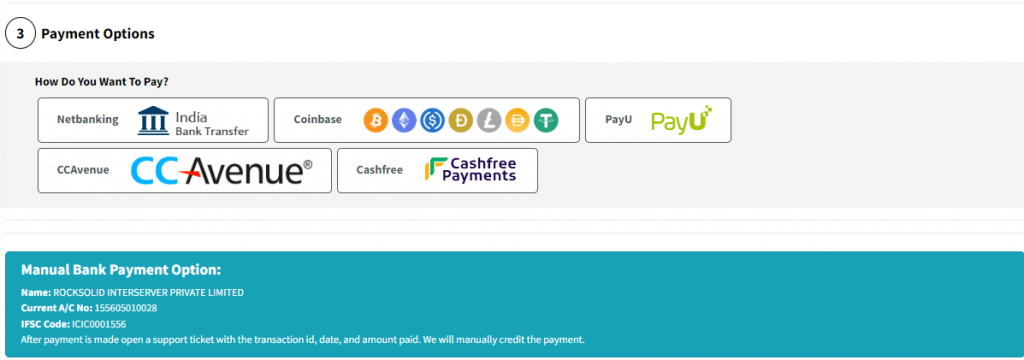
You can choose the vendor and choose the payment method type like credit or debit card, net banking, and UPI to make payment.
Manual Bank Payment details for INR:
**************
Name: ROCKSOLID GICTServer PRIVATE LIMITED
Current A/C No: 155605010028
IFSC Code: ICIC0001556
***************
Reply back with the screenshot/transaction id of the payments to update the invoice.
Always feel free to reach our Live Chat Support at https://www.GICTServer.net/ for quicker assistance to change the currency type.
So that you can pay through any local payment options available and supported by our payment gateways.
Related guides
Billing Refunds Availability
GICTServer Refunds: A Clear Guide for Our Customers Whether you’re just joining the GICTServer family or you’ve been hosting with us for years, we know that clarity is...
InterServer BillingHow do I cancel my account?
Hello, Virtual Hosting, Mailbaby, Storage packages, and Licensing services can typically be canceled directly from your end.
InterServer BillingHow do I update my billing information?
For Dedicated Server Clients: Billing information can be updated through https://GICTServer.net/cms.
InterServer BillingHow to update and pay with a credit card at https://my.GICTServer.net
To enable credit cards log into https://my.GICTServer.net with your email address as the username.