
GICT knowledge base
Modify cPanel & WHM News
Published
Modify cPanel & WHM News
The cPanel offers an option to display custom messages on the cPanel/WHM interface.
We can add custom messages on cPanel, reseller WHM, etc. You can follow the below steps for adding custom messages.
1) Login to the WHM.
You could log in to the WHM using a web browser. You need to enter the IP address or hostname of the server followed by a colon and port number such as http://hostname:2086. If you need to access the WHM secured URL, you need to enter the below in the address bar of the web browser. https://hostname:2087. The difference here is the port number. Please note, you need to access the WHM, cPanel or Webmail accounts via SSL connection (Secured connection) to enable external authentication.
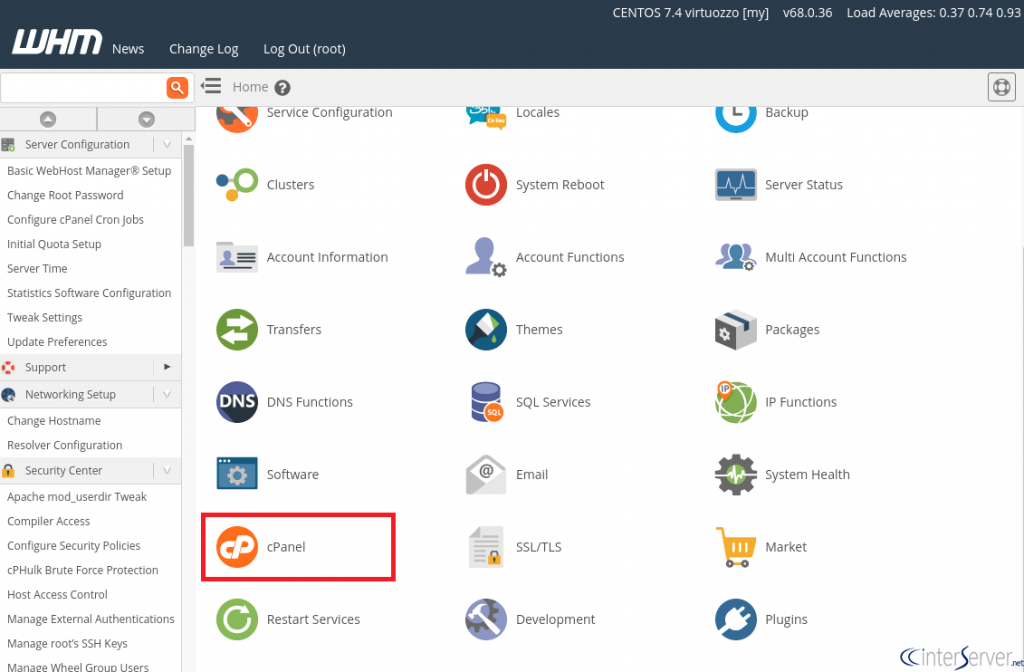
2) Go to Home >> cPanel.
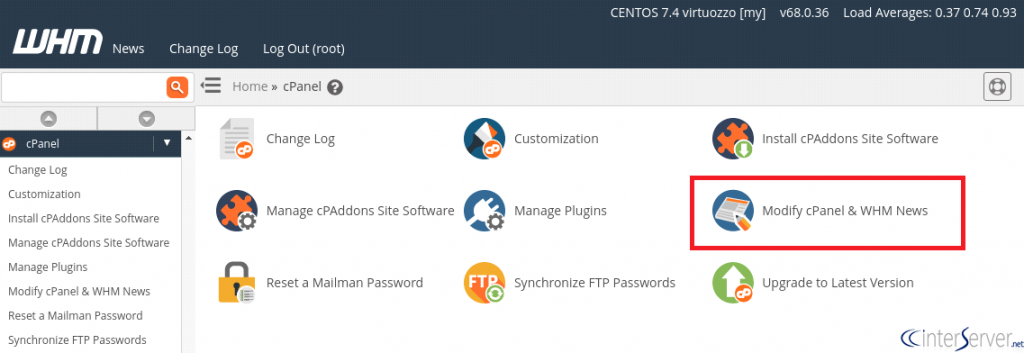
You will be redirected to next page where you can see options to change log, customization, manage plugins and upgrade to latest version.
3) Go to Modify cPanel & WHM News.
There are four text boxes which you can use for different uses.
First box: The first box can be used to add the message for cPanel users to see.
Second box: This box is used for adding messages for resellers to see on their WHM interface.
Third box: This box can be used for entering a message that you wish for user accounts that you do not own to see in their cPanel interfaces. Resellers who own their own accounts and resellers’ customers will see this message.
Fourth box: You can enter a message that you wish for users and accounts that you own to see in their cPanel interfaces. Resellers who own their accounts and resellers’ subordinate users will not see this message.
This can be viewed in the screenshot given below.
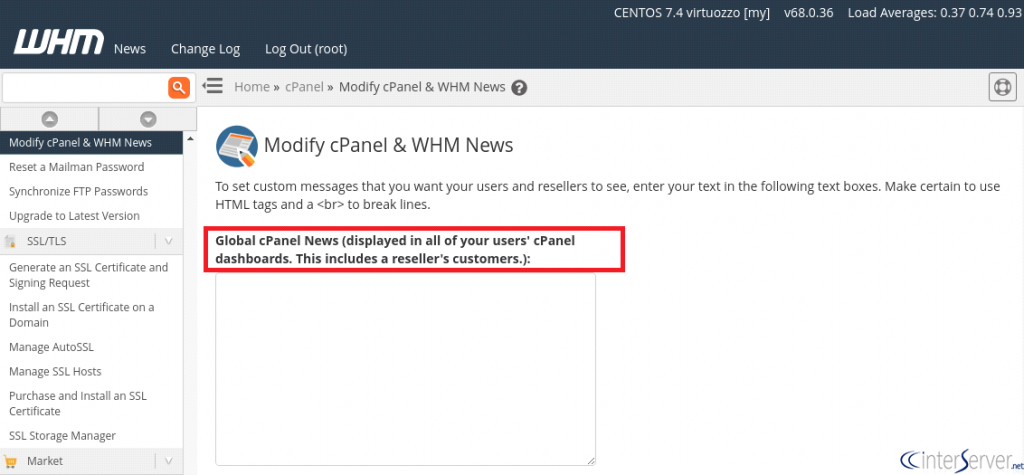
This is an example of global cPanel news. ie., displayed on all of the cPanel dashboard interfaces but you could use other boxes for other interfaces as mentioned above.
This is how we can add cPanel & WHM news from WHM.
If you need any further help please do reach our support department.
Related guides
Host Additional Domains on an Eligible GICTServer Account
Check your hosting limits, choose a separate site or alias and use cPanel or DirectAdmin with deliberate DNS, content and certificate verification.
cPanelHardening Your cPanel Server: Beyond the Basics After CVE-2026-41940
Security is a moving target. With the recent discovery of CVE-2026-41940, it has become clear that just having a firewall isn't enough anymore.
cPanelcPanel and Plesk notice: Awstats,. Webalizer and Analog stats are being removed
Important Update: cPanel and Plesk Phasing Out Legacy Statistics Tools If you regularly check your website traffic through your hosting control panel, we have an...
cPanelThe dangers of shared licenses (in other words unofficial/cracked licenses)
Why Cracked cPanel Licenses Aren’t Worth the Risk: A Guide for GICTServer Customers When you’re managing a server, every dollar counts.