
GICT knowledge base
Swap on a VPS: When It Saves You and When It Kills Performance
Published
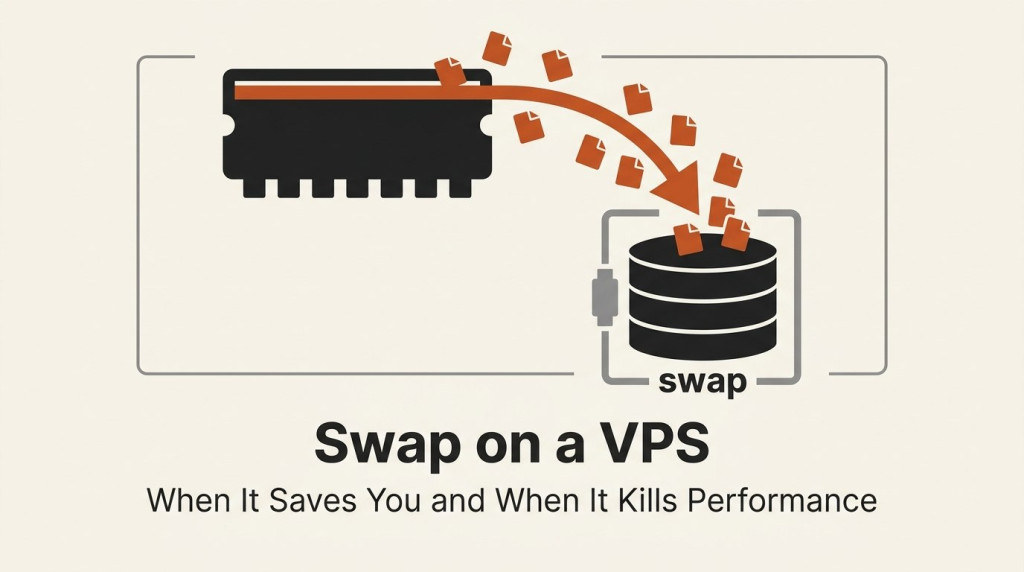
Picture a small VPS, 1 GB of RAM, running a website. Traffic spikes, a few extra worker processes start, memory fills up, and then one of two things happens. Either the Linux OOM killer picks a process and kills it, taking your site down, or swap quietly catches the overflow and your site stays up but slows to a crawl. Swap is the safety net between “my process got killed” and “my server is fast.” Used right, it saves you. Used wrong, it makes everything painfully slow.
This article explains what swap actually is, when it helps, when it hurts, and how to set it up and tune it. Every command below was run on a real Linux server before publishing.
What swap actually is
Swap is disk space the kernel uses as an overflow area for RAM. When physical memory gets tight, the kernel takes memory pages that have not been touched recently and writes them to the swap area on disk, freeing that RAM for something more active. When a swapped-out page is needed again, the kernel reads it back in. This is called swapping, or paging.
The critical fact is speed. RAM is measured in nanoseconds. Disk, even a fast SSD, is measured in microseconds, which is hundreds to thousands of times slower. So swap does not give you “more RAM.” It gives you slower RAM that keeps things from crashing. That single trade, capacity in exchange for speed, is the whole story of swap.
When swap saves you
On a small VPS, a bit of swap is cheap insurance:
- It prevents the OOM killer from nuking your processes. Without swap, when RAM runs out, Linux starts killing processes to survive. That is often your web server or database, and it goes down hard. With swap, a temporary spike spills to disk instead of triggering a kill.
- It absorbs short, occasional spikes. A nightly backup, a burst of traffic, a memory-hungry cron job. These push memory up for a few seconds. Swap lets them ride through instead of falling over.
- It reclaims RAM wasted by idle pages. Long-running processes accumulate pages they touched once and never use again. Swapping those out frees real RAM for disk cache, which can actually make the box faster.
For a 1 to 2 GB VPS, a small amount of swap is almost always worth having. It turns a hard crash into a soft slowdown.
When swap kills performance
The danger is sustained memory pressure. If your server genuinely needs more RAM than it has, the kernel starts swapping constantly, paging data out and immediately needing it back. This is called thrashing, and it is brutal. Load average shoots up, disk I/O saturates, and every request crawls because the CPU spends its time waiting on disk instead of doing work.
Databases are the classic victim. Postgres, MySQL, and Redis all manage their own memory carefully and assume it lives in RAM. When the kernel swaps their pages to disk, query latency can jump by orders of magnitude. A swapped database is often slower than no database at all.
The rule of thumb: swap is a buffer for spikes, not a substitute for RAM. If your server swaps constantly, that is not a swap problem, it is a signal to add RAM or reduce your memory footprint.
Hands-on: add and tune swap
You need root. First, check what you have:
free -h
swapon --show
On a fresh VPS with no swap you will see:
               total        used        free      shared  buff/cache   available
Mem:            15Gi       6.1Gi       1.2Gi        51Mi       8.4Gi       9.2Gi
Swap:             0B          0B          0B
Swap: 0B means there is no safety net at all. Let us add one.
Create a swapfile
A swapfile is the easy, flexible option (no repartitioning). Create a 1 GB file, lock down its permissions, format it as swap, and turn it on:
sudo fallocate -l 1G /swapfile
sudo chmod 600 /swapfile
sudo mkswap /swapfile
sudo swapon /swapfile
mkswap confirms the format:
Setting up swapspace version 1, size = 1024 MiB (1073737728 bytes)
no label, UUID=ac5b1f76-f777-4450-87a8-605f9097b249
The chmod 600 matters: a world-readable swapfile could leak memory contents, so the kernel will warn about loose permissions. Now check again:
free -h | grep -i swap
swapon --show
Swap: 1.0Gi 0B 1.0Gi
NAME TYPE SIZE USED PRIO
/swapfile file 1024M 0B -2You now have a 1 GB safety net, currently unused.
Make it survive reboots
swapon only lasts until reboot. To make it permanent, add it to /etc/fstab:
echo '/swapfile none swap sw 0 0' | sudo tee -a /etc/fstabNow it comes back automatically on every boot.
Watch swap actually get used
To see swap do its job, put the machine under memory pressure and watch. The cleanest way to observe it without endangering anything is to run a memory-hungry process inside a memory-limited cgroup, so the excess is forced into swap in a contained way:
# run a 400MB process but cap its RAM at 200MB
sudo systemd-run --scope -p MemoryMax=200M -p MemorySwapMax=400M \
  python3 hog.py 400
While it runs, check the numbers:
free -h | grep -i swapSwap: 1.0Gi 209Mi 814MiSwap usage jumped from 0B to 209Mi. The process wanted 400 MB but was capped at 200 MB of RAM, so roughly 200 MB spilled into swap instead of the process being killed. That is swap earning its keep, in miniature. In production you watch the same number with free -h, or watch the si (swap in) and so (swap out) columns of vmstat 1. Steady nonzero si/so means active thrashing.
Tune how eagerly the kernel swaps
The vm.swappiness setting controls how aggressively the kernel reaches for swap, on a scale of 0 to 100. Check it:
cat /proc/sys/vm/swappiness60The default of 60 is fairly eager, which suits desktops. On a server with enough RAM, you usually want it lower so the kernel only swaps under real pressure and leaves your hot data in memory. Set it live and make it permanent:
sudo sysctl vm.swappiness=10
echo 'vm.swappiness=10' | sudo tee /etc/sysctl.d/99-swappiness.conf
A value around 10 is a common choice for web and app servers. For a database server you might go even lower (1) to keep the database resident.
How much swap, and other options
- Sizing. For small VPS plans, 1 to 2 times your RAM is a reasonable starting point, capped at a few GB. Swap is a buffer, not bulk storage, so huge swap on a tiny box just hides a real RAM shortage.
- Swapfile vs partition. A swapfile is easier to resize and works fine on modern kernels. A dedicated partition is marginally faster but inflexible. For a VPS, use a swapfile.
- zram and zswap. These compress pages in RAM instead of writing to disk, giving you a faster “swap-like” buffer. On a RAM-constrained VPS, zram is often a better first line of defense than disk swap.
Wrapping up
Swap is not more RAM and it is not free performance. It is a safety net that trades speed for the ability to survive a memory spike without killing a process. On a small VPS, a modest swapfile plus a sensible swappiness is smart insurance: it turns hard crashes into soft slowdowns and buys you time to react. But if you see swap in constant use, do not celebrate that it is working. Take it as the warning it is, and add RAM or trim your memory usage before thrashing drags the whole server down.
Related guides
How to Set Up zram on a Small VPS
Configure zram on Ubuntu with kernel and swap checks. Understand compressed memory limits, monitor real use and avoid unsafe swap-file changes.
LinuxHow to Find Services That Need a Restart After Updates with needrestart
Find services using outdated libraries with needrestart on Ubuntu. Read restart reports, review automatic restart policy and plan maintenance safely.
LinuxHow to Limit a Linux Service’s Memory with systemd
Limit a Linux service with systemd MemoryHigh, MemoryMax and swap controls. Check cgroup support, diagnose pressure and remove only your own policy.
LinuxHow to Protect SSH with CrowdSec on Ubuntu
Protect SSH with CrowdSec on Ubuntu. Connect log detection to firewall enforcement and test temporary blocking without losing administrator access.