
GICT knowledge base
How to Install SSL by Let’s Encrypt in ISPmanager?
Published
SSL certificate is very much important in any website right now. Without an SSL certificate, the data transfer between your customer’s browser and your server is done without any encryption. It means that the bad guy can see what is being transferred between your server and your user’s browser. And you don’t want that if you are accepting any kind of sensitive information like Credit card information, passwords and much more.
To make the SSL certificates mainstream, Let’s Encrypt authority came up with the solution. Let’s Encrypt authority allows anyone to issue SSL certificates for Free! And you can issue as many SSL certificates as you want, only if you are not abusing the services provided by Let’s Encrypt.
Let’s Encrypt is a non-profit certification authority that generates SSL certificates for free. Also, the SSL certificate generation can be fully automated by using Let’s Encrypt’s SDKs. Here are the key principles of Let’s Encrypt:
1) Free of charge.
2) Automation. Let’s Encrypt fully automates the process of requesting, configuration, and updates of certificates;
3) Security.
4) Transparency.
5) Independence and benefit.
Install SSL by Let’s Encrypt in ISPmanager
Follow the below steps to install Let’s Encrypt and enable Let’s Encrypt SSL in ISPmanager.
1) Log in to the ISPmanager panel as the root user.
2) Select “Modules” from the “Integration” section.

3) Select “Let’s Encrypt” from the Modules list and click on “Install” button.
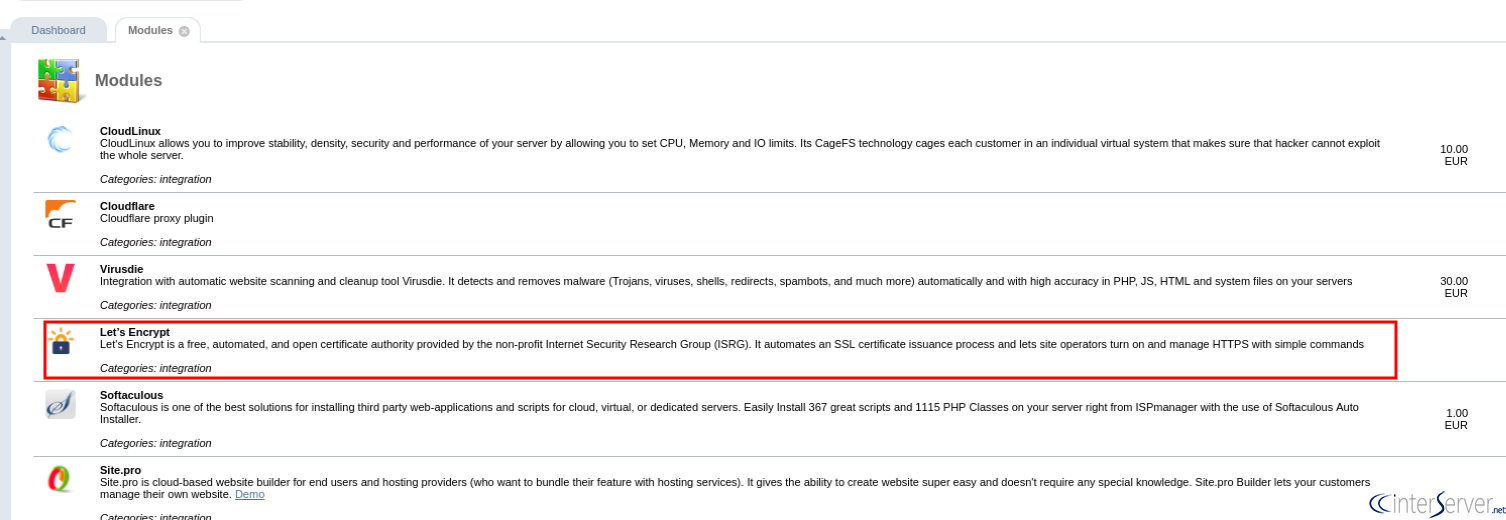
To enable Let’s Encrypt SSL on a domain, follow the below steps.
1) Select the “SSL certificate” under the “Web-servers Settings”.

2) Then select the “Let’s Encrypt” option from the resulted window.
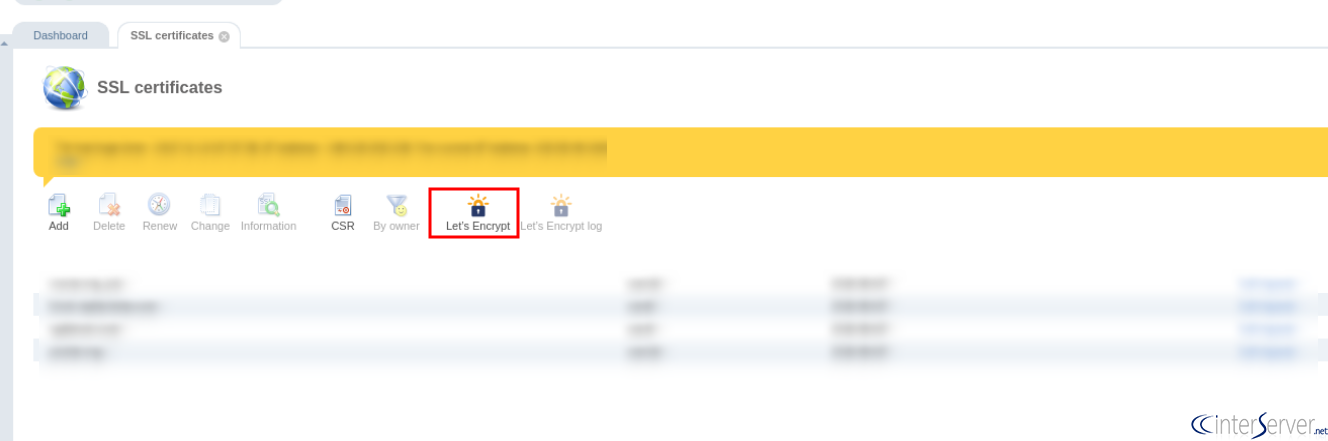
3) In this step, fill the resulted form fields by selecting the user and the domain on which you want to install the certificate.
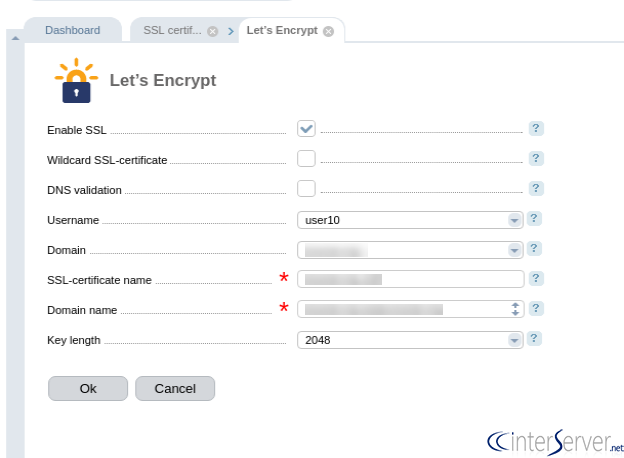
4) After filling up all the required fields, click the button “Ok”.
5) After pressing the Ok button, the self-signed certificate will be installed on the site. Once the domain check process is completed, the type will change into “Existing”. Now your site will load with the secure green padlock symbol.
If you are using Virtual Private Server or Virtual Machine, you can use Let’s Encrypt’s Certbot to install and renew SSL certificates for all your applications automatically. So, this is how you can get SSL certificates for free from Let’s encrypt authority.
Please let us know if you need more help in the comment section given below.
Related guides
How to Install WordPress in ISPmanager?
We can install WordPress on ISPmanager with only a couple of clicks. Please follow the below steps to install WordPress on ISPmanager.
ISPmanagerISPmanager Installation and Features
What is ISPmanager? ISPmanager Installation and Features. ISPmanager is a popular commercial Linux-based back-end dashboard. The panel developed since 1997
ISPmanagerHow to Add New User in ISPmanager
How to Add New User in ISPmanager. To add a new user to the ISPmanager panel, please follow the below steps. 1) Login to your ISPmanager account.
ISPmanagerHow to Create Reseller in ISP Manager?
In ISP manager, you can create reseller user in which it resells its own resources and services of its hosting.