
GICT knowledge base
Understanding IPMI: Security, Legacy Challenges, Remote Management and OS Install
Published
The Intelligent Platform Management Interface (IPMI) is a critical tool for server administrators, providing “out-of-band” management. This allows you to manage a server even if the operating system is crashed or the power is turned off. However, because IPMI operates at a hardware level, it requires strict security protocols and an understanding of legacy technical hurdles.
The Security Reality of IPMI
IPMI is essentially a “server within a server.” It runs on a Baseboard Management Controller (BMC), which has its own processor, memory, and network interface. Because IPMI grants total control over the hardware—including the ability to wipe drives or change BIOS settings—it is a high-value target for malicious actors.
Why IPMI Access is Restricted to Specific IPs
At GICTServer, we lock down IPMI access to specific, authorized IP addresses. You will notice it cannot be opened to the public internet for the following reasons:
- Brute Force Prevention: Open IPMI ports (typically UDP 623) are constantly scanned by bots attempting to guess administrative credentials.
- RAKP Protocol Vulnerabilities: Many versions of IPMI 2.0 have inherent flaws in the Remote Authenticated Key-Exchange Protocol (RAKP) that allow attackers to retrieve password hashes offline to crack them.
- Lack of Encryption: Older IPMI implementations often transmit data over unencrypted or weakly encrypted channels, making them susceptible to “man-in-the-middle” attacks.
Legacy Issues: Coding and Java
One of the most common frustrations with IPMI is its reliance on aging technology, particularly on older server models.
- The Java Trap: Many older servers (such as those using E3 or E5 Xeon processors) utilize Java-based Virtual Console (KVM) clients. Since modern browsers no longer support Java plugins, running these consoles often requires installing older versions of the Java Runtime Environment (JRE) and manually adding the IPMI URL to the “Java Exception Site List.”
- End-of-Life Firmware: Older servers eventually stop receiving firmware updates from the manufacturer. This means sub-par IPMI interfaces may contain unpatched security holes or bugs that will never be fixed.
- Modern Transitions: While newer servers use HTML5-based consoles, legacy hardware requires specific technical workarounds to function in a modern browser environment.
Many common functions for IPMI are built into the management portal at my.GICTServer.net. You can power cycle your server with out logging directly into IPMI. However you may need more advanced functions.
How to Access Your IPMI via GICTServer
1. Access Your GICTServer Customer Portal
Navigate to https://my.GICTServer.net/ and log in with your account credentials.
2. Select Your Server
From your server list, locate and select the server you wish to manage: View Server List.
3. Access IPMI Credentials
Locate the IPMI  section on your dashboard and click on it.
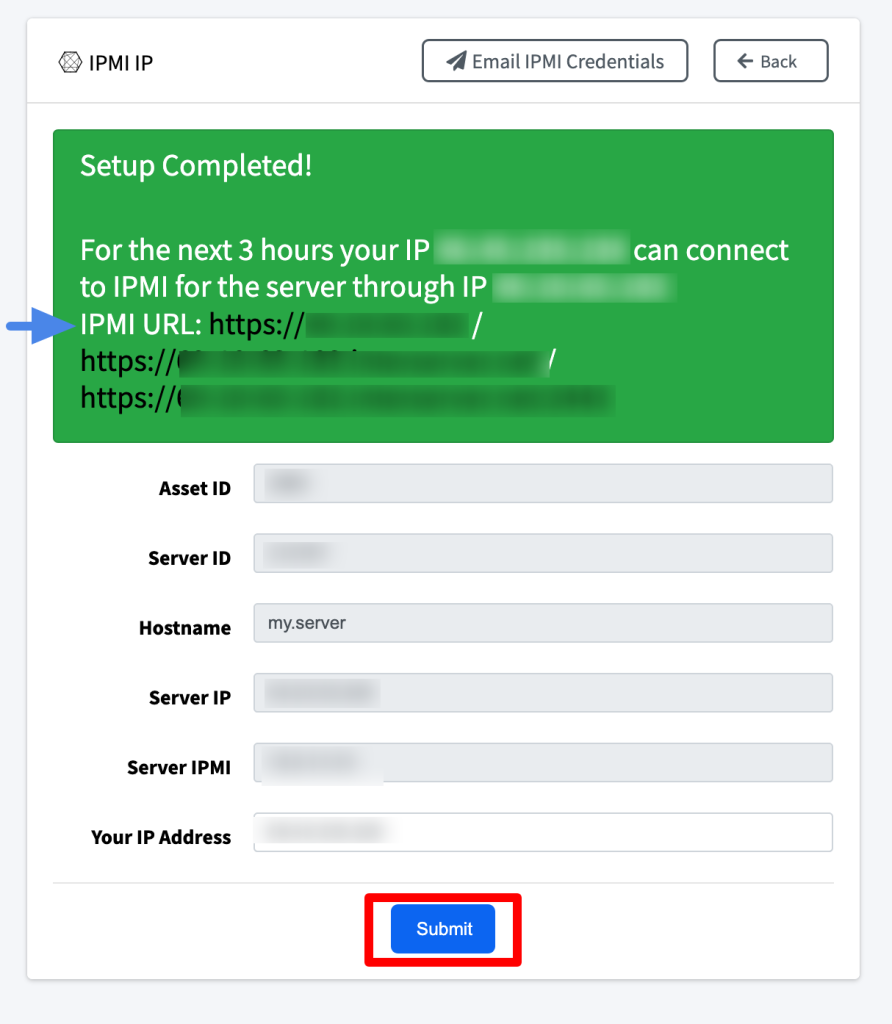
Click on the Submit button. The page will reload; you can then click on the IPMI URL. Use the Operator logins that were provided in your welcome email.
Alternatively, at the top of the page, you can select Email IPMI Credentials to have them resent to you.

Custom OS Installations
While installing an OS via IPMI virtual media is often possible, several “roadblocks” may prevent success, such as network latency causing the ISO mount to drop or compatibility issues with older firmware.
Need Help? GICTServer staff can install a custom OS for you. Please note that custom OS install requests are processed manually and may take 12 – 24 hours to be completed under standard business hours and longer on adjusted holiday schedules such as Christmas and New Years.
For a detailed video tutorial on installing an OS through IPMI, please click here.
If you have any questions, please feel free to contact our support team.
Related guides
GICTServer MCP Server: Endpoints, Access, and Connection Checks
Find GICTServer MCP endpoint information, distinguish public and account access, and check availability and credentials before enabling automation.
my.interserver.netChanging a hostname for a server in my.GICTServer.net
Understanding Server Identifiers on my.GICTServer.net When you order a dedicated server, the hostname is chosen during the initial setup to serve as the server's basic...