
GICT knowledge base
How to Fix 413 Request Entity Too Large Error in Nginx (5 Working Solutions)
Published
You try to upload a file, submit a form, or push an image to your site, and the server slams the door with a blunt message: 413 Request Entity Too Large. The upload was perfectly valid. The server simply decided it was bigger than it is willing to accept, and it refused before your application ever saw it.
The Hypertext Transfer Protocol (HTTP) status code 413 means exactly that: the request body exceeded a configured size limit. In an Nginx setup, that limit lives in Nginx by default, but there is a second limit hiding in PHP that catches people out constantly. This guide walks through five working solutions, starting with the fix that solves it for most people and moving through the reasons that fix sometimes appears to do nothing. By the end, you will know not just the setting to change but where to change it and why one change is often not enough.
Prerequisites
Before you start, make sure you have:
- An Nginx server you can configure, with the 413 error happening on a real upload or request.
- Root or sudo access to edit configuration files and reload services.
- The location of your Nginx configuration, usually
/etc/nginx/nginx.confor a site file under/etc/nginx/sites-available/. - Access to your PHP configuration if your site runs PHP, which most upload-handling sites do.
Why the Error Happens in Two Places
Before changing anything, understand the path a request takes, because this is the detail that turns a frustrating afternoon into a two-minute fix. An upload does not go straight to your application. It passes through Nginx first, and if PHP handles the request, through PHP after that. Each of those layers has its own size limit, and either one can reject the request with a 413.
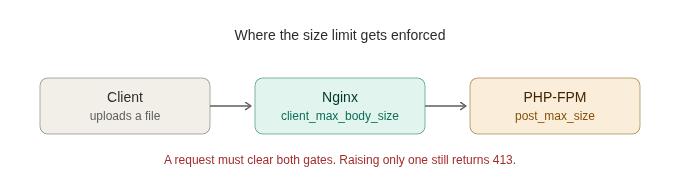
This is why people raise the Nginx limit, see the error persist, and conclude the fix did not work. It did work, on the Nginx gate. The request is now getting through Nginx and hitting the PHP gate instead. Keep both gates in mind as you work through the solutions below.
Solution 1: Increase client_max_body_size in Nginx
This is the fix for the large majority of 413 errors, so start here. Nginx caps the request body size with a directive called client_max_body_size, and its default is only 1 megabyte. Any upload larger than that gets rejected before it reaches your application.
Open your Nginx configuration and add or change the directive to a size that fits your needs:
client_max_body_size 64M;That allows request bodies up to 64 megabytes. Set it to whatever your largest legitimate upload requires, with a little room to spare. If you want to remove the limit entirely, set the value to 0, though I would not recommend that on a public-facing server, because an unlimited body size is an open invitation for someone to exhaust your disk or memory with a giant upload.
After saving, you still need to reload Nginx for the change to take effect, which Solution 5 covers. If this fixes your problem, you are done. If the error survives, the next two solutions explain why.
Solution 2: Set the Directive in the Correct Context
This is the most common reason the fix from Solution 1 appears to fail, and it is worth its own section because so many people lose an hour here. The client_max_body_size directive behaves differently depending on which block you place it in, and putting it in the wrong place means it quietly does not apply to your upload.
You can set the directive in three contexts:
- Inside the
httpblock, where it applies to every site on the server. This is the simplest choice when you want one limit everywhere. - Inside a
serverblock, where it applies only to that one site or virtual host. - Inside a
locationblock, where it applies only to a specific path, such as an upload endpoint or an admin area.
A more specific context overrides a broader one. So a value set in a location block wins over the server block, which in turn wins over the http block. The trap is setting a generous limit in the http block while a stricter, forgotten value sits in a server or location block and overrides it for the exact path you are uploading to.
Here is the directive applied to a single location, which is the targeted approach when only one endpoint handles large uploads:
server {
    location /upload/ {
        client_max_body_size 100M;
    }
}
If your fix from Solution 1 did nothing, search your entire configuration for other client_max_body_size entries before changing anything else. A stricter value lurking in a more specific block is almost always the culprit.
Solution 3: Increase PHP’s Upload Limits
If your site runs PHP, and most sites hitting this error do, then Nginx is only the first gate. PHP enforces its own limits, and once your upload clears Nginx, PHP can reject it next. Raising the Nginx limit without touching PHP is exactly the half-fix that leaves people stuck.
Two settings in your php.ini file control this. The first, upload_max_filesize, caps the size of a single uploaded file. The second, post_max_size, caps the total size of the entire request body, which includes the file plus any other form data. Because post_max_size covers the whole request, it must be larger than upload_max_filesize, or the file limit becomes meaningless.
upload_max_filesize = 64M
post_max_size = 72M
Notice that post_max_size is set higher than upload_max_filesize on purpose, leaving headroom for the rest of the form data. A good rule is to keep all three numbers consistent: set your Nginx limit, your post_max_size, and your upload_max_filesize so they line up, with post_max_size at the top. Mismatched limits across the two layers are the source of most lingering 413 confusion.
These changes require restarting PHP-FPM, the FastCGI Process Manager that runs PHP, which Solution 5 covers.
Solution 4: Tune Buffer Settings for Reverse Proxy Setups
If Nginx sits in front of another server, acting as a reverse proxy for an application backend, a few more directives come into play. This applies to setups where Nginx forwards requests to something like a Node.js application, a separate application server, or an upstream service rather than handling PHP directly.
When Nginx buffers a large request body before passing it on, the buffering itself can run into limits. The directive client_body_buffer_size controls how much of the body Nginx holds in memory before writing the rest to a temporary file. For large uploads through a proxy, you may also want to control request buffering with proxy_request_buffering.
client_body_buffer_size 16k;
proxy_request_buffering off;
Turning proxy_request_buffering off makes Nginx stream the request straight to the backend instead of buffering the whole thing first, which helps with very large uploads. Most people will never need to touch these, so do not change them unless you run a proxy setup and the first three solutions did not resolve the error. Reaching for these on a standard PHP site just adds complexity without fixing anything.
Solution 5: Apply the Changes Correctly and Verify
This is the step people skip, and skipping it makes a correct fix look broken. Editing a configuration file changes nothing until you reload the service that reads it. Worse, reloading a broken configuration can take your site down, so always test before you reload.
First, check that your Nginx configuration is valid. This catches typos and syntax errors before they cause an outage:
sudo nginx -tIf it reports the configuration is fine, reload Nginx to apply your changes without dropping active connections:
sudo systemctl reload nginxIf you changed any PHP settings in Solution 3, restart PHP-FPM so it picks them up. Match the version number to your installed PHP:
sudo systemctl restart php8.4-fpmNow confirm the fix actually worked rather than assuming it did. Reproduce the original upload, or test directly with a sized request from the command line:
curl -F "[email protected]" https://yoursite.com/upload/If the request succeeds where it failed before, you are done. If it still returns 413, the diagram earlier tells you where to look next: the gate you have not raised yet.
Conclusion
Fixing a 413 Request Entity Too Large error is straightforward once you see that the limit lives in two places. You raise client_max_body_size in Nginx first, since that solves it for most people. You make sure the directive sits in the right context, because a stricter value in a more specific block silently overrides a generous one. For PHP sites, you raise upload_max_filesize and post_max_size to match, since clearing the Nginx gate only sends the request to the PHP gate. For proxy setups, you tune the buffering directives. Then you test the configuration, reload Nginx, restart PHP-FPM, and verify the fix instead of guessing.
Keep the three numbers aligned across Nginx and PHP, with post_max_size highest, and this error stops surprising you. The next time it appears, run sudo nginx -t and check both gates in order, and you will clear it in minutes rather than hours.
Related guides
WebSockets Explained: How Real-Time Communication Actually Works
WebSockets explained: how the HTTP upgrade works, what frames look like, how to set up a WebSocket server on your VPS, and how to debug connection problems.
web developmentCookies vs LocalStorage vs SessionStorage: What Each One Exactly Means
A simplest breakdown of the three ways browsers store data: cookies, localStorage, and sessionStorage.
web developmentHow to Run Multiple PHP Versions on Nginx with PHP-FPM
Learn how to run multiple PHP versions on Nginx with PHP-FPM through a step-by-step guide, enabling seamless support for different applications.
web developmentUnderstanding CORS and Why Browsers Block Cross-Origin Requests
Understand CORS, its system of cross-origin requests, how to configure it in web servers like Nginx and Apache, and common errors and solutions.