
GICT knowledge base
How to Enable and Configure SMTP in phpBB
Published
SMTP stands for Simple Mail Transfer Protocol. It is one of the best ways to send E-mail from VPS or a shared server. You can create your own SMTP server or you can use a ready-made SMTP service. When you use SMTP, your E-mails are sent from the SMTP server instead of your local server. If you are using a VPS from a cloud service provider, We recommend you to use SMTP to avoid spam.
To enable and configure SMTP, you just have to provide the SMTP server credentials in a form provided by phpBB. It does not require you to have any technical knowledge if you are using an SMTP service. If you want to use your own server, You should know How to set it up. In this tutorial, I will show you how to enable and configure SMTP in phpBB with ease. So, Let’s get started.
Enable and Configure SMTP in phpBB
Step 1: Log in to the administrator control panel of your forum using admin credentials.
Step 2: Click on the “Client Communication -> E-mail Settings” from the left sidebar of the admin panel.
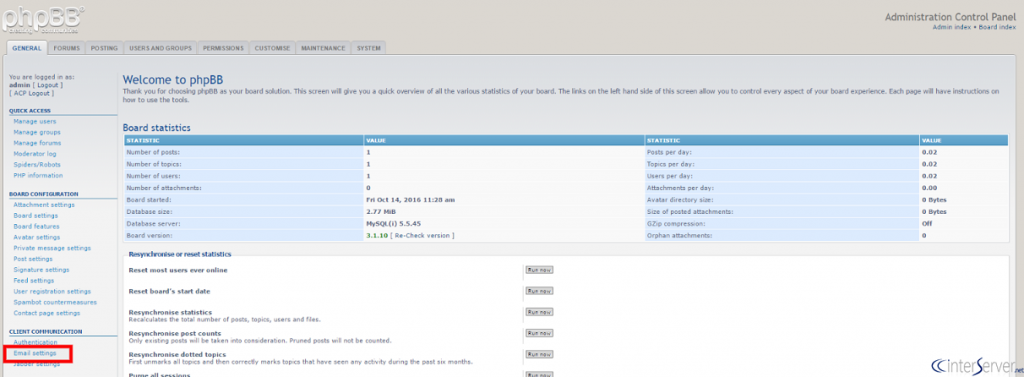
On this page, you will see two sections. The first one is for basic E-mail settings with the title “General Settings”. The other one is for SMTP settings.
Step 3: In the SMTP Settings section, click on “Yes” in the first radio buttons with the label “Use SMTP server for email”.
Step 4: Now, Enter the SMTP server information in the form. You would have to enter the SMTP Host, Username, Password, Port and some more fields.
Note: If you are using an SMTP service, all the required SMTP information should be provided to you.
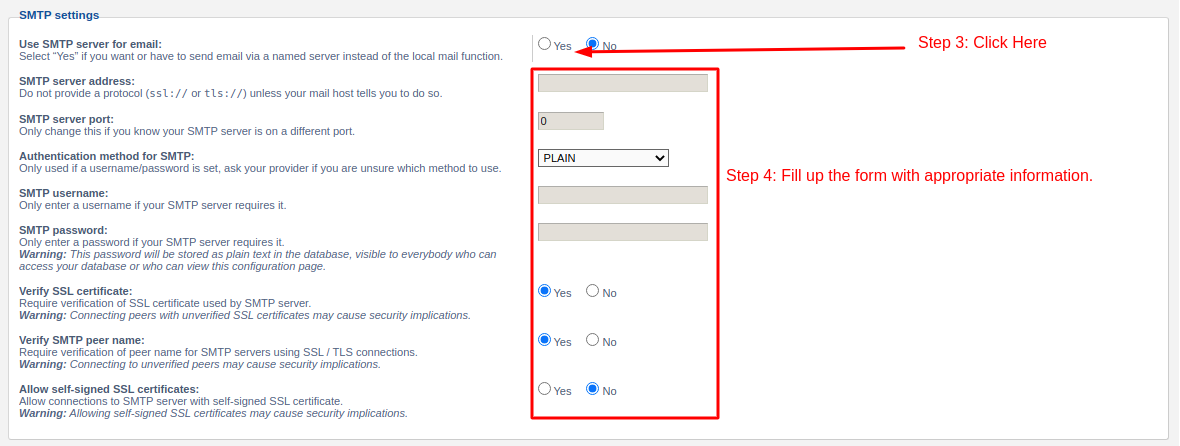
Step 5: Finally, click on the Submit button given at the bottom of the page to apply changes.

So, this is how you can enable and configure SMTP in phpBB. If you want to disable SMTP temporarily, just click “No” in the SMTP settings section. We hope you liked this tutorial. If you are facing issues, please contact our support department for quick help!
Related guides
How to Install phpBB Manually
How to Install phpBB Manually phpBB is a free flat-forum bulletin board software solution that can be used to stay in touch with a group of people or can po
phpBBHow to Install phpBB on Ubuntu Server
How to Install phpBB on Ubuntu Server PhpBB is the most powerful and popular open source bulletin board system. You can create unique forums on your website
phpBBMass Email Settings in phpBB
In this documentation, we can check about mass email settings in phpBB. In this section, you can email a message to either all of your users or all users of
phpBBHow to Ban Emails in phpBB
In this documentation, we can check how to ban email addresses in phpBB. 1) Login to phpBB admin panel. 2) Go to the tab ‘Users and Groups’. 3) Select the o