
GICT knowledge base
How to Change Footer Text in WordPress?
Published
WordPress is the most flexible content management system ever built. WordPress repository contains thousands of free plugins and themes that allows us to add hundreds of different functionalities and designs to our website. One of the most important area of your site is footer. So, It is important to make sure that your footer is perfect as per your requirements.
WordPress does not provide us an option to update footer text. However, some themes might allow you to update Footer text without playing with the PHP and HTML code. You can check if your theme provides an option or not in the Appearance -> Customise option from the left sidebar.
Majority of the themes does not provide an option to edit footer text including the default WordPress themes. In this tutorial, I will show you How to update footer text in WordPress. This short tutorial is a little bit technical and requires you to have a little bit of HTML and PHP experience.
If you do not have any prior experience with PHP, you might break the code and the whole site will face downtime. So, make sure you understand what you are doing. Finally, Let’s get started with the tutorial.
How to change footer text in WordPress
First of all, Log in to the admin panel of your WordPress site. Then, click on the Appearance -> Theme Editor option from the left sidebar. See the following screenshot for reference.
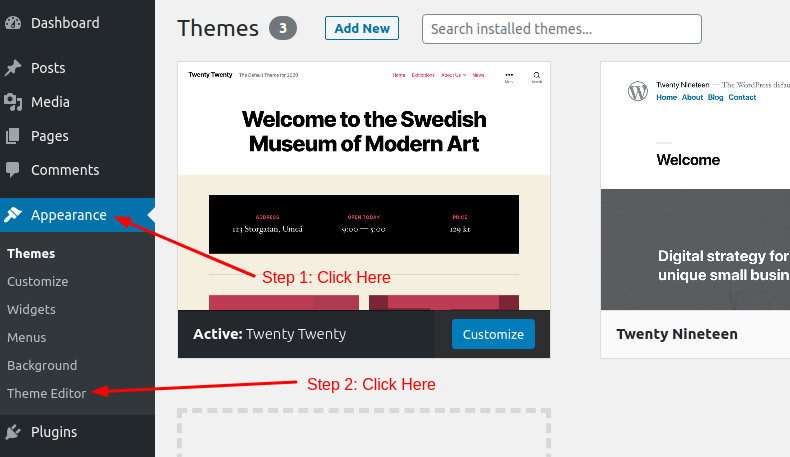
Once you are there, You will see a list of files in the right sidebar. All the files in the list makes up your current theme. Any change in any of the file will affect how your WordPress application works and looks.
In this case, look for the footer.php file from the right sidebar and click on it. It will show you the code just like the following image.
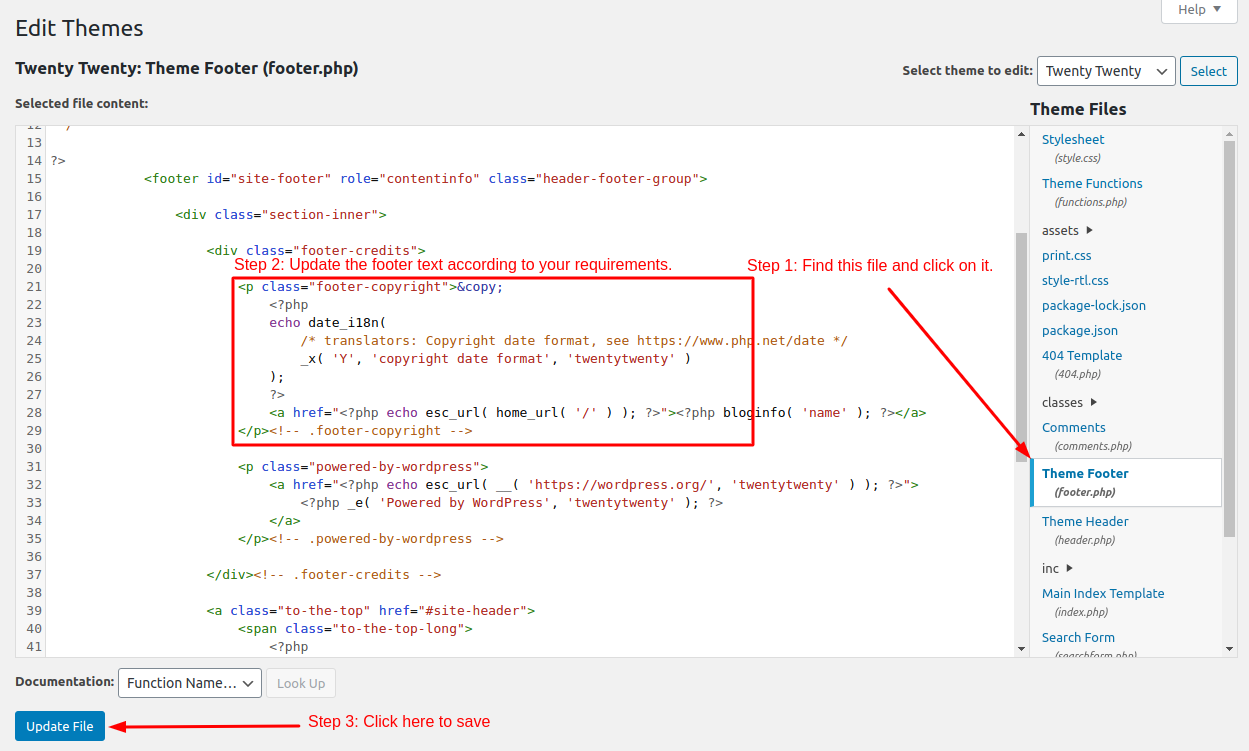
So, this is how you can update the footer text in any WordPress theme. If you know PHP, you can also make it dynamic. We hope this tutorial was helpful for you. If you have any questions, please let us know in the comment section given below.
Related guides
7 Common Hosting Mistakes Beginners Make (And How to Avoid Them)
7 common hosting mistakes beginners make in 2026: no backups, ignored updates, bad host choice, weak passwords, single point of failure, no staging. With fixes for each.
WordPressWebsite Migration Backup Checklist: What to Save and How to Test
Prepare a website migration backup: inventory files, databases, email and DNS, check archive integrity, test recovery and plan a safe final synchronization.
WordPressCore Web Vitals in 2026: A Practical Fix Guide for Site Owners
Core Web Vitals 2026: practical fixes for LCP, INP, and CLS. Real root causes, what to measure, common misconceptions, and a priority order of fixes for site owners.
WordPressFixing the WordPress “Death Loop”: When Missing Files slow down your site
You’ve just launched your new WordPress site or pushed a big update. In your staging environment, everything ran perfectly.