
GICT knowledge base
How to Ban Users in phpBB
Published
phpBB is one of the best open-source software to run a forum on the Internet. It provides all the required features you need to manage the security and quality of your forum. The security and quality of your forum is very important. It is because “Forum links” is a thing in SEO and if you are the owner of a popular forum, You have to make sure no one is abusing your forum to make low quality links.
In this tutorial, I will show you How you can ban users from your forum. It is a very handy feature that allows you to avoid spam entries from anonymous users who use your forum with poor intentions. In this tutorial, I will show you How to ban a specific user from your forum in phpBB. So, Let’s get started with the tutorial.
How to ban Users in phpBB
Step 1: Log in to the administrator control panel of your phpBB admin credentials.
Step 2: Click on the “Users and Groups” tab from the list of tabs available in the administrator control panel.
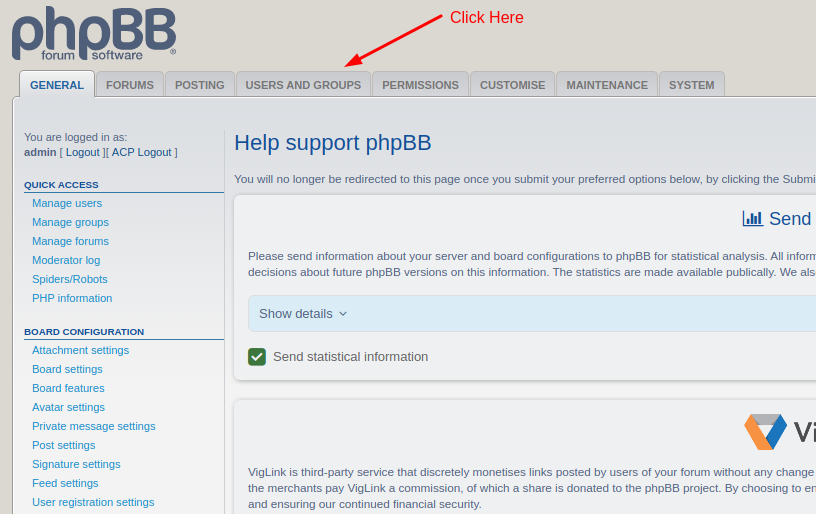
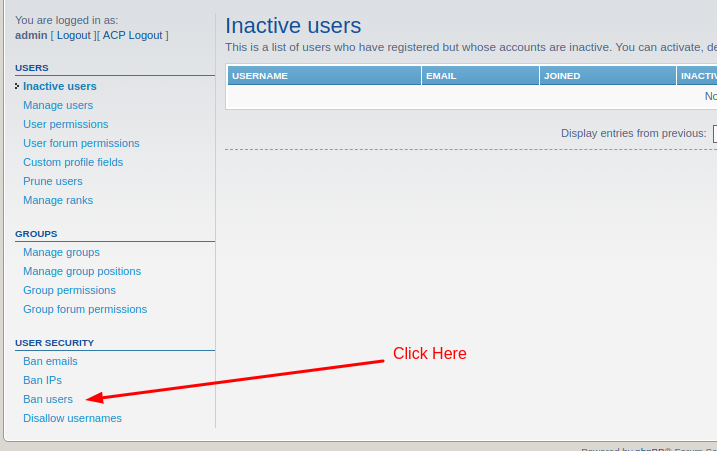
Step 3: Click on the “Ban users” link from the left sidebar of the admin panel given under the “User security” section.
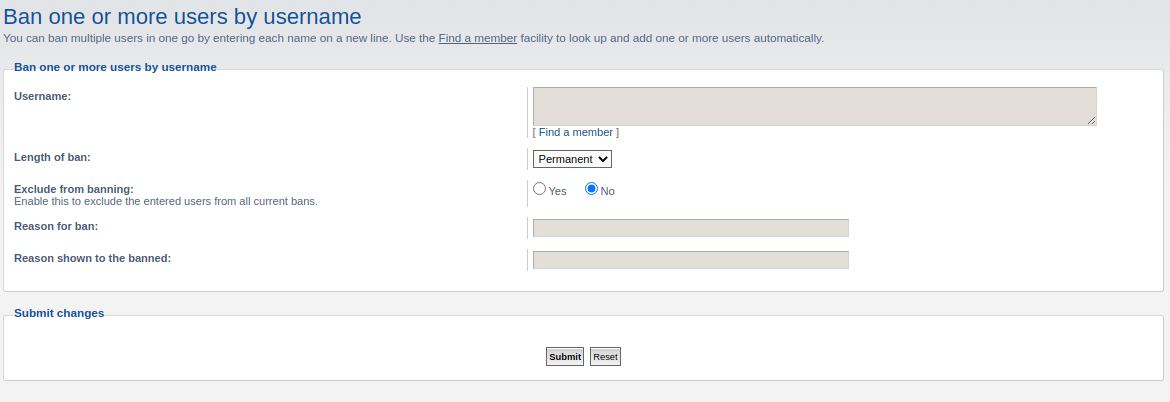
Step 4: On this page, you will see a form that allows you to input the information regarding ban. Fill up the form with appropriate information like Username, Length of ban, etc.
Note: You can ban more than one user with this method. Just enter the usernames in new lines to ban multiple users at once.
Step 5: Click on the “Submit” button given at the bottom of the page to save changes.
So, this is how you can ban users from your phpBB forum. This feature will help you a lot in maintaining the quality of your forum. We hope you liked this tutorial. If you have any questions, please feel free to share them in the comment section given below.
Related guides
How to Install phpBB Manually
How to Install phpBB Manually phpBB is a free flat-forum bulletin board software solution that can be used to stay in touch with a group of people or can po
phpBBHow to Install phpBB on Ubuntu Server
How to Install phpBB on Ubuntu Server PhpBB is the most powerful and popular open source bulletin board system. You can create unique forums on your website
phpBBMass Email Settings in phpBB
In this documentation, we can check about mass email settings in phpBB. In this section, you can email a message to either all of your users or all users of
phpBBHow to Ban Emails in phpBB
In this documentation, we can check how to ban email addresses in phpBB. 1) Login to phpBB admin panel. 2) Go to the tab ‘Users and Groups’. 3) Select the o