
GICT knowledge base
Upload and Download Module in Webmin
Published
Upload and Download Module in Webmin
Webmin is a web-based interface for administration for Unix using any web browsers, we can perform most of the function which we are performing from CLI. The latest available version of Webmin is 1.881
The Upload and Download module assists you in getting files to your server — either by downloading files from the Internet onto your server or by allowing you to upload them from your PC to the server. You can also download files from the server also. Using this module, you can schedule downloads in the background. This module is the default module that comes with Webmin.
1) Login to Webmin dashboard.
2) Click on the “Others” option available under Webmin tab.
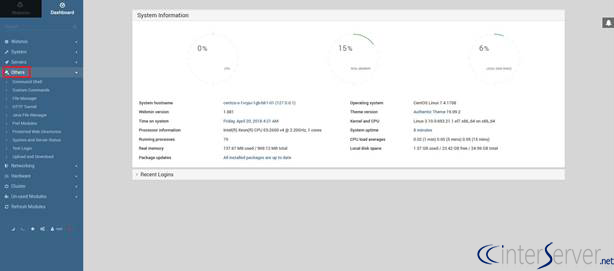
3) Select the option “Upload and Download”.
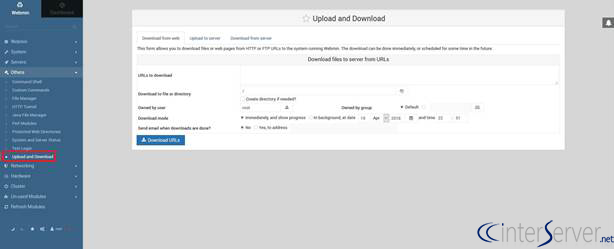
As we already discussed upload and download modules allow you download files from web page, upload to server and download from the server.
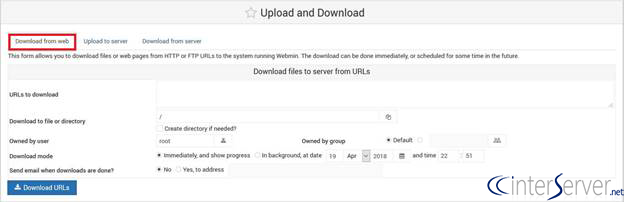
4) Download from web: This option allows us to download the files or web pages from the internet using either of the protocol HTTP or FTP URLs to the server. We can either download this immediately or scheduled for a future.
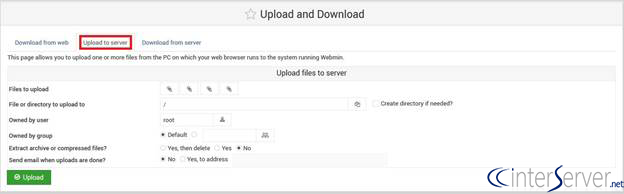
5) Upload to server: The option allows uploading files from local system to the server. We can also create a directory if needed.
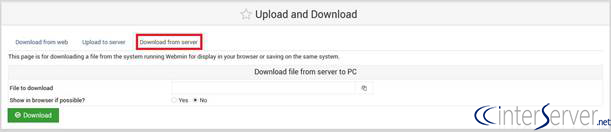
6) Download from server: This module allows you download files from the server. We can display the files on display.
If you need any further assistance please contact our support department.
Related guides
How to Install Virtualmin with Webmin on Ubuntu
How to Install Virtualmin with Webmin, LAMP, BIND, and Postfix on Ubuntu Webmin is a web-based control panel that helps you to setup user account, Apache, D
WebminImport a cPanel Account into Virtualmin Safely
Plan a self-managed cPanel-to-Virtualmin import with private backups, deliberate account settings and separate website, database and mail verification.
WebminUse Webmin File Manager with Explicit Privilege and Path Scope
Review Webmin identity and filesystem paths before edits, moves, ownership changes or deletion, with private before-states and deliberate recovery.
WebminChange or Recover a Webmin Password with the Correct Account Scope
Distinguish Webmin-only and Unix passwords, use current authorized recovery tools and avoid exposing replacement credentials in shell arguments.