
GICT knowledge base
How to setup Metadata in Joomla?
Published
Joomla is a simple, yet powerful content management system. It allows you to manage each and every aspect of your online presence. One of the cheapest and ideal method of growth is SEO. The first step to SEO after the installation of Joomla is to set up Metadata of your website. Metadata is simply the short description of your website.
Metadata of a website contains Meta Description, Robots instructions, Meta Keywords, Author Meta tag and much more. There are tens of different types of Metadata. From the Joomla Admin panel, you can easily set up basic Metadata for your website. In this tutorial, I am going to show you the same. So, Let’s get started with the tutorial.
Set up Metadata in Joomla
Step 1: Log in to the Joomla admin panel as an Administrator.
Step 2: Click on the “System” option from the top menu bar.

Step 3: From the Drop-down menu, click on the “Global Configuration” option.

Step 4: Make sure you are on the “Site” tab. If not, click on the “Site” tab.

Step 5: Find “Metadata Settings” from multiple forms and fill up the information according to your requirements.
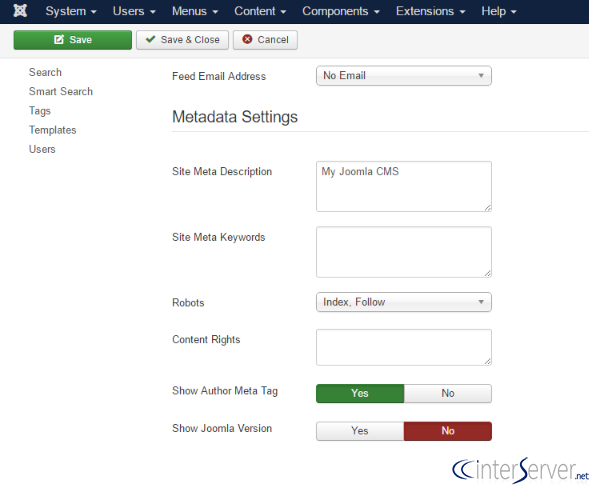
Step 6: Click on the “Save” button to apply changes to the website.

How to test? You can check if Metadata appears on the site. Just open your website in the new tab, right-click and click on “View Page Source” from the options. In the <head> section of the page, you should find <meta> tags containing the appropriate information.
So, this is how you can set up basic Metadata in Joomla. It is a very easy process and we recommend you to set up Meta information just after installing the CMS. If you are facing any issue while following this tutorial, you can use the comment section to reach us! We are happy to help.
Related guides
WordPress vs. Joomla: Which is the Best CMS for Websites?
WordPress and Joomla, both are one of the best CMS available in the market. Read this comparison for head-to-head battle between both!
JoomlaHow to Create a Portfolio Website Using Joomla?
In this tutorial, we can check how to create a Portfolio Website using Joomla.An online portfolio is a platform where you can display, share, and sell your
JoomlaHow to Fix Your Hacked Joomla Site
In this tutorial, we can check how to fix a hacked Joomla site. Joomla is an open-source Content Management System (CMS) used to create websites and online
JoomlaJoomla Admin Password Reset
Joomla Admin Password Reset. Joomla is an open source powerful CMS (content management system) which is widely used for publishing websites. Joomla sites