
GICT knowledge base
Setting up Railgun on cPanel
Published
Setting up Railgun on cPanel
cPanel is the most used control panel in the World through which we can manage our websites and settings easily via a User-Friendly interface. Cloudflare is a free web service that secures and accelerates the website performance by act as a proxy between the website viewer and Our servers. Through this technology, you can protect your websites against malicious visitors and DDOS attacks and also you can save Bandwidth and reduce the page load times which will boost the website performance.
Please see our article on how to enable/setup Cloudflare for your domains here https://www.GICTServer.net/tips/kb/enable-setup-cloudflare-GICTServer/. Cloudflare is now providing a new technology for improving the performance of websites, which is Railgun. Railgun is a web proxy system built for Cloudflare, which caches the dynamic content of a website. Railgun ensures the connection between Cloudflare and origin server as fast as possible. As per Cloudflare community, this new technology compresses uncatchable contents up to 99.6% by leveraging techniques and this will result in an average 200% additional performance increase. Following are the situation where Railgun technology helps:
1) A lot of the visitors to the website are long way geographically from the website’s hosting.
2) Your web hosts charge a lot by the GB for bandwidth
3) You have a website with a lot of dynamic content, such as a very active blog or news source.
Let’s see the steps on how to setup Railgun on a cPanel server.
1) Add server IP address on Railgun interface on Cloudflare panel, and open server firewall for Cloudflare network IPs to 2408 TCP port. You can view the Cloudflare network IPs on https://www.cloudflare.com/ips/
2) Add the following entry on Apache configuration file to add Railgun instance to the trusted proxy list.
CloudFlareRemoteIPTrustedProxy 127.0.0.1
3) Install Railgun on the server by executing following command.
# yum install railgun-stable
4) Activate Railgun on cPanel by going to Cloudflare Icon on cPanel, and select ‘Performance’ tab. Scroll down to the website on which you wish to enable Railgun and click on ‘Settings” besides the domain name. And click on ‘Off’ button beside the Railgun option to turn it On.
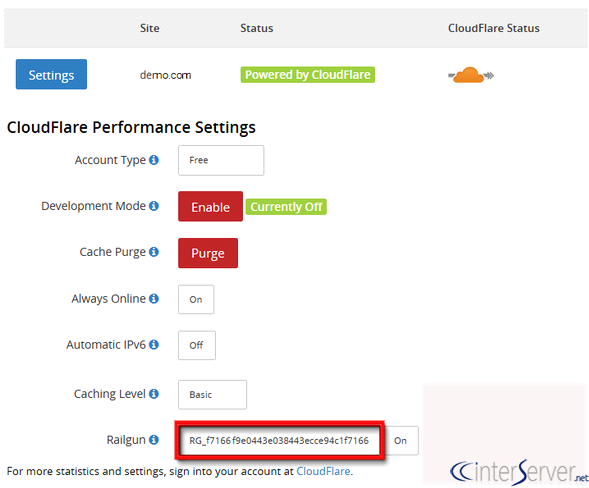
We can use this feature for any domain setup on Cloud flare’s DNS and has its IP address listed on the Cloudflare Partner panel.
If you need any further assistance please contact our support department.
Related guides
Add or Update a DMARC Record in Cloudflare DNS
Manage a Cloudflare DMARC TXT policy at the correct owner name, verify authority and alignment and review reporting before tightening enforcement.
CloudFlareHow Can I Solve 502 Error Bad Gateway from Cloudflare?
502 Bad Gateway means our network is not able to connect with your server for communication. The 502 Bad Gateway error is an HTTP status code which indicate
CloudFlareCloudFlare Tips and Tricks
CloudFlare Tips and Tricks What is Cloudflare? The Cloudflare is actually a company that offers a CDN, web security etc.
CloudFlareHow to Create a CloudFlare Account and Add a Website?
Cloudflare acts as a reverse proxy and it will protect and accelerates any website which is online.