
GICT knowledge base
Scrub DDOS Protection
Published
GICTServer network protection
Scrub DDoS Protection
GICTServer Scrub is our in-house mitigation layer for Distributed Denial of Service attacks. It keeps protected traffic inside the GICTServer network so attacks can be inspected, filtered, and stopped with lower latency and better operational visibility.
Custom rule control
Built for low latency
Firewall VS Filter: A filter will take priority over broad XDP firewall rules but not targetted rules. A Synproxy filter will take priority over a XDP drop all rule, but not a specific single ip drop.
Key benefits
Traffic stays on our network
Protected traffic remains inside GICTServer’s network, reducing latency and giving our team the visibility needed to respond faster during attacks.
Automatic inspection
Once enabled, traffic to the protected IP is continuously monitored and filtered so mitigation is already in place when an attack begins.
Rules for your application
Create allow, deny, GEO, and protocol-specific filters that match how your server or application actually receives traffic.
How to order Scrub protection
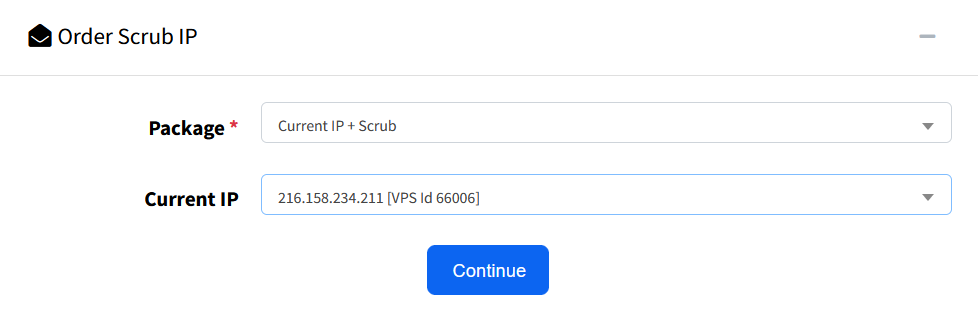
Ordering is handled through the GICTServer customer portal.
- Log in at my.GICTServer.net.
- Click Scrub in the left-hand menu.
- Click Order.
- Select the IP address you want to protect.
- Complete checkout.
Custom firewall rules
Use port, IP, GEO, and protocol-based rules to shape how traffic reaches your protected service.
Improve the server security posture
Tailor protection to your application

Rules activate through scrubbing
The firewall activates when traffic passes through the scrubbing system. Servers on the same edge router may bypass these systems.
Blocklists and allowlists
- Blocklist: Use port 0 as a wildcard to block all ports.
- Allowlist: Must target a single specific port; wildcards are not supported.
- Allowlists vs. filters: Allowlists take precedence over filters. For granular security, use filters instead.
GEO applies only where filters do not
Active filters take priority over GEO rules. GEO rules only apply to ports without existing specific filters.
GEO and ASN based filters
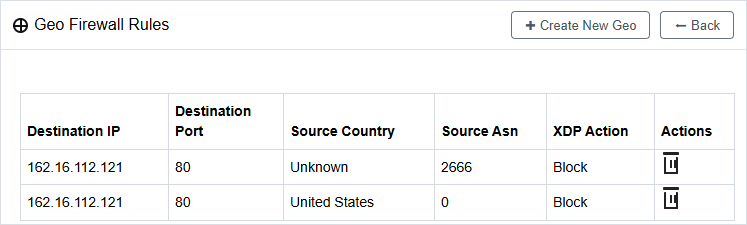
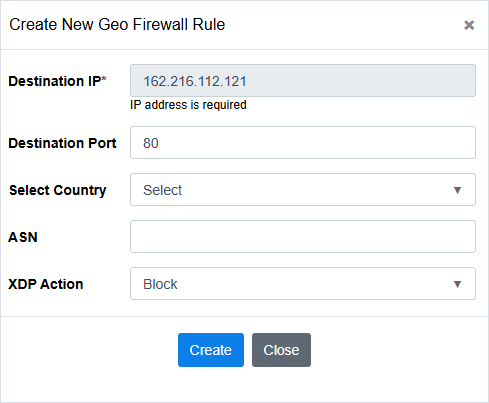
Geo Firewall Rules let you match traffic by destination IP, destination port, source country, and source ASN. Use these rules when you need to block a region, an unknown country match, or traffic from a specific network provider ASN before it reaches the protected service.
Country and ASN controls
- Destination IP: Select the protected IP the rule should apply to.
- Destination port: Scope the rule to the service port you want to protect.
- Source country: Choose a country, including Unknown when traffic cannot be mapped cleanly.
- Source ASN: Enter an autonomous system number to block or control traffic from a specific network.
- XDP action: Choose the action Scrub should take when the rule matches, such as Block.
Target broad abuse patterns
GEO and ASN rules are useful when attack traffic consistently comes from a region, an unknown GEO source, or a network/provider ASN. They are configured separately from protocol filters and should be reviewed regularly so legitimate users are not blocked unnecessarily.
Example setup: DirectAdmin control panel
A strong baseline starts with default-deny rules, then adds only the ports and filters required by your services.
Firewall access rules
blocklist 0 tcpblocklist 0 udp
Drop unsolicited traffic by default.
port 22 tcptrusted IP only
Restrict server management to a known jump server or office IP.
25, 465, 587 SMTP
110, 995 POP3
143, 993 IMAP
3306 MySQL
Advanced traffic filters
port 53dnsfilter
ports 80 and 443synproxy
port 2222synproxy
Tip: Using synproxy on web ports helps mitigate TCP SYN flood attacks before they reach your application.
Available filters
Scrub supports specialized filters for common games, control panels, VPN protocols, DNS, voice traffic, and TCP services.
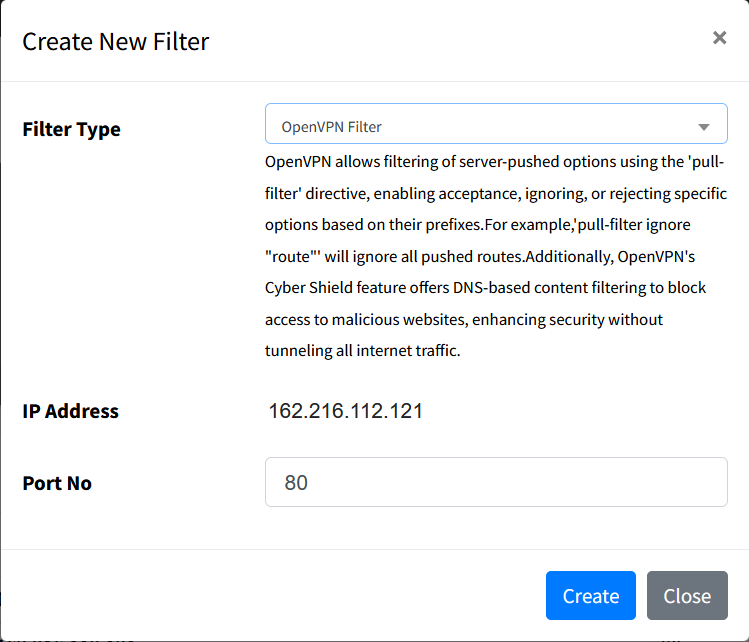
Examples: Counter-Strike 2, Counter-Strike: Source, Team Fortress 2, Garry’s Mod, Rust.
Examples: ARMA 3, DayZ, ARK: Survival Evolved, Arma Reforger.
RCON compatibility quick reference
| Game | Source RCON | BattlEye RCON | Notes |
|---|---|---|---|
| ARK: Survival Ascended | No | Yes | BattlEye BERCon |
| Rust | Yes | No | Source-style RCON (WebSocket) |
| DayZ | No | Yes | BattlEye BERCon |
| Counter-Strike: Source | Yes | No | Source RCON |
| Arma Reforger | No | Yes | BattlEye BERCon |
| ARK: Survival Evolved | No | Yes | BattlEye BERCon |
| Counter-Strike (1.6) | Yes | No | GoldSrc/Source RCON |
| Garry’s Mod | Yes | No | Source RCON |
| Team Fortress 2 | Yes | No | Source RCON |
| Palworld | No | No | Custom UE5 RCON |
| ArmA 3 | No | Yes | BattlEye BERCon |
| Valheim | No | No | No native RCON |
| Conan Exiles | No | No | Custom RCON |
| Insurgency | Yes | No | Source RCON |
| Atlas | No | Yes | BattlEye BERCon |
| ArmA 2 | No | Yes | BattlEye BERCon |
| PixARK | No | Yes | BattlEye BERCon |
| Dark and Light | No | No | UE4 RCON |
| Beyond the Wire | No | No | Custom UE4 RCON |
| Battalion 1944 | No | No | Custom UE4 RCON |
These filters help mitigate volumetric and application-layer attacks specific to the targeted protocol or service.
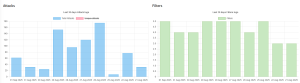
Detailed logging
Attack history is available to show attack overviews and help debug connection issues or false positives.

Need help configuring Scrub?
If you have questions about Scrub DDoS Protection or need assistance configuring rules, contact GICTServer support at [email protected].
Scrub is built directly into the GICTServer network and continues to evolve as new attack methods emerge.
Scrub change log
10/04/2026
- Unreal Engine 5 filter: Unreal Engine 5 has a filter now. It supports only Unreal Engine 5 games which do not have a magic byte. If your UE5-based game does not work through this filter, please reach out as it likely requires a magic byte. Please include a packet capture if able from your client trying to connect.
- Generic UDP filtering: New Generic UDP filtering in place. This was done to solve various issues with the current adaptive engine.
- Flood protections: A few novel floods were identified and patched with various generic filters.
- Threat feed: Threat Feed updated.
- BYOIP support: BYOIP is fully supported within Scrub now.
06/29/2026
- call of duty filter update: call of duty filter update – fix for specific port-changing configurations, the filter will now automatically apply to +/- 1 ports and will attempt to detect COD traffic to automatically apply filter if COD traffic is detected (matches auth sequence, validates auth, attempts connect -> automatically push through COD filter).
- Additions: Source RCON Protocol (tcp RCON) (filter id: source_rcon) and BattlEye RCON (udp RCON) (filter id: battleye_rcon)
03/05/2026
- Source Engine filter update: Garry’s Mod is now supported in the Source Engine filter.
03/01/2026
- A2S filter: High-performance query cacher for caching and responding to A2S_INFO and A2S_PLAYER packets.
02/07/2026
- GEO firewall: XDP Firewall can now block by ASN or country.
- Adaptive UDP: Adjusted to be less sensitive during floods.
- DoS mitigation tuning: Added protections against new reflective attacks.
01/22/2026
- Log pagination: Limited scrub logs to 100 results per page to improve dashboard loading and readability.
- XDP firewall fix: Resolved a potential whitelist/allowlist logic issue to improve rule consistency.
- DoS mitigation tuning: Applied general improvements based on observed flood patterns and emerging attack vectors.
12/31/2025
- Added GeyserMC: GeyserMC lets Bedrock Edition players join Java Edition servers for cross-play.
12/19/2025
- XDP route handler: Installed a new route handler to reduce kernel routing stress during large floods. It engages linerate-route and disables hardware-offloaded VLAN compression.
- Log handler: Improved display of error, warning, and success messages.
- Panic and recover: Rewritten functions for out-of-range indexes to recover gracefully.
- Lock handler: Rewritten to lock rule reconciliation during routine iteration, helping prevent collisions during high-PPS floods.
- A2S cache: Implemented asymmetric caching for A2S_INFO packets.
- FiveM filter: Updated to full asymmetric functionality using synproxy for TCP and adaptive UDP thresholds.
- Hot reloading: Added support for reloading filters during active floods without cold reloads.
- Buffer optimization: Increased XDP buffer size in alignment with recent kernel updates.
- Flood performance: Improved linerate quick-win callers for 100Mpps+ traffic spikes.
- Hardware offloading: XDP now monitors NIC interrupts and automatically attempts to push rules to the hardware module.
10/27/2025
- CPU optimization: Routine optimization reduced CPU usage by 90% during peak flood conditions.
- Adaptive filtering: Major rewrite of EWMA baseline sampling.
- Hardened challenges: SCP:SL, UE5, and TS3 filters now challenge connections using native mechanisms.
- GeoIP performance: Optimized GeoIP tries for faster lookups.
- Carpet bomb protection: Adaptive filtering now handles entire prefix floods natively.
- Data pollution protection: Added EWMA safeguards requiring 10 clean cycles before adaptation can resume after a flood.
08/29/2025
- Minecraft Java and Bedrock: Transitioned from passive filters to fully configurable filters.
- Monoamp implementation: Added protections for highly targeted systems, including lower EWMA limits and enhanced fragmentation handlers.
08/24/2025
- ICMP mitigations: Patched two ICMP flood types involving hidden packets and fragmented ICMP.
- UDP patches: Resolved four UDP fragmentation flood vectors.
- Signature engine: Initial signature engine code was pushed to production.
- Adaptive scaling: Updated logic to reduce limits faster and increase them slower to protect legitimate traffic.