
GICT knowledge base
Simplify your Python code: Techniques for Cleaner and more Efficient Programming
Published
In the world of programming, cleaner and more efficient code saves time and makes collaboration easy. The Python programming language is known for its readability and easy-to-use syntaxes. Yet, as the projects grow in complexity, maintaining simplicity can be a challenging task for us!
According to Statista research, Python is the third most widely utilized programming language among developers worldwide as of 2023, with 49.28%
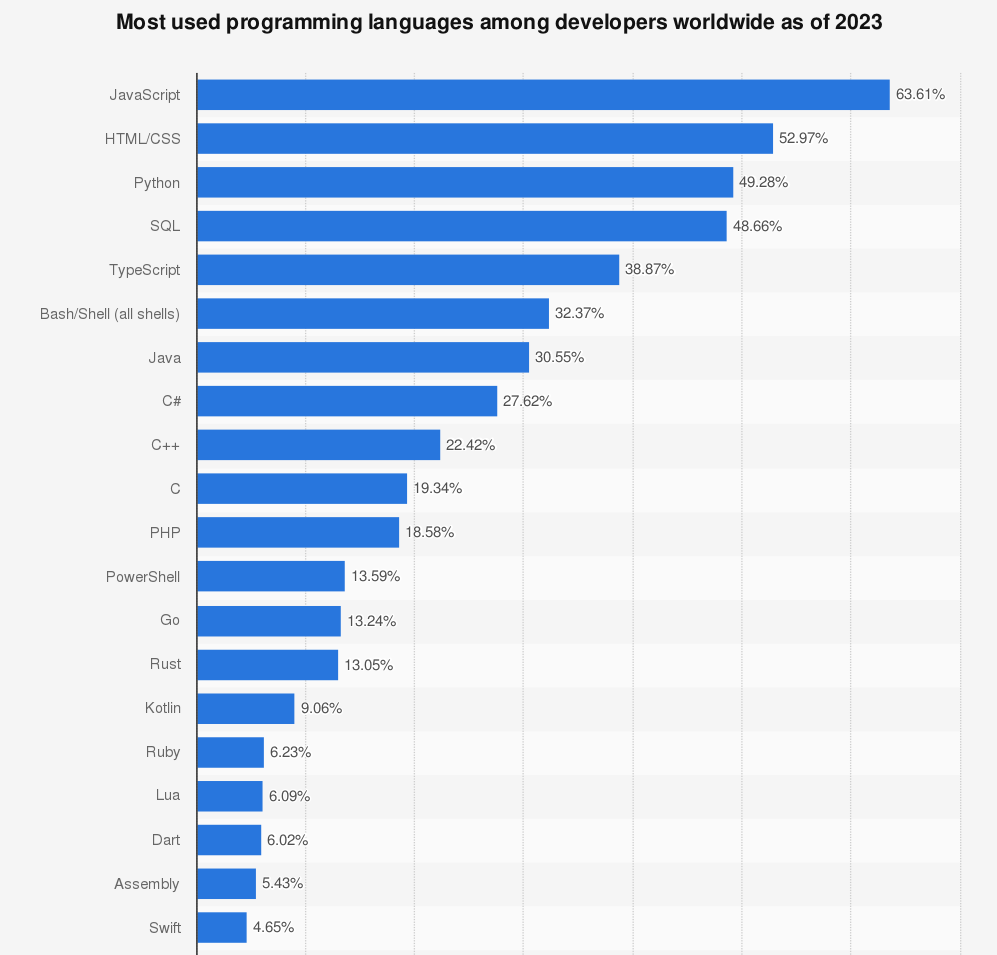
The reason Python became a more popular language is that you can create more complex and multi-protocol applications while maintaining conscious and readable syntax.
The positive side of Python is that it offers many techniques and tools that help us streamline our code, making it more efficient and easier to understand. From the power of list comprehension and lambda function to context manager and error handling with try-except block, these techniques help programmers write cleaner and more efficient code.
This article will uncover all the techniques and tools that help us simplify specific aspects of Python code.
1. List Comprehension
List comprehension offers a shorter syntax and is specifically used for creating a new list based on the existing list.
The syntax of the List comprehension is like the following.
Variable = [expression for value in iterable if condition]
Let’s look at the code for filtering even numbers using list comprehension and without using list comprehension.
Code with List Comprehensions
# Using list comprehension

squares = [x**2 for x in range(1, 6)]

print(squares)  # Output: [1, 4, 9, 16, 25]
Code without List Comprehensions
# Equivalent code without list comprehension

squares = []

for x in range(1, 6):

squares.append(x**2)

print(squares)  # Output: [1, 4, 9, 16, 25]
The above code demonstrates how list comprehension can simplify the process of creating lists and filtering elements compared to the code without list comprehension.
List Comprehensions with Condition
You can use list comprehension to filter items from an iterable based on a condition. That means only items that satisfy the condition are included in the new list.
even_numbers = [x for x in range(1, 11) if x % 2 == 0] # Creates [2, 4, 6, 8, 10]
Nested List Comprehensions
You can use nested list comprehension to create more complex structures like lists of lists or by applying multiple conditions.
matrix = [[1, 2, 3], [4, 5, 6], [7, 8, 9]]

flattened = [item for row in matrix for item in row]  # Creates [1, 2, 3, 4, 5, 6, 7, 8, 9]
Mapping and Transforming with List Comprehensions
List comprehension can also be used for applying transformation or mapping operations to elements of an iterable
names = ["Alice", "Bob", "Charlie"]

initials = [name[0] for name in names]  # Creates ['A', 'B', 'C']
String Manipulation with List Comprehensions
You can also use list comprehensions to manipulate strings, such as converting characters to uppercase or lowercase.
words = ["Hello", "World"]

lowercase_words = [word.lower() for word in words]  # Creates ['hello', 'world']
Click the link to study more about List Comprehension.
2. Lambda Function
The lambda function in Python is anonymous, meaning it has no name. It is created using the lambda keyword. It can take any number of arguments but can only have one expression.
Here is the basic syntax of the lambda function.
lambda arguments: expression
Let’s take a look at the code of squaring a list of numbers using lambda and without using the lambda function.
Using Lambda function
# Using lambda with map to square a list of numbers

numbers = [1, 2, 3, 4, 5]

squared_numbers = list(map(lambda x: x**2, numbers))

print(squared_numbers)  # Output: [1, 4, 9, 16, 25]
Without using the Lambda function
# Equivalent code without lambda, using a named function

def square(x):

return x**2
numbers = [1, 2, 3, 4, 5]

squared_numbers = list(map(square, numbers))

print(squared_numbers)  # Output: [1, 4, 9, 16, 25]
The above comparison shows that the lambda function provides a more conscious way to define a simple operation. In short, lambda functions are best suited for one-off simple operations.
Using Lambda function with filter()
You can use the lambda function to filter or select elements that meet a specific condition.
numbers = [1, 2, 3, 4, 5, 6]

even_numbers = list(filter(lambda x: x % 2 == 0, numbers)) # Output: [2, 4, 6]
Using Lambda function with sorted()
Lambda function can be used as the key function to customize the sorting order of elements in sequence.
names = ["Alice", "Bob", "Charlie", "David"]

sorted_names = sorted(names, key=lambda x: len(x)) # Output: ['Bob', 'Alice', 'David', 'Charlie']
Using Lambda function with Higher-Order Functions
Lambda functions can be used as arguments to higher-order functions like reduce() for aggregating data.
from functools import reduce

numbers = [1, 2, 3, 4, 5]

product = reduce(lambda x, y: x * y, numbers) # Output 120
Follow the link to learn more about lambda anonymous functions.
3. Generator and Iterators
Generators and iterators are mainly used when dealing with a large dataset or for resource optimization( when memory efficiency is concerned)
Understandably, generators and iterators allow you to process data one at a time rather than loading the entire dataset into memory.
Benefits of using Generators and iterators
- Memory efficiency: The main benefit of using generators and iterators is they can process large or infinite sequences of datasets without loading the entire dataset into the memory. They generate and yield value on-the-fly. This means actions are done as required, without significant pre-planning or upfront work.
- Lazy Evaluation: It means that values are computed or read-only when they are needed. This can improve performance and reduce unnecessary computations.
- Sequential Processing: Generator and Iterator are particularly useful when processing data, one item in a specific order at a time. This indicates you work with the data elements in the order they appear, without skipping or rearranging them.
Iterators
An iterator is an object that represents a stream of data. Or it can be used to traverse a sequence of elements, such as a list, tuples, or a file, one item at a time.
In Python, any object that uses __iter__() and __next__ method is an iterator.
- __iter__(): returns the iterator object itself.
- __next__(): return the next item from the iterator.
When there are no more next items, it raises the StopIteration exception.
Below is the code using an iterator to iterate through a list of numbers.
numbers = [1, 2, 3, 4, 5]

iter_obj = iter(numbers)
while True:

try:

item = next(iter_obj)

print(item)

except StopIteration:

break
The above code creates an iterator from a list of numbers and manually iterates through the numbers using a while and the next() function. It prints each number one at a time and terminates the loop when there are no more elements to iterate.
Generators
Generators are a type of iterable, but they are implemented using a special type of function called a generator function. A generator function contains one or more yield statements. When a generator function is called, it returns a generator object, which can be used to iterate through the items produced by the generator function.
Here is the code that uses a generator to generate a sequence of numbers.
def number_generator(n):

for i in range(n):

yield i
gen_obj = number_generator(5)
for num in gen_obj:

print(num)
In this example, the number_generator function is a generator function that yields numbers from 0 to n-1. It doesn’t generate all numbers at once; instead, it yields one number at a time as you iterate over it.
By using generators and iterators, you can write code that is memory-efficient, performs well with large datasets, and supports lazy evaluation, which can be essential in many real-world applications.
4. Error Handling with Try-Except
Error handling with try-except is crucial to writing robust and failsafe Python code. It allows you to handle exceptions(errors) that may occur during program execution.
Try-except blocks can prevent the program from crashing and provide meaningful error messages or alternative actions when issues arise.
Here is the general syntax of the try-except block.
try:

# Code that may raise an exception

except ExceptionType as exception_variable:

# Code to handle the exception
- try: try block contains the code you want to monitor for exception.
- except: If an exception of the specified type occurs in the try block, the code in the except block is executed to handle the exception.
- ExceptionType: This is the type of exception you want to catch, like ZeroDivisionError, FileNotFoundError, ValueError, etc.
- Exception_variable: This variable allows you to access information about the exception (like an error message) that occurred.
Benefits of using error-handling(try-except)
- Prevent Crashes: Error handling prevents your program from crashing when an unexpected error occurs, which could, as a result, lead to data loss or program instability.
- Graceful handling: It allows you to gracefully handle errors by providing alternative actions or displaying meaningful error messages to users.
- Debugging: Error messages can help dubbing and solve unexpected issues, making identifying and fixing problems in your code more manageable.
- Robustness: Effective error handling makes your code easier to understand and maintain, as it separates error-handling logic from the main program flow.
Error-handling examples
Handling a Zero Division Error
try:

result = 10 / 0  # This will raise a ZeroDivisionError

except ZeroDivisionError as e:

print("Error:", e)  # Error: division by zero
In this example, a ZeroDivisionError occurs when trying to divide by zero. The except block catches the exception and prints an error message.
Handling File Not Found Error
try:

with open("nonexistent.txt", "r") as file:

content = file.read()

except FileNotFoundError as e:

print("Error:", e)  # Error: [Errno 2] No such file or directory: 'nonexistent.txt'
Here, we attempt to open a file that doesn’t exist. The except block handles the FileNotFoundError exception and provides an error message.
Handling ValueError
try:

value = int("abc")  # This will raise a ValueError

except ValueError as e:

print("Error:", e)  # Error: invalid literal for int() with base 10: 'abc'
In this case, we try to convert a non-numeric string to an integer, resulting in a ValueError. The except block captures and prints the error message.
From the above error handling explanation, try-except is essential for building reliable and robust Python applications.
That’s it. You can use the above techniques to make your Python code cleaner and more efficient. And also, you’ll be ready to tackle real-world programming challenges confidently.