
GICT knowledge base
How to switch from Blogger to WordPress without losing Google ranking
Published
If you want to migrate your blog from Blogger to WordPress then you came to the right place. In this tutorial, we will learn about how to switch Blogger to WordPress without losing Google ranking. Blogger to WordPress migration is very common when a site starts growing and you want to add more functionality to your site. Blogger is a very good blogging platform. However, it comes with it’s own limitations.
Before starting the main tutorial, let’s talk about the things you must have to perform the migration.
Set up a hosting account and install WordPress
To install WordPress, you must have a web hosting account. Almost all the web hosting providers provide Softaculous auto-installer. It allows you to install WordPress and other content management systems without any technical knowlegde.
If you don’t already have a web hosting account, Click here to get GICTServer web hosting account. We will set up an account for you within minutes so that you can continue with the tutorial without delays.
There are two different ways to install WordPress once you have a web hosting account. You can either use Softaculous to install WordPress automatically, Or you can also install WordPress manually on your web hosting account.
Once you have a working web hosting account, here is how you can migrate from Blogger to WordPress.
Migrate from Blogger to WordPress
This section contains a step by step tutorial to migrate from Blogger to WordPress. Here is how the whole migration process will work in brief.
- Export your blog from Blogger.
- Import the exported blog from blogger to WordPress
- Set up a permalink structure on WordPress
- Redirect from Blogger to WordPress
Let’s get started with the first step.
Step 1: Export your blog from Blogger
To export your blog from Blogger, Log in to your Blogger Dashboard and go to Settings -> Manage Blog. In the list of available options, click on the Back up content option and confirm the download of export file in XML format.
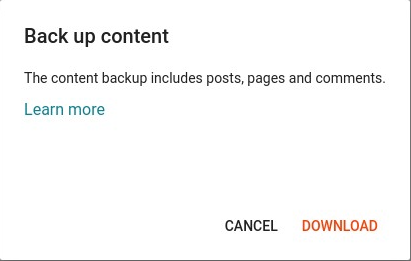
Your blogger content is downloaded in an XML file on your computer. Once the download is complete, it’s time to import your content into WordPress.
Step 2: Import from Blogger to WordPress
To import your blogger content to WordPress, Log in to the WordPress admin area and goto Tools -> Import. On this page, you will see a list of available import options. Click on the Install Now button under the Blogger importer. See the following screenshot for reference.
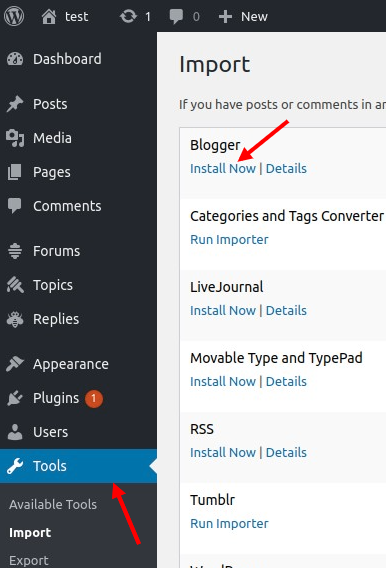
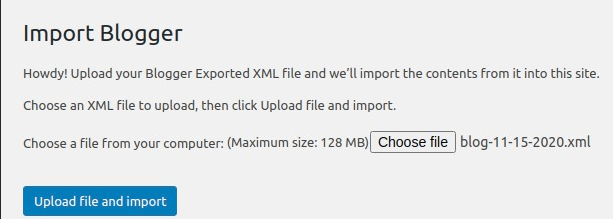
Now you would need to click the run importer link to continue. WordPress will ask you to choose the XML file which already exists on your computer. After choosing the file, simply click on the Upload file and import button.
If you have multiple users to handle the blogger’s blog, then you can create a new user account for a particular user. You can also assign these posts to an existing author on your WordPress site.
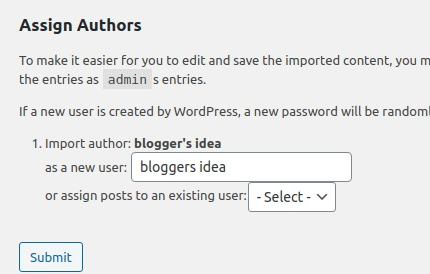
After making the selection as your choice, click on the submit button to continue. Now you can check your blogger content on the WordPress admin area by visiting the Posts > All Posts post page.
Step 3: Set up permalink on WordPress
The permalink is the structure of the URL of your posts. You can select one from multiple URL strcutures. To set up the Permalink in WordPress, Log in to the admin panel of your WordPress site. Then click on the “Settings -> Permalink” option form the left sidebar.
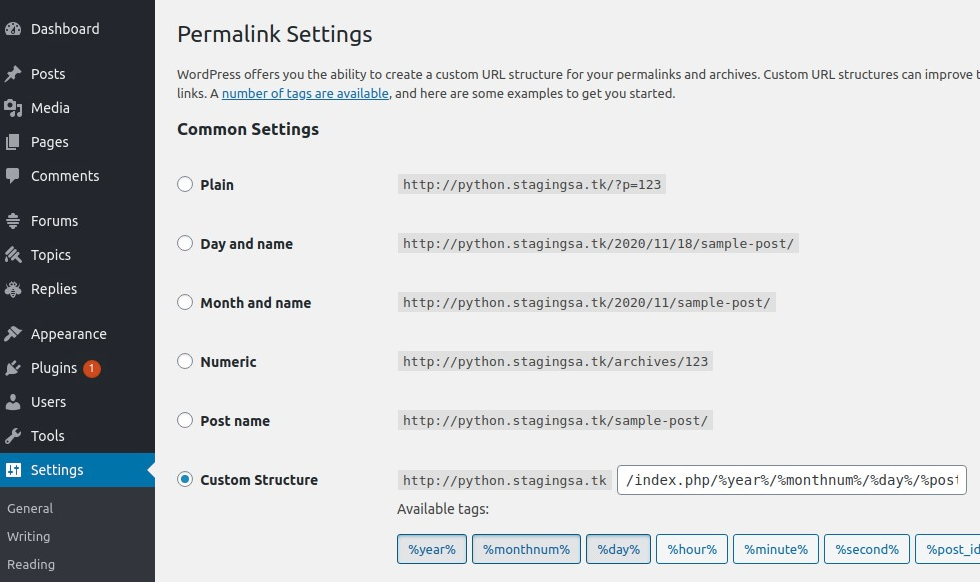
By choosing a custom structure, you can create your URL close to your blogger URL by adding a slug after your domain name.
Step 4: Redirect from Blogger to WordPress
The most important thing you need to do is set up proper redirection. Without proper redirection, you have a risk of losing your existing traffic or SEO ranking.
The essential part of the redirection is to make sure that the user can redirect on the same page on the new site which they were trying to access on the old site. From all this stuff we also ensure the one thing that search engines understand that your site is moved to this new location.
For this, you need to install Blogger to WordPress redirection plugin and activate it. After this, you need to visit “Tools -> Blogger to WordPress Redirection” page and click on the start configuration button.
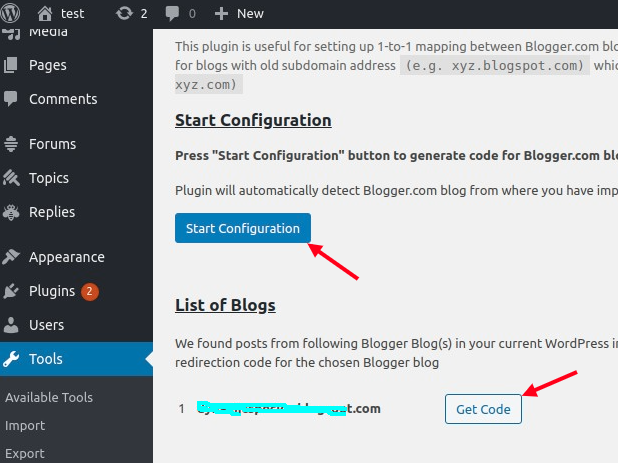
This plugin will detect your Blogger URL and show the option to get a redirection code, so click on the Get Code button next to your Blogger URL.
It will now generate a piece of code that helps you to redirect properly from your Blogger blog to your new WordPress site. You have to use that code to redirect from Blogger to WordPress.
We hope this tutorial was helpful for you. If you are facing any issue migrating the site, please let us know in the comment section given below.