
GICT knowledge base
How to Optimize Google My Business Account for Local SEO
Published
Optimizing your Google My Business account is a great way to improve your business’s online presence and help local customers find you more easily. By setting up and maintaining a strong profile, you can boost your chances of appearing in local search results.
This guide will walk you through simple steps to make sure your Google My Business account is fully optimized, improving your visibility and attracting more customers from your area.
How to Optimize Your Google My Business Account?
To improve your listing’s chances of appearing in the Google 3-Pack, we suggest using these Google My Business optimization tips.
Keep Your Information Up to Date
Your business listing acts as your company’s online storefront, where customers can find details about your services and how to contact you. That’s why it’s important to keep your information accurate and up to date. Make sure to regularly review your business details to see if anything has changed.
Check things like your business name, address, phone number, description, and working hours. Don’t forget to adjust your hours for holidays or special events. Also, make sure your business information matches what’s listed on other local directories and your official website.
Having inconsistent details, like different names, addresses, or phone numbers, can lead to penalties for your profile, so always double-check everything carefully.
Select Primary and Secondary Categories
Choosing a business category is an important step when setting up your Google My Business listing. The categories you pick will affect what search results your business shows up in and can also impact your ranking in Google’s local pack.
There are about 4,000 categories to choose from, so take your time to pick the right ones. Think carefully about your options to make sure you choose the best categories for your business.
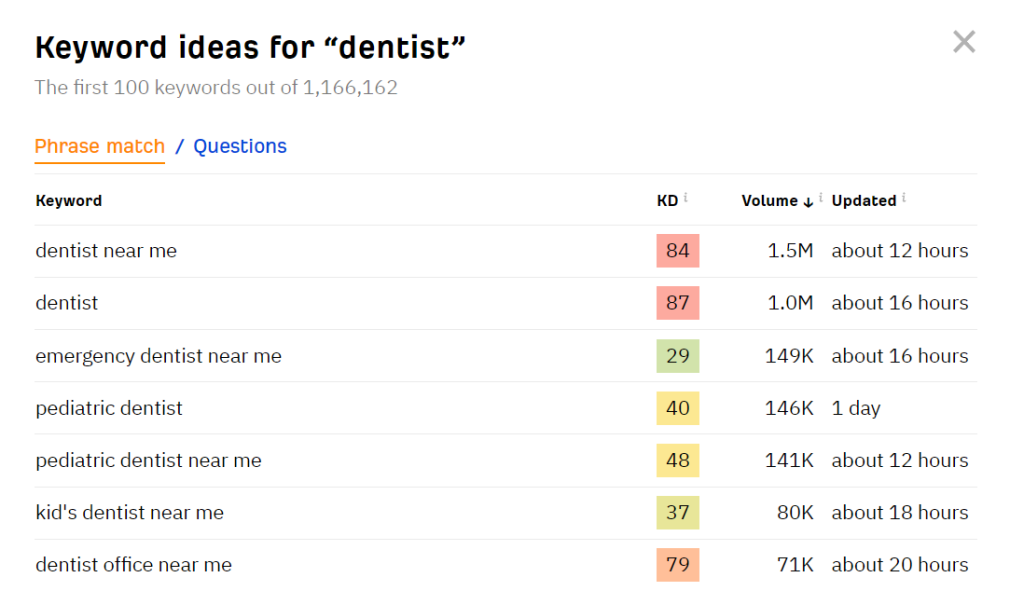
One key thing to look at is search volume – the more popular the search term, the more people may see your listing. Tools like Semrush or Ahrefs can help you find out which keywords have high traffic.
Also, check out your local competitors. Search for a relevant keyword and see what categories other businesses are using in the local pack.
Usually, only the main category is shown. To find the secondary categories, you can use a tool like GMB Everywhere.
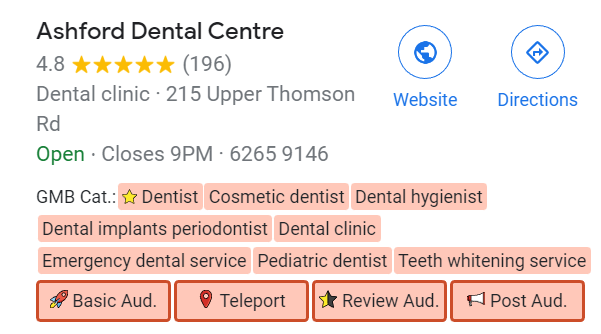
Although you can choose up to nine secondary categories, make sure they are relevant to your business. Only pick categories that truly match your business to stay within Google’s rules.
Add Your Products and Services
Adding products and services to your Google My Business profile can help make your business more visible. It lets customers know what you offer and helps your listing stand out from others.
To add them, sign in to your Google Business account and search for your business name or just type “my business” in the search bar. Once you find your profile, click “View Profile,” then select the “Edit Profile” button. Choose either “Products” or “Services” based on what you’re adding.
You’ll then need to fill in details like the product name, category, image, price, and description.
Keep in mind that Google doesn’t allow certain products or services like tobacco, gambling, medical devices, financial services, alcohol, and unapproved supplements. Violating this rule could lead to your entire product list being removed, even the allowed items.
Use The Product Catalog
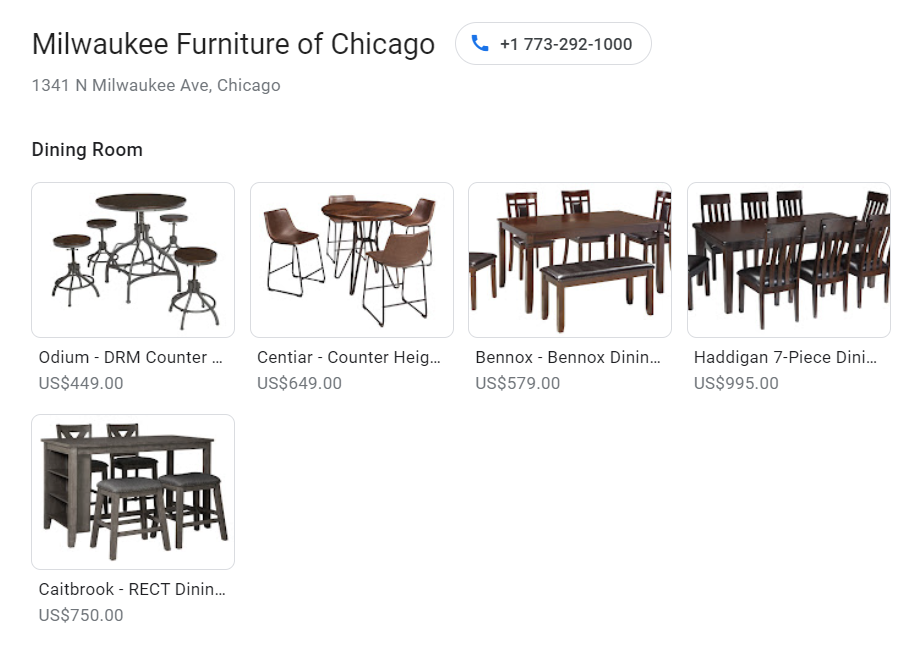
To grab the attention of potential customers, display your product catalog directly on your profile. Google offers a “Products” tab where customers can:
- Browse through different product categories
- Click on product cards for more details
- Call your business directly
- Use a button or link to order online
Set Up Messaging
Another way to optimize your Google My Business profile is by turning on the messaging feature. This allows customers to easily contact you, which helps build trust, increase satisfaction, and encourage more interaction.
With Google Business Messages, customers can start a chat directly from your business listing on Google Search or Maps. They just need to click the “Chat” button.
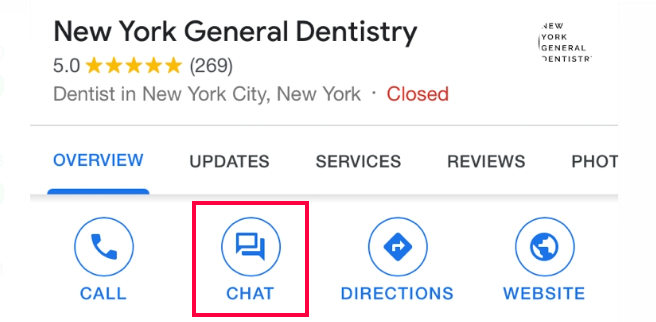
To set it up, turn on the Messaging feature. You’ll be notified whenever you get a message, and you can even set up an automated welcome message and share pictures during chats.
Use Special Attributes
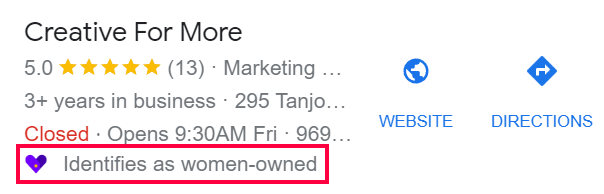
Special attributes are extra details that tell customers what your business offers. For example, restaurant owners can add attributes like takeout, dine-in, delivery, or outside food allowed. This helps your business show up in searches for things like “dine-in restaurants near me” or “delivery restaurants near me.”
Depending on your business type, you can add different attributes to make your profile stand out. You can share details about amenities, languages spoken, activities available, accessibility, and payment options.
In recent updates, you can even highlight if your business is women-owned.
Answer Client Questions
When potential customers find your Google Business Profile, they expect to see accurate information. This not only helps generate leads but also improves the customer experience.
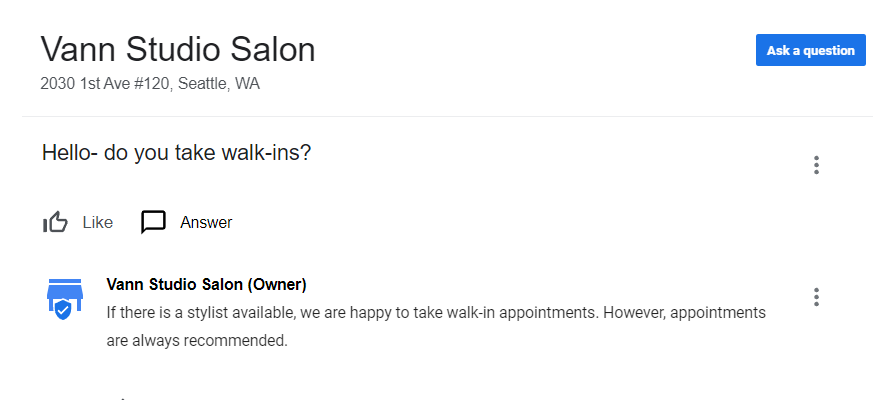
Google has a Q&A section in your listing, where anyone can post answers to questions. Google may also show automatic answers based on previous responses or customer reviews. The most liked questions and answers will show up at the top.
Since you can’t always be sure about the quality or accuracy of these answers, it’s a good idea to respond yourself. Also, some people might confuse this section with a messaging system, and questions could be potential sales leads. If you don’t keep an eye on the Q&A section, you might miss out on customers.
Publish Posts and Photos
Posting new photos and updates regularly can help build trust with customers and show Google that your business is active and real.
Photos give people a glimpse of what your business is like, whether it’s the inside of your restaurant, the menu at your café, or the overall atmosphere of your store. Including people in your photos also shows what kind of service customers can expect.
Make sure your photos are high-quality or at least look professional. Also, add alt text, titles, and captions to improve your local search ranking, and turn on geotagging for better results.
Besides photos, Google My Business allows you to share updates directly from your profile using the Posts feature. You can announce new offers, events, or seasonal promotions to keep customers engaged.
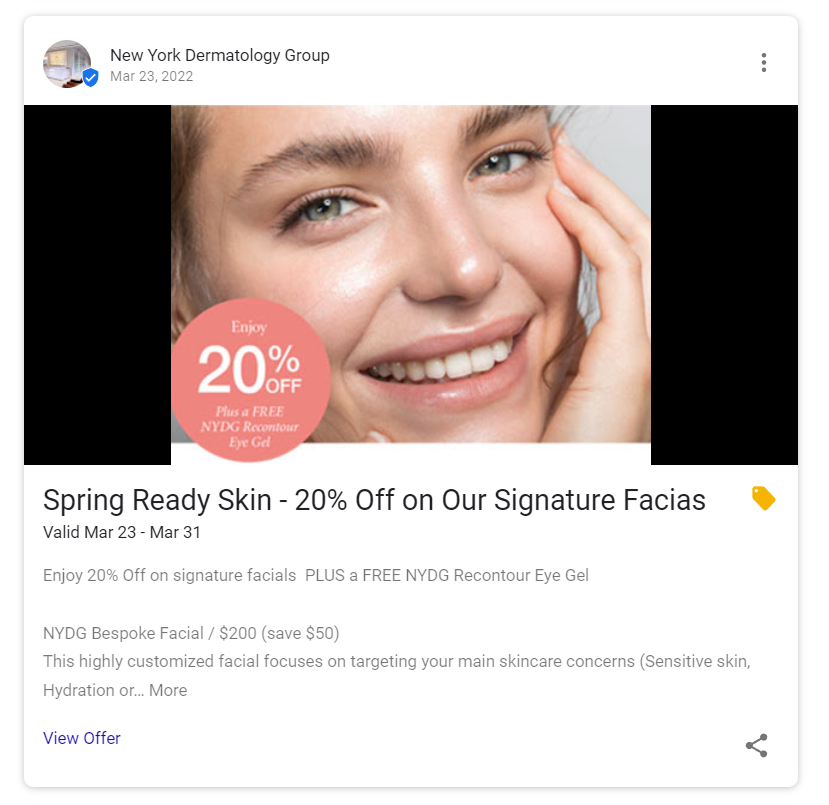
When creating posts, remember to include relevant keywords, make sure the content is free from mistakes, and provide accurate details. To make your posts stand out, include images like flyers or campaign pictures, and add links to your website.
Keep in mind that Google My Business posts expire after six months. It’s a good idea to check and update them regularly so customers always see your latest deals.
Respond to Reviews
It’s important to keep track of and respond to your Google Reviews, as they can play a big role in turning visitors into customers. Good reviews help build trust and show potential customers that your business is reliable and of high quality.
When you reply to reviews, it shows that you care about your customers and their experience. Keep in mind that Google Reviews are public and may appear in the Knowledge Graph, so how you respond can shape how others see your business.
Try to respond in a clear, friendly, and helpful manner. Avoid short, one-word answers, and focus on addressing any concerns the customer may have. If you receive a negative review, responding to it is a good chance to offer a solution and possibly encourage the customer to update their review.
Conclusion
As more people search for businesses online, having a Google My Business profile is essential to boost your company’s visibility on search engines. It makes it easy for customers to find your products, contact information, and location.
When setting up your profile, be sure to provide accurate details about your business and avoid violating Google’s rules to prevent issues like account suspension.
Besides creating your account, it’s important to make the most of the features available and follow some optimization tips. This will help improve your chances of ranking higher on Google Search and appearing in the Google 3-Pack.
However, a Google Business Profile alone won’t fully improve your local SEO. In addition to your listing, make sure to focus on your on-page and off-page SEO, including having a well-optimized website and creating valuable content.
Related guides
301 Moved Permanently Error: Understanding and Implementing Redirects
Learn about the 301 Moved Permanently error, its causes, SEO implications, and effective strategies for implementing and managing redirects to optimize user experience...
SEOWhy Every Web Developer Needs a Portfolio
Discover why every web developer needs a standout portfolio and learn the essential elements that make it impressive.
SEOThe Ultimate Guide to Multilingual SEO: Expand Your Global Reach
Discover best practices for multilingual SEO to enhance your global visibility.
SEOSEO Has Changed – How to Do Keyword Research That Actually Works in 2025
Discover effective keyword research strategies for 2025. Learn how to understand search intent, utilize the best tools, and optimize your content for better visibility...