
GICT knowledge base
How to fix ‘OpenLiteSpeed is functioning normally’ error?
Published
‘OpenLiteSpeed is functioning normally‘ error mostly happens when we’re using free Open Source ‘LiteSpeed’ webserver. This webserver is most frequently used for individual sites that don’t change often. This is because OpenLiteSpeed requires a restart to load any new .htaccess file. We can fix this issue by just restarting the ‘Litespeed’ webserver in Directadmin via Dashboard >> Show Services (Admin Privilege) after adding a new domain or subdomain.
- Login to Directadmin via http://your_server_ip:2222/
- Change to ‘Admin’ Privilege instead of ‘User’
- Go to Dashboard / Show Services
- You can see ‘litespeed’ service there. Click on (+) and ‘Restart’
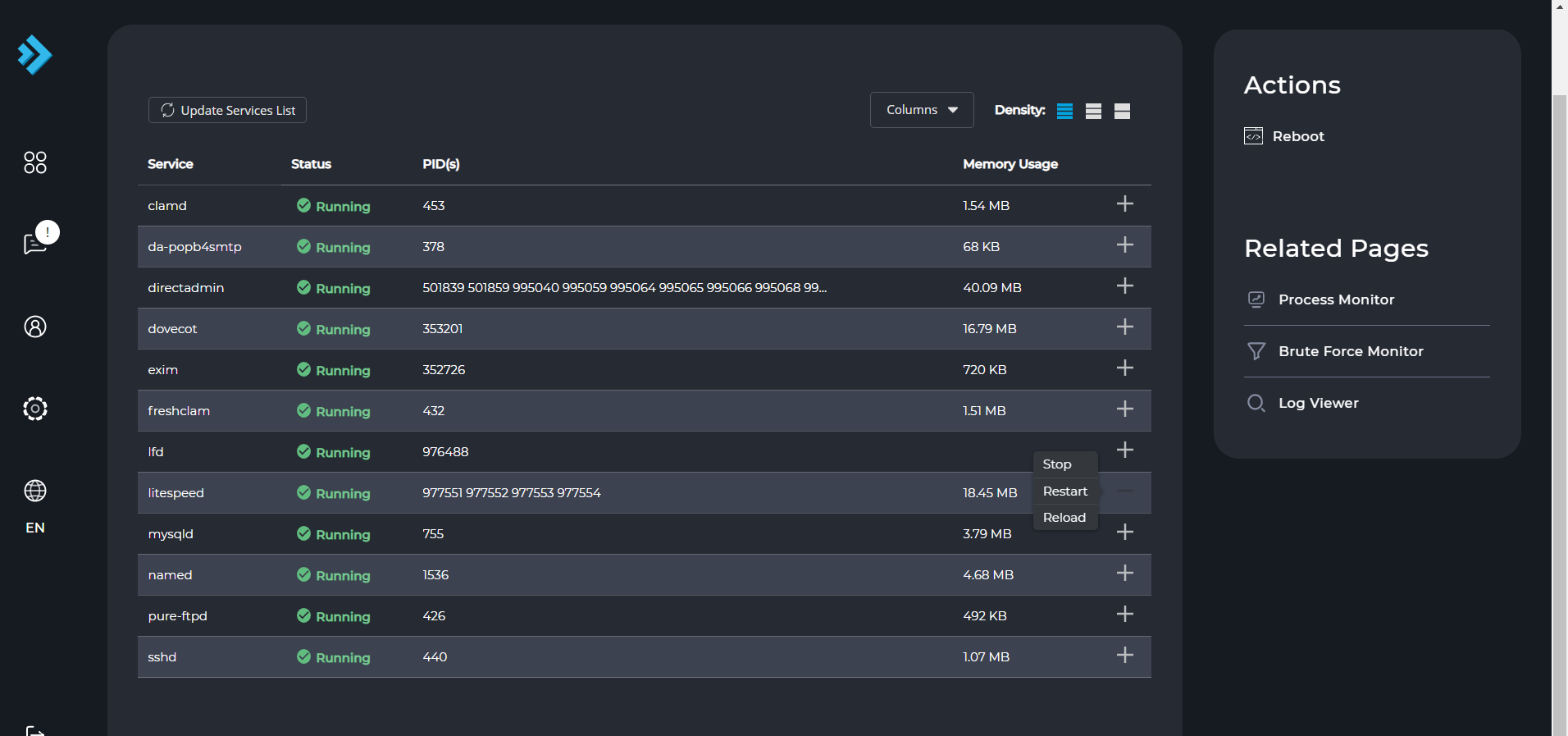
Kindly note, if you’re using Cloudflare nameserver, make sure you’re using correct A record for the domain, also need to ‘Purge’ the cache after the above changes via Cloudflare Dashboard
If you would like to have a cronjob setup, which would reload OpenLiteSpeed every X minute if there are newer .htaccess files that the starting time of OpenLiteSpeed, you may use a cronjob like (*/3 means every 3 minutes, you may change it to happen less/more often):
*/3 * * * * root if ! find /home/*/domains/*/*_html/ -maxdepth 2 -type f -newer /usr/local/lsws/cgid -name ‘.htaccess’ -exec false {} +; then /usr/local/lsws/bin/lswsctrl restart; fi
Cronjob can be created as /etc/cron.d/openlitespeed_htaccess_scan
If you’ve any concerns/questions, please contact our support via live chat or ticket system, so we can better assist you directly.
Related guides
Using GEOIP to block an ASN or Country on GICTServer shared hosting with litespeed
Boost Security: Using LiteSpeed GeoIP for Country or ASN Blocking Running a website site means you're a constant target for spam, brute-force attacks, and malicious bots.
LiteSpeedHow can you Switch to Apache from Litespeed in WHM?
How to Switch to Apache from Litespeed in WHM? You can perform this task your WHM using the plugin called “Switch to Apache”.
LiteSpeedLiteSpeed Cache is Disabled Warning on WordPress
As the name implies, the Litespeed cache is a cache and it is used in the Litespeed Web Server. The Litespeed web server is a substitute to the Apache Web
LiteSpeedPurchase LiteSpeed Web Server from WHM’s Interface
LiteSpeed Web Server is a more advanced and powerful substitute for Apache web servers. LiteSpeed Web Server (LSWS) can directly read Apache configuration