
GICT knowledge base
Enable Debug Profiler in Magento
Published
Magento is the most popular E-commerce management system. It allows the internet Entrepreneurs run E-commerce stores. Magento is also free and Open-source, It means that you can also modify it and add functionality according to your requirements.
As you can add more functionality using the custom code as well as the extensions. Extensions are small piece of software that allows you to add a specific functionality to your store. But, there are thousands of extensions available in the market and some of them are poorly coded.
So, some of the extensions or unmanaged custom code can break sometimes and also slow down the website. It is not always easy to find the code responsible for slowing down or taking down the site. As long as you can access the administrator panel of your Magento store, You can always enable the debug profiler in Magento to help you debug your store.
In this tutorial, I will show you How to enable Debug Profiler in Magento. After enabling the Debug profiler, You will see a table containing detailed information about each piece of code that is loaded while rendering the current page. It will make it easier for you or your developers to debug.
Enable Debug Profiler in Magento
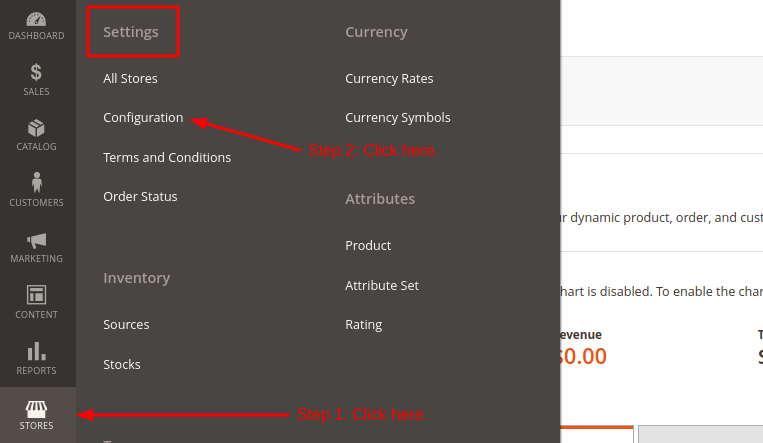
First of all, log in to the admin panel of your store. Then, click on the Stores -> [Settings] -> Configuration option as shown in the following screenshot.
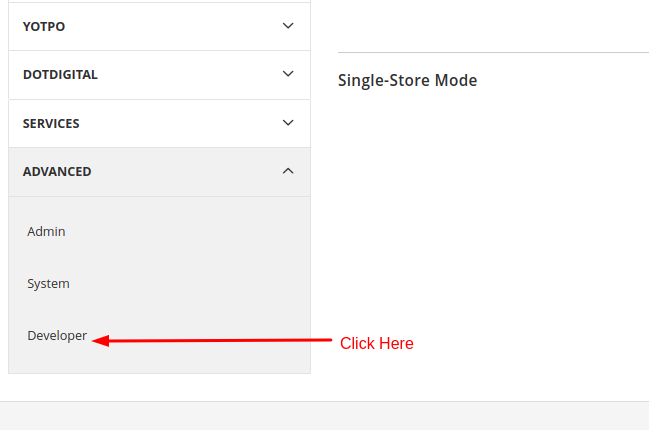
On this page, you will see a left sidebar with collapsible categories of configuration. And the main content page where you can update the configuration in multiple sections. From the left sidebar, expand the Advanced option and click on the Developer sub-option.
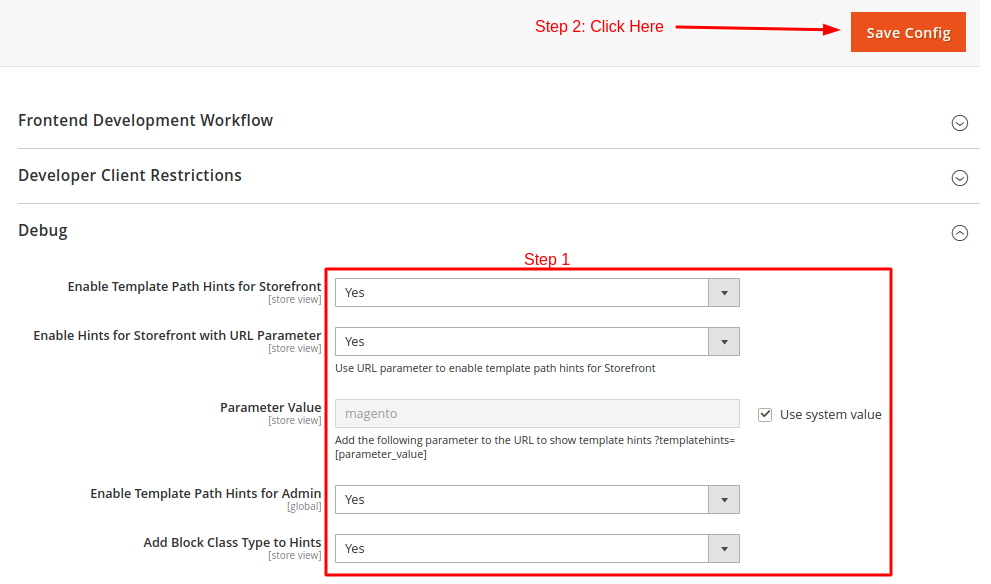
On this page, you will see a lots of collapsed menus. Click on the Debug option to expand it. Then, select the appropriate options from multiple drop-down menus according to your requirements. Then, click on the Save Config button given on the top-right corner of the page to save changes.
So, this is how you can enable the debug profiler in Magento. We hope this short tutorial was helpful for you. If you have any questions, feel free to use the comment section given below.
Related guides
Top 10 Best Content Management Systems in 2021!
Follow this list to learn in detail about the 10 most popular content management systems available in the market.
E-CommerceWooCommerce vs Shopify : The best E-commerce platforms
WooCommerce and Shopify are the two most popular E-commerce platforms. Follow this tutorial to learn more about both of them.
E-CommerceBest Applications to Run E-commerce Websites
E-commerce Hosting:E-commerce is the process of selling and buying of goods or services over the world wide web. It is also known as electronic commerce or
E-CommerceEasy Digital Downloads Plugin for WordPress
Easy Digital Downloads (EDD) plugin is the second most well-known WordPress eCommerce plugin, after WooCommerce. EDD plugin is used to create an eCommerce