
GICT knowledge base
Create and Display Custom Forms in WordPress with WP Forms
Published
WPForms is one of the most popular contact form plugins for WordPress. It is available in the WordPress plugin directory. The pro version includes some advanced surveys, polls, and add-ons too. These advanced features will help you to create engaging WordPress contact forms in just 5 minutes. Using this plugin, you can embed contact forms anywhere on the site in pages or posts, or widgets. This plugin will offer you features like conditional logic and multi-page forms too. You will have various template designs for creating contact forms and polls. Moreover, you can also use WPForms to create surveys and polls. Using the Form Pages add-on, you can create distraction-free custom form landing pages like Google Forms and Wufoo.
You can easily customize your contact forms with our section dividers, HTML blocks, and custom CSS. Even if you use Elementor or Divi page builder, the plugin will let you customize the styles and forms. The plugin supports many payment gateway options like PayPal, Stripe, Authorize.net. Moreover, you will have email marketing service integrations as well such as MailChimp and Getresponse. WPForms provides smart anti-spam protection out-of-the-box, plus direct integrations with HCaptcha and Google ReCAPTCHA. Moreover, you can show a custom success message or redirect users to a custom thank you page. The plugin also allows you to collect files and media through contact forms with file upload options.
Additionally, you can even send form entry data to secondary tools and external services. You don’t require any third-party connector for that. Moreover, You can also discover the steps your visitors take before they submit your forms. With the Zapier add-on, you can easily connect your WordPress forms with 1000+ apps. It allows you to display location information about your users. WPForms form analytics integration with MonsterInsights will enable you to track your lead capture forms easily. WP Forms supports various payment gateway options like PayPal, Stripe, Authorize.net. Additionally, you will have email marketing service integrations as well such as MailChimp and Getresponse.
You can also integrate your contact forms with an email marketing service or collect payments for bookings and orders. You can also create signature forms or add the signature field to your contact form, application form, booking form, etc. It will let you collect user-submitted content in WordPress with our front-end post-submission form. This plugin provides you with a drag and drop interface to create any type of form. You can add the fields which have single or multiple answers. You will also have CAPTCHA editing features. Also, you can embed the ReCAPTCHA form the settings by inserting the site and secret keys. You can also do general and advanced settings before creating the forms. This plugin also allows you to use images as poll choices along with the text. So, let’s discuss the basic features of this plugin in brief.
Features
- This plugin can convert any form into WordPress contact forms in just 5 minutes.
- You can create a simple contact form, marketing form, request a quote form, donation form, payment order form, registration form, or a subscription form. You will have templates for all the categories.
- Also, there are ReCAPTCHA editing options. You can embed the ReCAPTCHA and HCAPTCHA from the settings by inserting the site and secret keys.
- The plugin has 100+ templates for different categories. And they are available even in the free version.
- The WPForms plugin also provides a drag and drop form builder interface, and we can create any type of form. You just need to drag the fields to form and edit it the way you want.
- WPForms plugin also allows you to use predefined survey forms for quick and easy market research.
- This plugin also allows you to easily create poll surveys and display real-time results anywhere on the website.
- It supports all types of intelligent survey fields like Likert scales, star rating, multiple-choice, and NPS.
- This plugin also offers interactive survey reports for real-time insights within our WordPress dashboard.
- The plugin supports many payment gateway options like PayPal, Stripe, Authorize.net. Moreover, you will have email marketing service integrations as well such as MailChimp and Getresponse.
- This plugin is also one of the most SEO-friendly contact form plugins. You can embed your contact form on any page with an optimized title and description.
- You can easily integrate your contact forms with an email marketing service or collect payments for bookings and orders.
- WPForms form analytics integration with MonsterInsights allows you to track your lead capture forms easily.
- With the Zapier add-on, you can easily connect your WordPress forms with 1000+ apps.
- Along with the contact form, you can also use WPForms to create surveys and polls.
- Using the Form Pages add-on, you can create distraction-free custom form landing pages like Google Forms and Wufoo.
Pricing Details
WP Forms is a powerful contact form plugin for WordPress. It offers four paid plans – Basic, Plus, Pro, and Elite. The Basic plan will let you create unlimited forms along with a license for one site. This plan costs $39.50 per year. Plus plan consists of marketing integrations and form automation. Plus plan provides the license for three websites and retails for $99.50 per year. At the same time, the Pro and Elite plan includes many advanced add-ons and features. Pro and Elite plans cost $199.50 and $299.50 per year.
How To Install And Activate WP Forms Plugin
The installation process is very easy. You can just follow the simple steps mentioned below to install and activate the plugin.
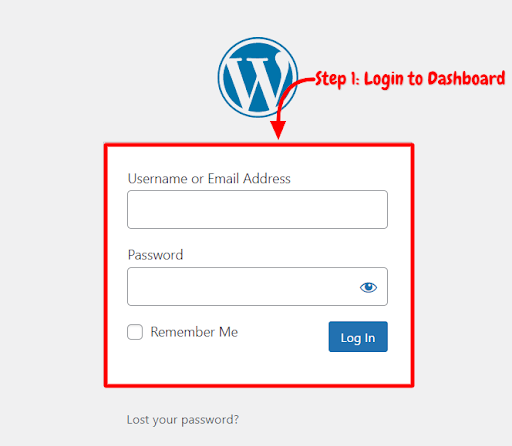
Step 1: First, you need to log in to the WordPress admin dashboard.
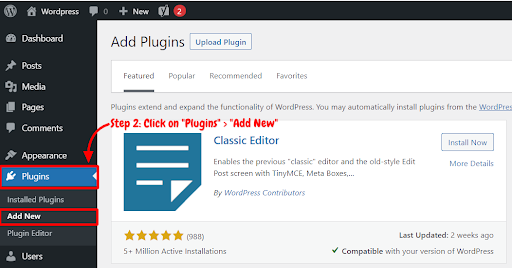
Step 2: Now, you will see the option “Plugins” on the left-hand side panel. Click on “Plugins,” then select “Add New.”
Step 3: You will see a search bar on the top right-hand side corner. Search “WP Forms Plugin”.
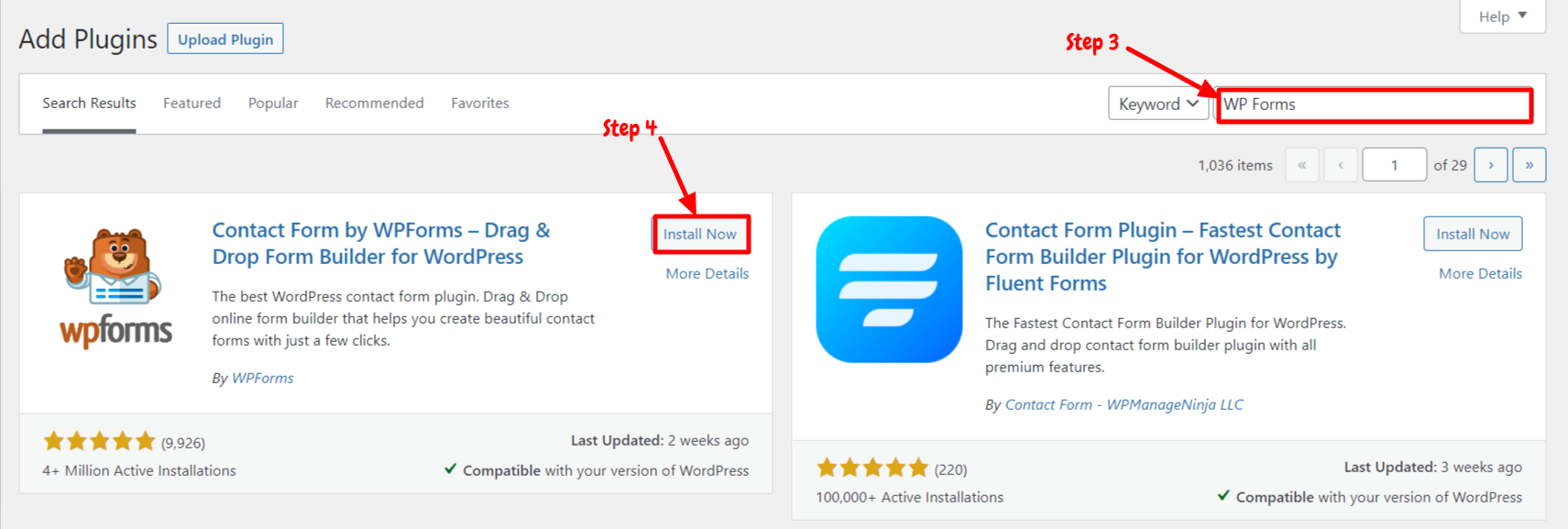
Step 4: Now, you need to click on “Install Now.”
Step 5: After installation, you need to activate WP Forms Plugin in order to use it on your site. Now, click on “Activate.”
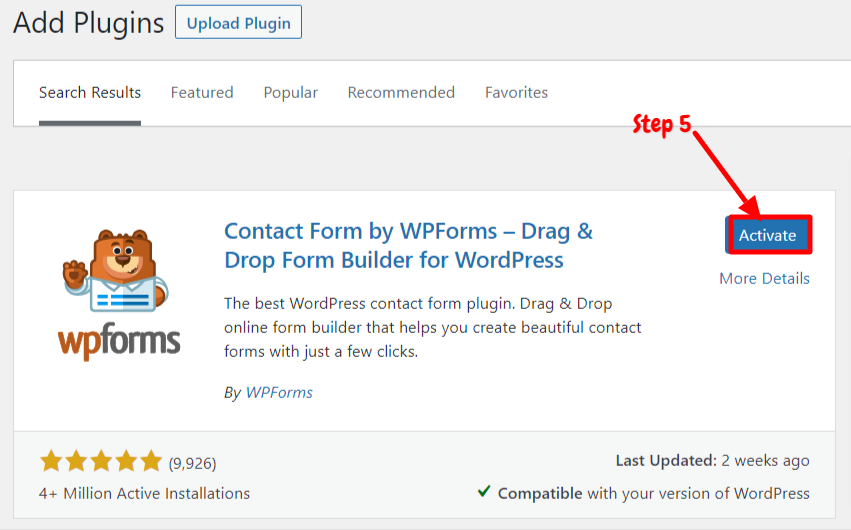
Now you have successfully installed and activated the plugin. You can now start creating any type of contact form using this plugin.
How To Use WP Forms Plugin
After activating this plugin, you can start creating forms within the WordPress dashboard. We have explained step by step guide below on how to create Contact forms or Sign up forms using this plugin,
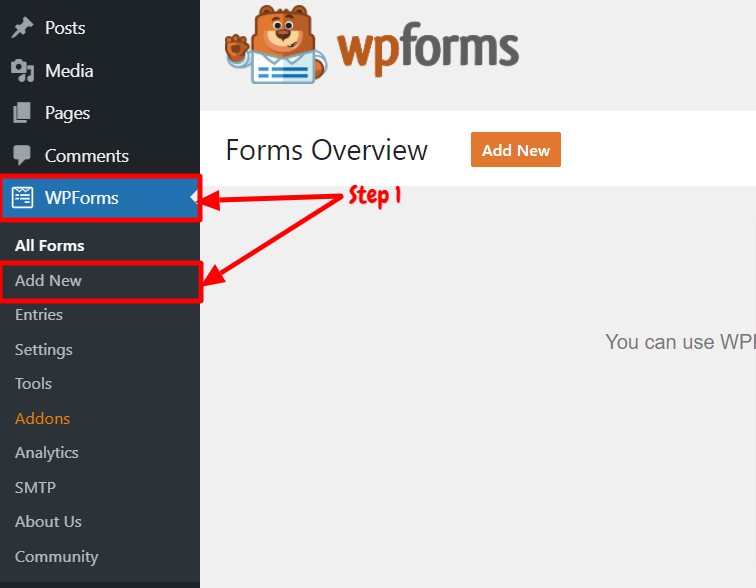
Step 1: First, you need to go to the “WP Forms” option on the left-hand side admin panel. Then select “Add New” to create forms.
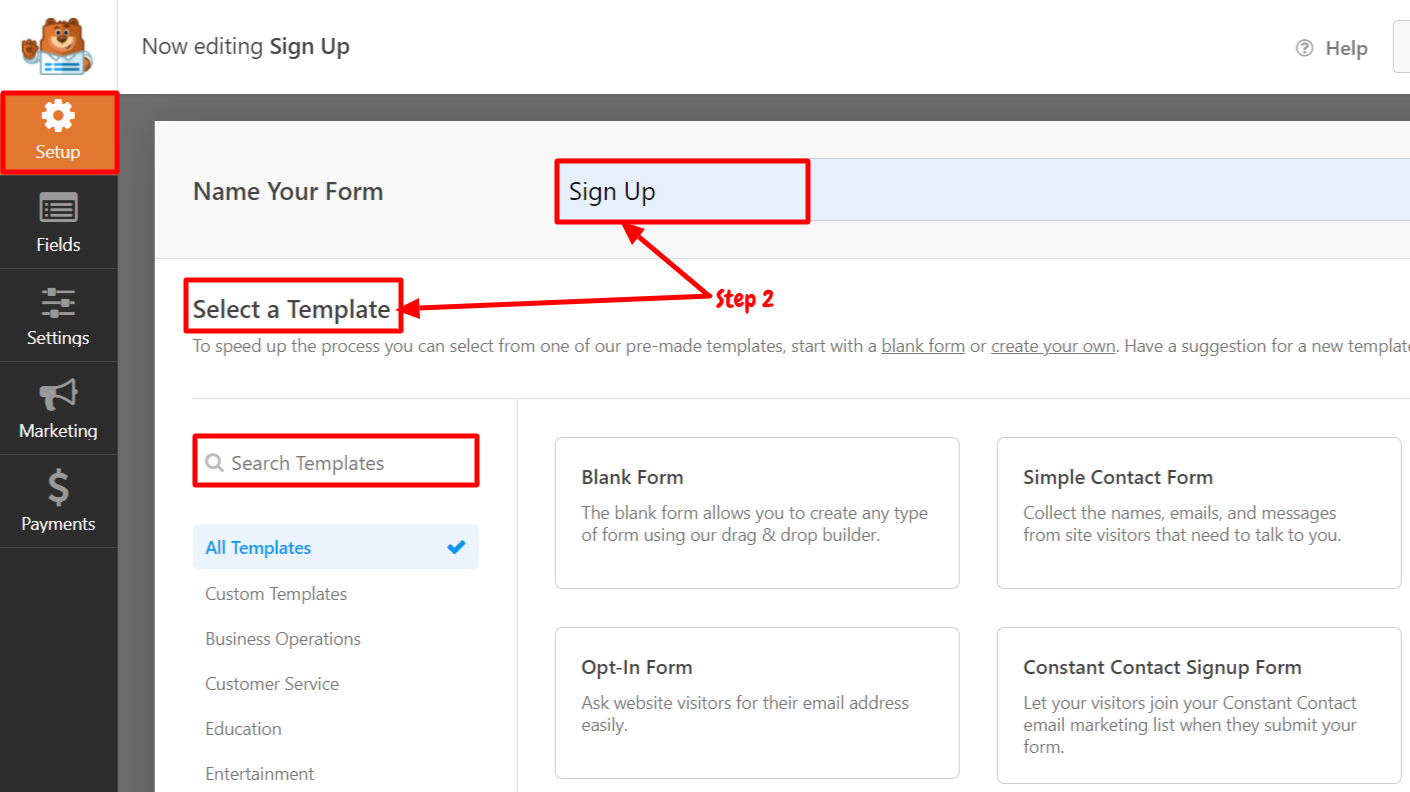
Step 2: You will be directed to the “Set up” page. Now, you need first to enter the name of your form. Then select the templates. You will have various category options for templates. Here, we are creating a SignUp Page. So, the form name will be Sign Up.
Step 3: After selecting the template, the second section will be “Settings.” In this section, you will have various customization options. You can add multiple field descriptions, reCAPTCHA, and checkboxes as per your choice. You just need to drag the field in the form and start editing the form.
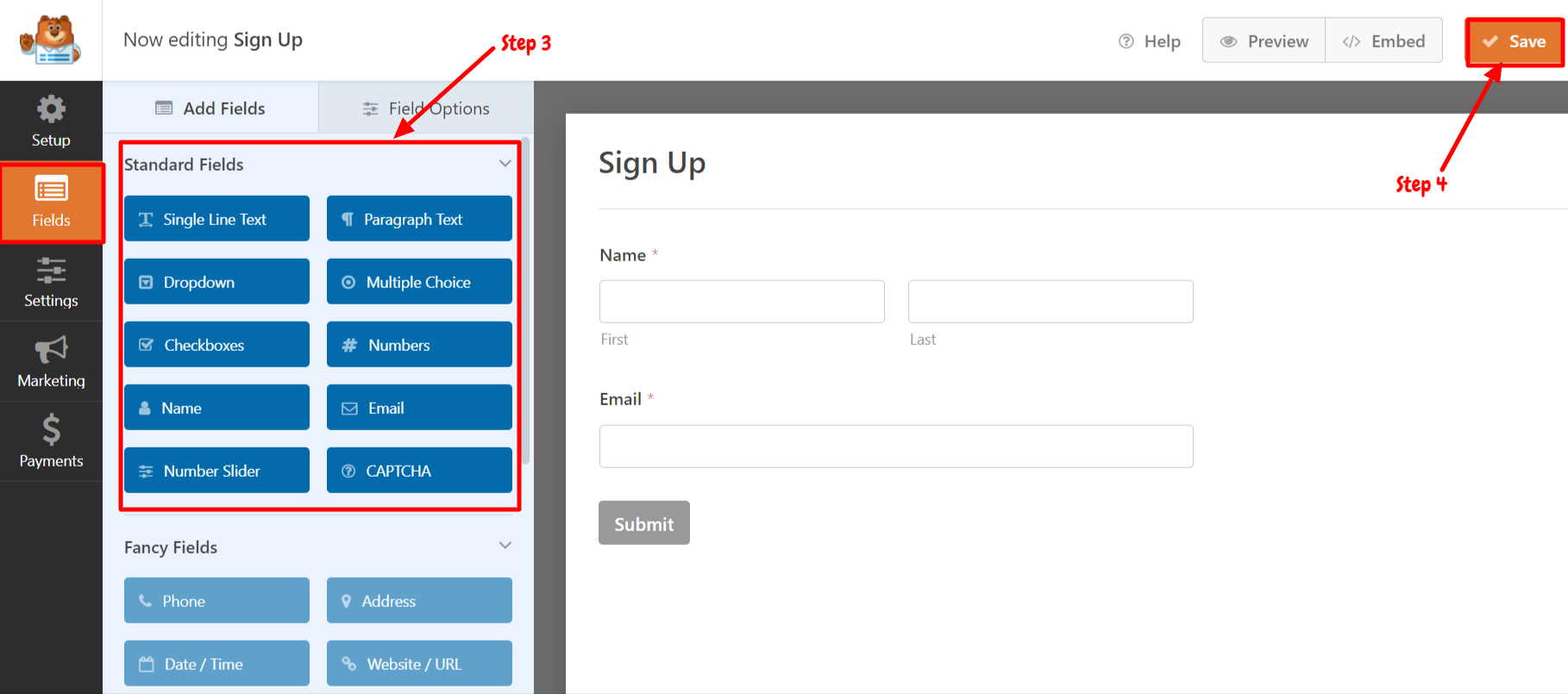
Step 4: After editing the form, click on “Save”. Now you can see the preview of this form.
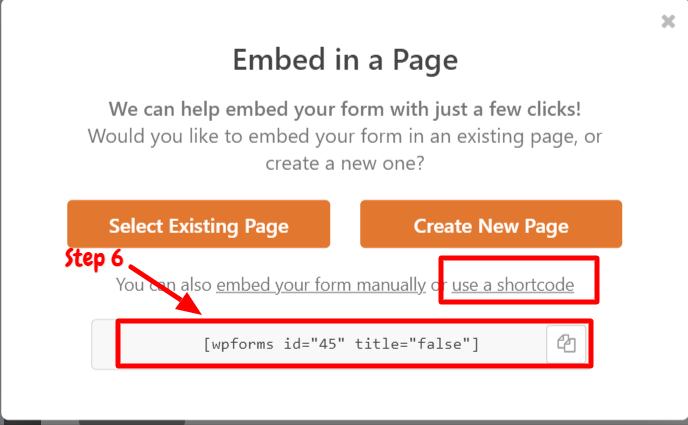
Step 5: In order to use this form on any page, you need to create a new page or embed the form using shortcodes. So, click on “Embed.” You will be asked to “select existing pages” or “create new page options.” Choose any one option, or you can also click on “use a shortcode.”
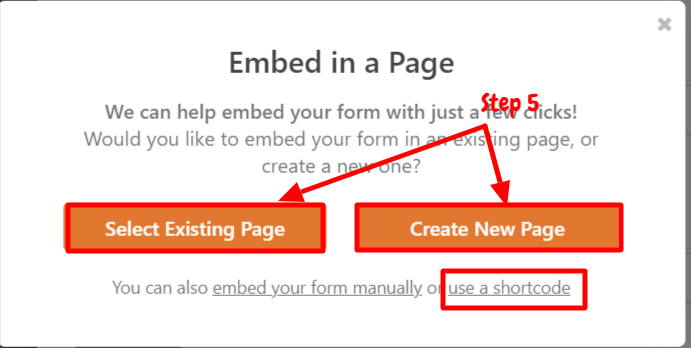
Step 6: Now, copy the shortcode and paste it into the new page. You can easily embed the shortcode of contact forms on any page.
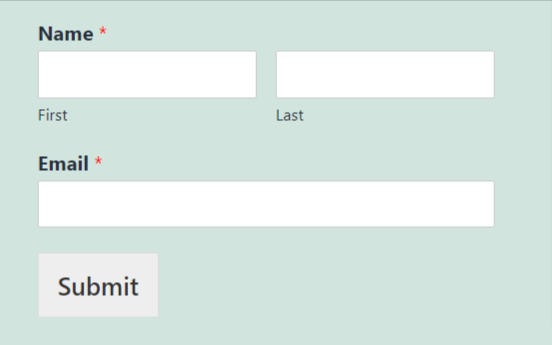
This way, you can create any contact forms, registration forms for various categories using this plugin.
Conclusion
WP Form is an effective solution for creating contact forms and survey polls. You can create any type of form within your dashboard. You just need to install and activate the plugin on your site. WP form plugin is free, so it is available in the WordPress Plugin directory. The installation process is very quick; you can follow the steps mentioned above to install and activate the plugin on your site. WP Forms is also one of the most SEO-friendly contact form plugins.
The plugin provides CAPTCHA to protect your site from spam entries. You will be able to customize many options as it provides drag & drop features for customization. This plugin also gives shortcodes to embed the forms on any page, post, or widget. You will get multiple options from star ratings to file uploads to multi-page contact forms with progress bars. The plugin also provides more than 90 templates for different categories. Thus, you can create forms and surveys for any category.
We have explained step by step guide on how to use WP Forms on your site. You can just follow the steps to create forms. Finally, We hope this article will help you to create surveys and contact forms using this plugin.