
GICT knowledge base
ChatGPT Mastery: Developer’s Guide to Effective Prompts
Published
In recent years, there’s no denying that Artificial Intelligence has undergone rapid transformation, impacting the way we work and seamlessly integrating into our daily lives. It has contributed to increased productivity, automated routine tasks, fueled personalized recommendations, and enabled the development of smart home devices, including advanced sensors and more.
ChatGPT is one of the AI tools that helps you do your work faster and more accurately. It’s an NLP(Natural Language Processing) tool designed to understand and generate human-like text.
As we talk about ChatGPT statistics, it has gained probably 180 million users over time.
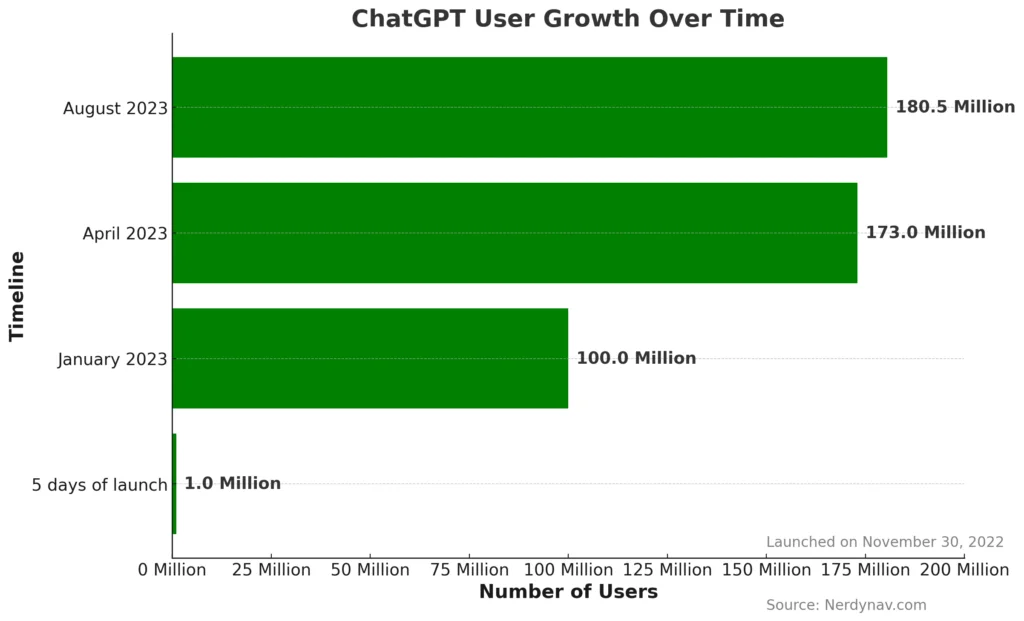
Pretty much a huge number, isn’t it? Why are people attracted to using ChatGPT over time? The answer is the same: ChatGPT can perform a wide range of language-related tasks and also solve problems in a short amount of time. Indeed, ChatGPT is a valuable tool for developers to enhance their productivity and efficiency.
In this article, we will discuss ChatGPT tips and tricks to help developers make their tasks as simple as possible.
Understand, Generate, and Complete Code using ChatGPT
Developers often use ChatGPT to power up coding-related tasks such as generating code snippets, code troubleshooting, and creating documentation with just text-based commands.
In many cases, developers might be stuck on understanding code even if they are familiar with the language. ChatGPT helps you understand any piece of code without hesitating.
Understanding code using ChatGPT
Now, let’s look at a specific example. We can ask ChatGPT to explain the code.
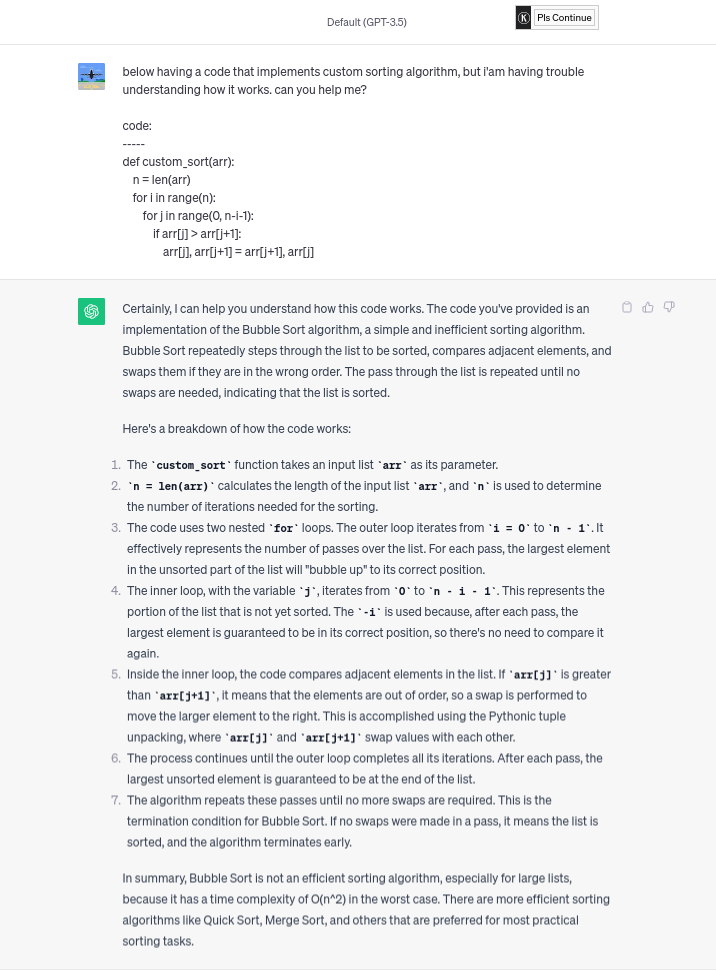
What I like the most about ChatGPT is it can explain how the code works line-by-line. Along with that, it can also suggest at the end of the completion that Bubble sort is not an efficient sorting algorithm because of its time complexity, and also give the suggested sorting algorithm to use. It is a way better answer.
Let’s take another example, but in this case, we can create a custom Linux command that is hard to make for the specific use cases, or we can say it’s a bit time-consuming.
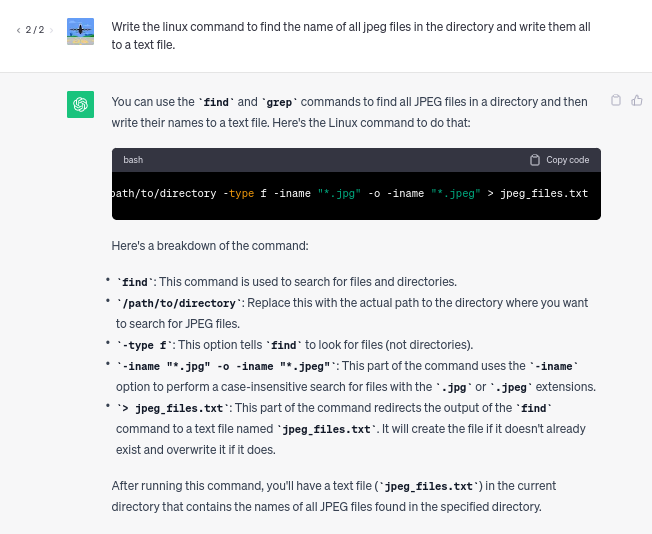
Likewise, you can use ChatGPT to make database queries, bash commands, and perform various tasks related to programming, system administration, and data manipulation. And that’s the beauty of it.
Generating code using ChatGPT
Let’s take one more example. In this example, we can ask ChatGPT to manipulate data present in the CSV file.
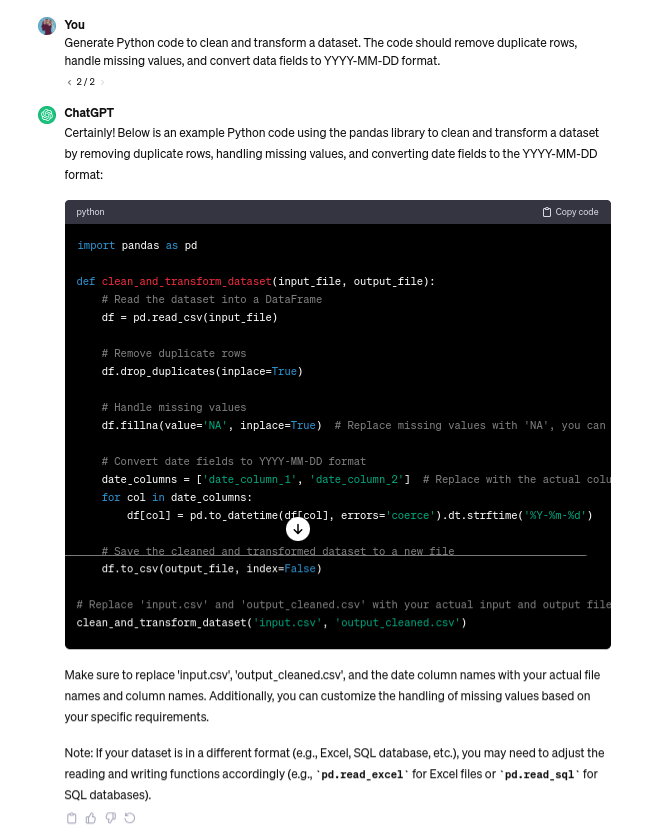
Above is the example code of generating a Python script to tackle a real data cleaning and transformation problem. Chatgpt saves you coding time, plus the main benefit is you can just give a desired prompt, like giving a task to your junior developer, and that’s it.
Completing code using ChatGPT
Aside from generating a task base code, you can also complete your half-generated code. This approach helps developers to gain insights into different coding techniques and algorithms. Let’s take an example of that.
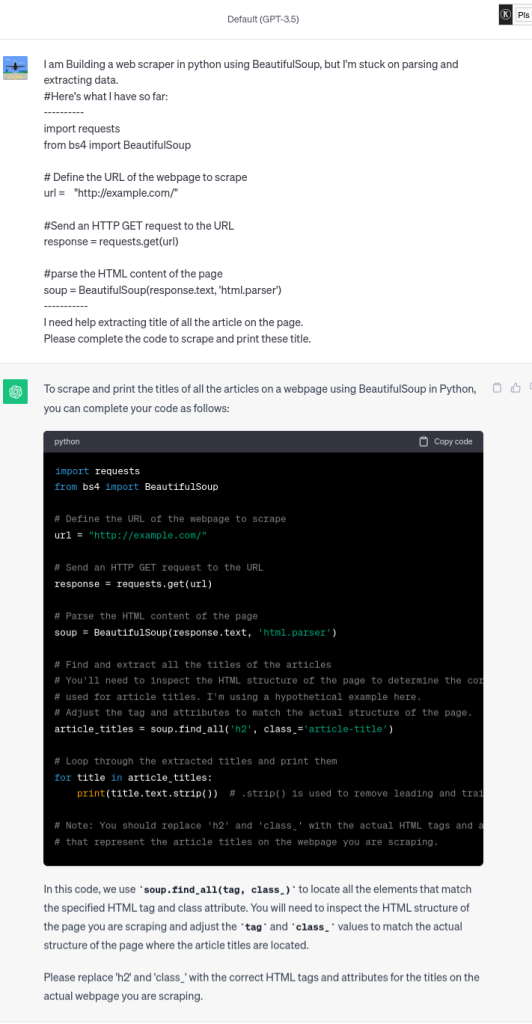
In the above example, we ask ChatGPT to complete the scrapping code. In the response, we receive the full code, including necessary comments to understand the consistency of the code. Despite that, it does not give exactly what you want, but it provides a clear structure of the code so we can not get stuck in the code.
Prototyping using Chatgpt
Since prototyping is an implementation part of any project, chaGPT helps you create a prototyping of your project to give a quick overview of your project. If you think that XYZ idea looks best and you want to apply it on the page, you can quickly create a prototype of your idea and see that on the webpage.
You might wonder how we can extract the full prototype in one completion. The below example will clear up your confusion.
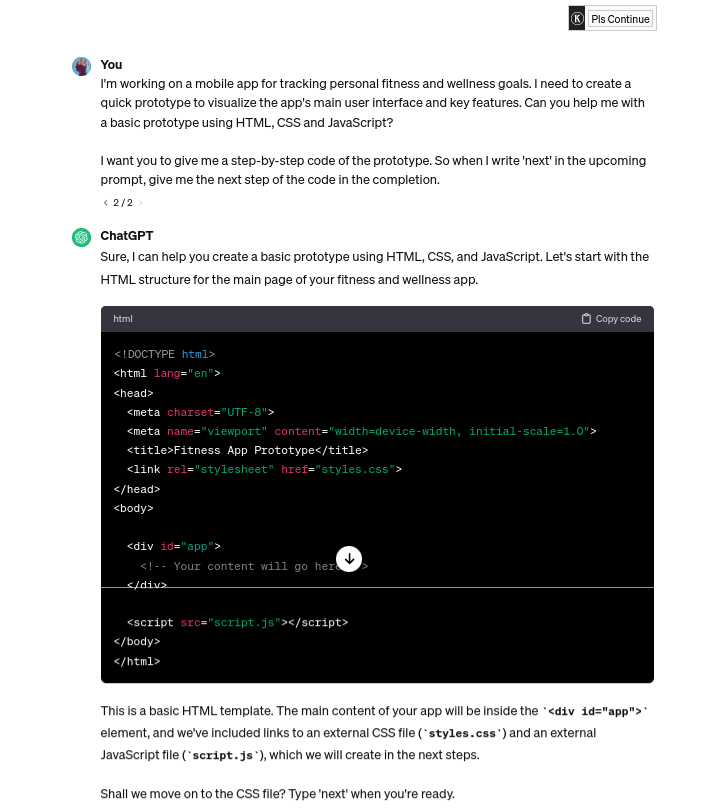
In the above example, we ask ChatGPT to create a prototype for the fitness tracking app. In response, it gives the code overview in HTML.
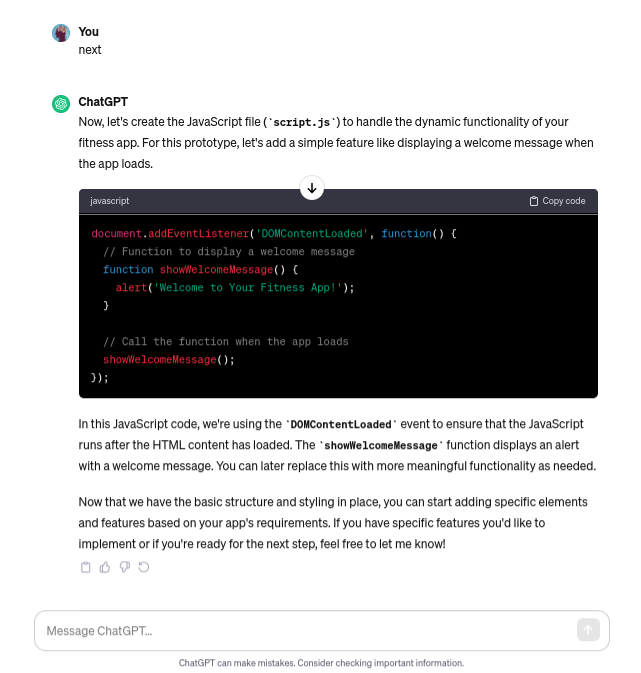
But, what you find most interesting in the prompt is we did not request complete completion in just one prompt. Instead, we almost automated the chat to give the next part of the prototype by just writing next in the next prompt.
Here is the next part of the prototype:
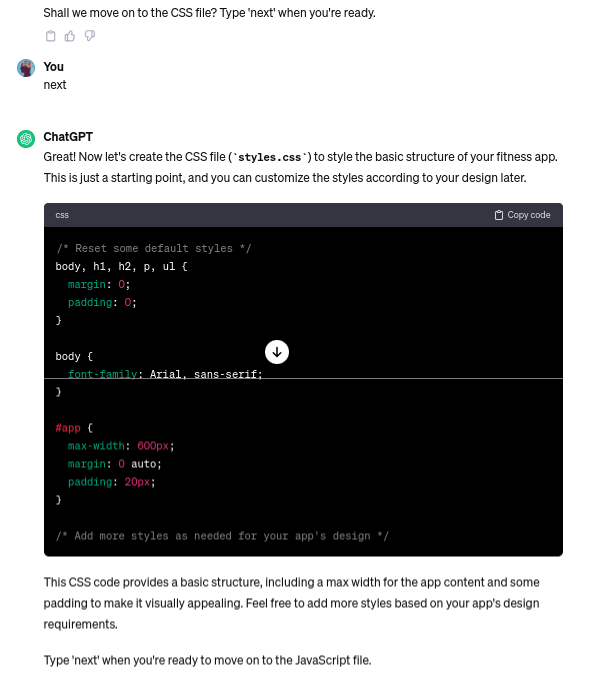
And so on…
Generate Database query using ChatGPT
Whether you are building a web application or mobile app, or we can say data analytics tool, manipulating and filtering data from the database is crucial. With the right prompt and clear instructions, you can leverage ChatGPT to generate SQL queries that retrieve the exact data you are looking for.
For example, you can simply prompt ChatGPT with a request like the following:
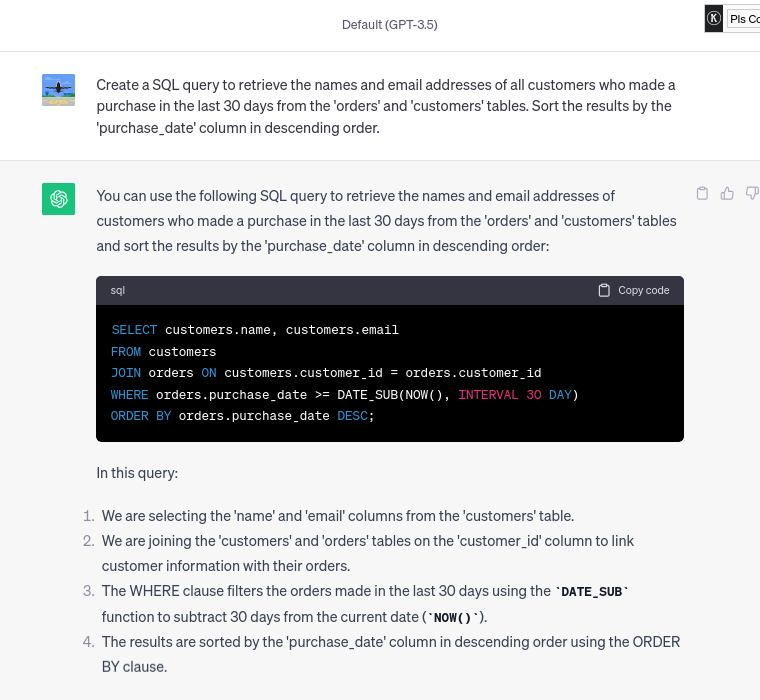
This not only saves time but also automates routine data-extracting tasks. Whether you are a developer, a data analyst, or a business owner, the ability to use the power of chatGPT to create database queries can significantly enhance your productivity and your data-driven workflow.
Code Troubleshooting using ChatGPT
When using ChatGPT for code troubleshooting, it is essential to provide a clear and concise description of the issue you are facing. The more contact and information you provide, the better the model can assist you.
To receive clear instructions from ChatGPT, sharing error messages can help identify and resolve issues more effectively.
Let’s troubleshoot the code using ChatGPT:
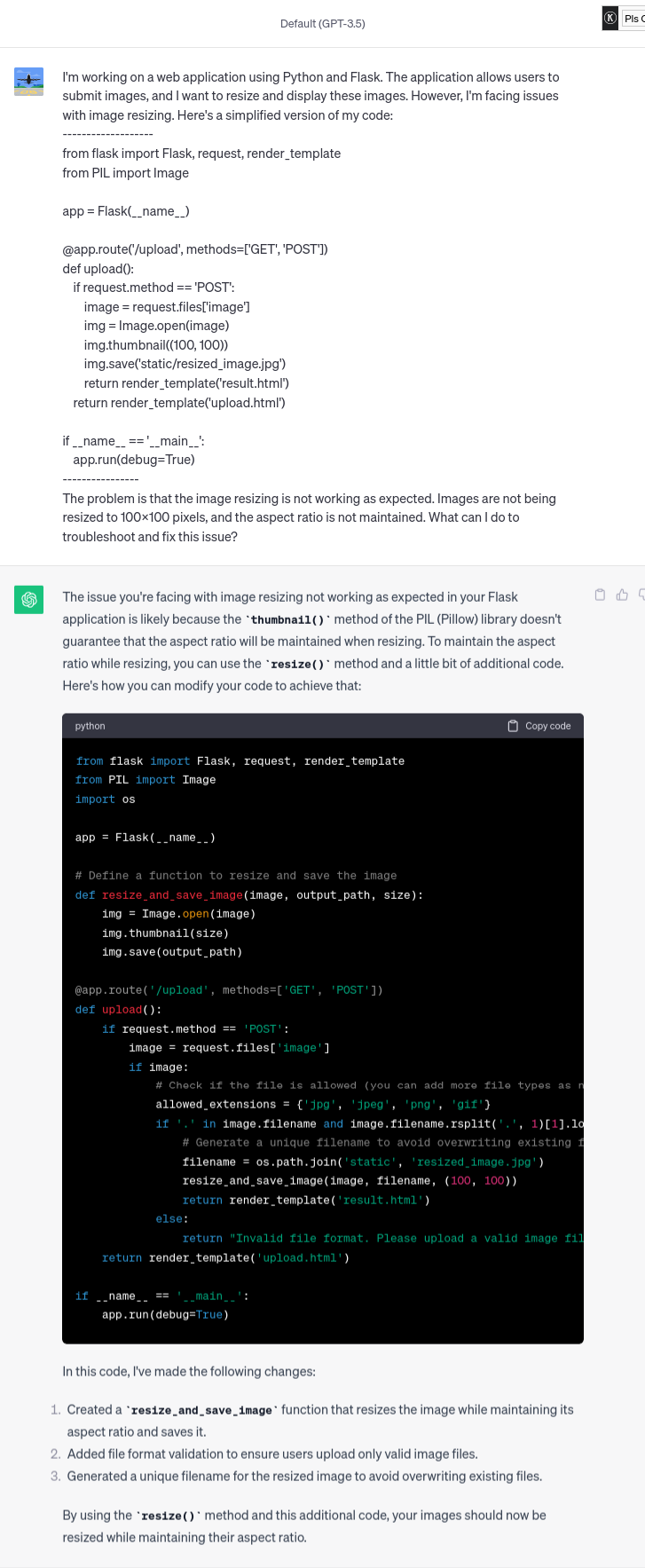
Like the above example, you can troubleshoot any programming language code with proper prompt and error explanations.
The reason ChatGPT is important for code troubleshooting is it can perform code reviews. By sharing your code with ChatGPT, you receive feedback on best practices, coding style, and potential improvements.
While ChatGPT can provide insights and solutions, you should validate and test its suggestions in your development environment to ensure they work as expected.
Generate Documentation using ChatGPT
You have to admit with me that proper documentation is the lifeline of any software project. It guides users and aids developers.
ChatGPT streamlines this crucial task, saving you time and resources. Accurate documentation enhances the user experience and accelerates software adoption.
ChatGPT is a game changer for crafting top-notch documentation, Ensuring your software project excels. Let’s delve into how ChatGPT transforms the documentation process.
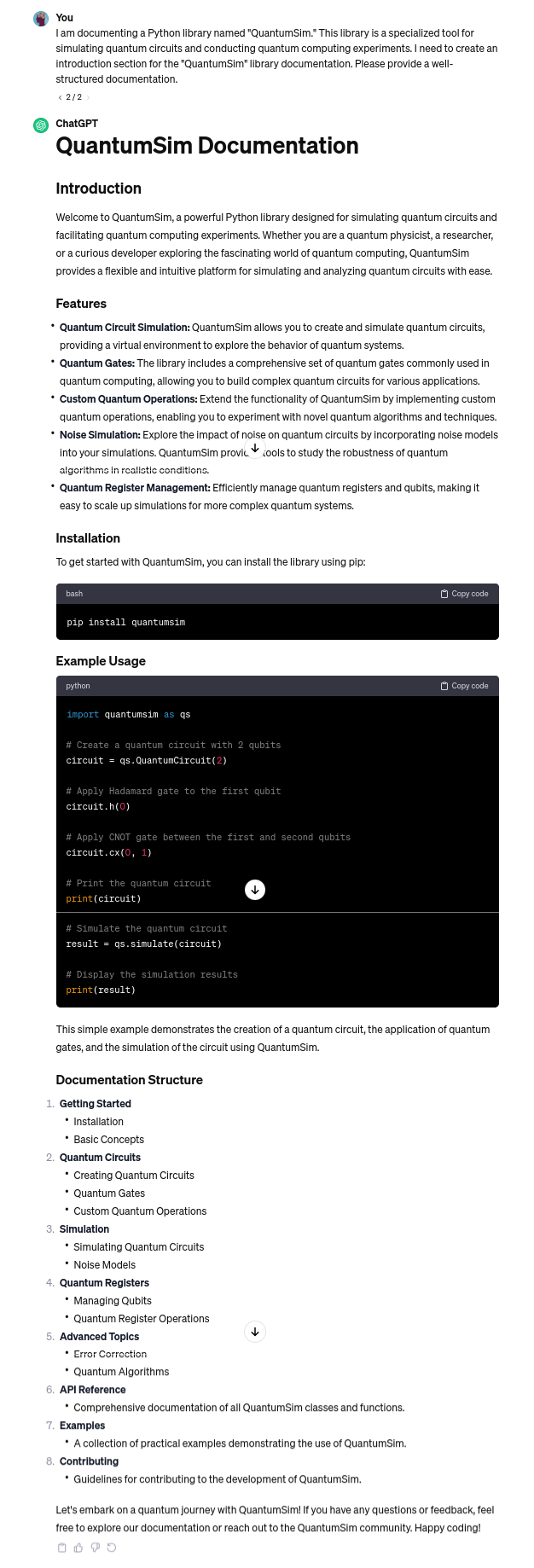
You can see how clear the explanation is. As you explore the world of article and documentation writing, remember the impact AI tools like ChatGPT can have on making your work accessible and understandable.
Algorithmic solution using ChatGPT
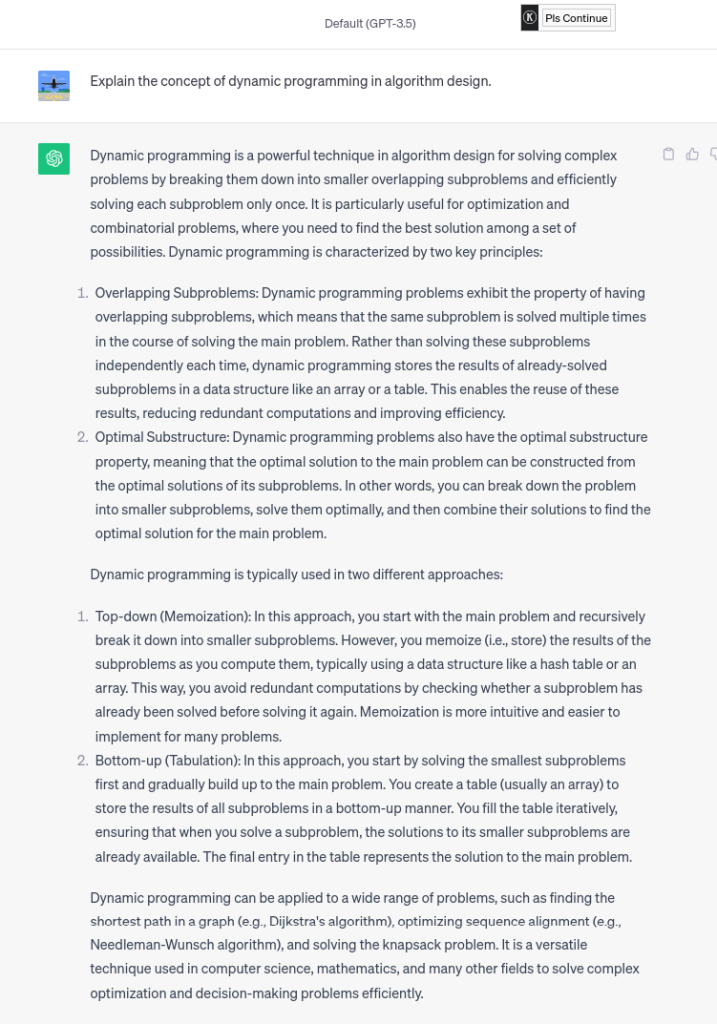
When it comes to tackling complex algorithmic challenges, ChatGPT is my go-to assist. It feels like having an intelligent partner in problem-solving. What makes it truly remarkable is its ability to remember and apply information from our previous interactions.
So, let me show you the magic of ChatGPT in action through an advanced example. We’ll dive into solving the “Longest Common Subsequence” using chat dynamic programming in Python.
And in the second prompt, we ask-
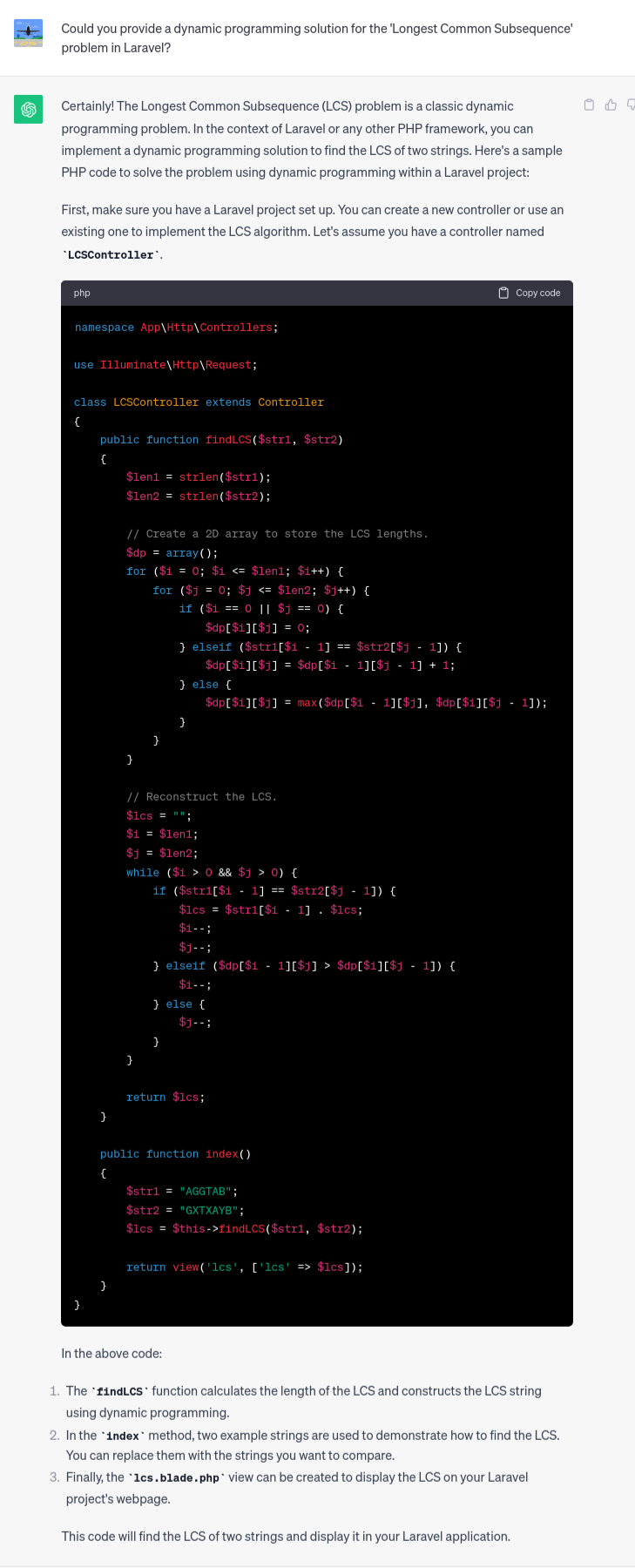
The above example can help you understand how ChatGPT can be a valuable resource in algorithmic problem-solving and encourage them to leverage its capabilities for better results.
Testing and QA using ChatGPT
As a developer, you may know very well that quality assurance is non-negotiable. ChatGPT becomes your QA partner, simplifying the creation of various test cases.
With a deep understanding of your requirements, ChatGPT provides efficient and comprehensive scenarios, saving time and enhancing software reliability. Let’s explore its capabilities.
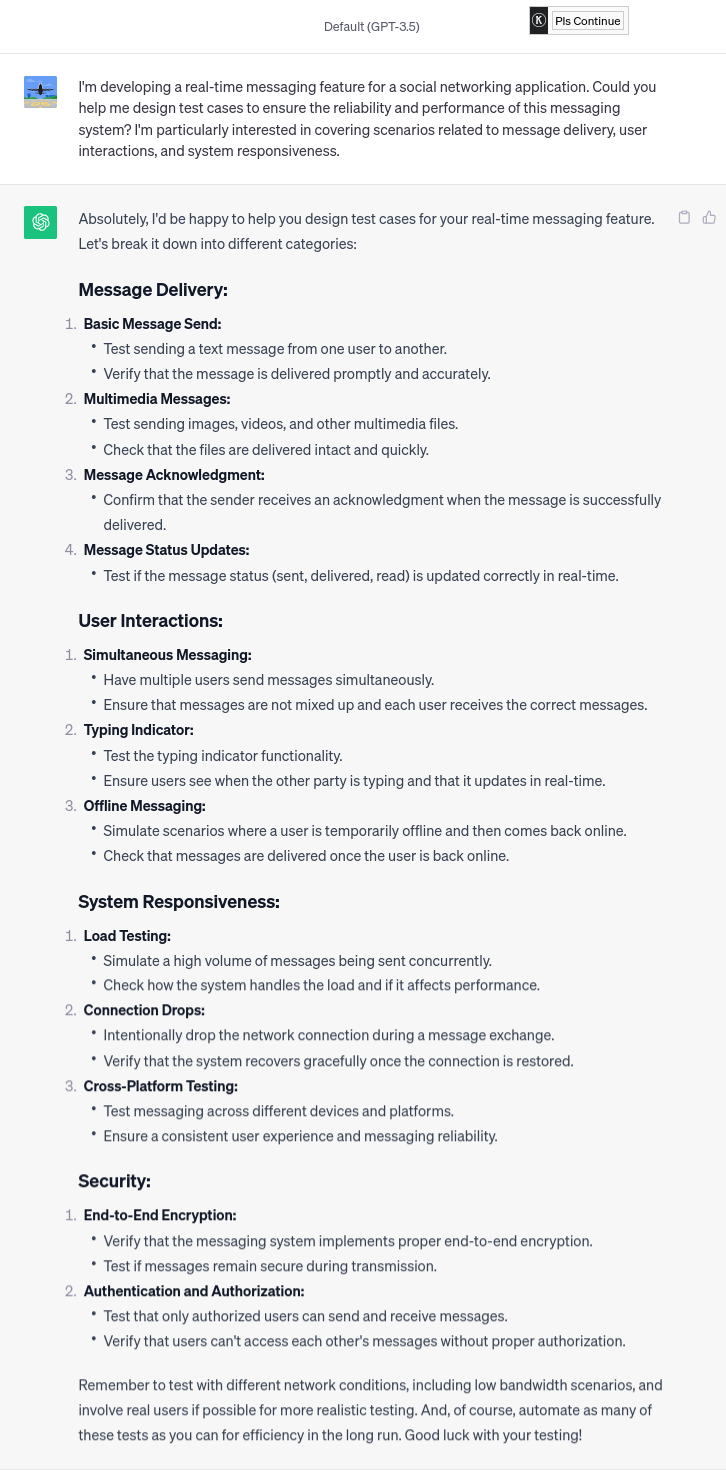
You can see how ChatGPT can assist in creating advanced test cases for a real-time messaging feature, covering scenarios related to delivery, user interaction, and system responsiveness.
Bonus: Unlocking Google Search Commands with ChatGPT
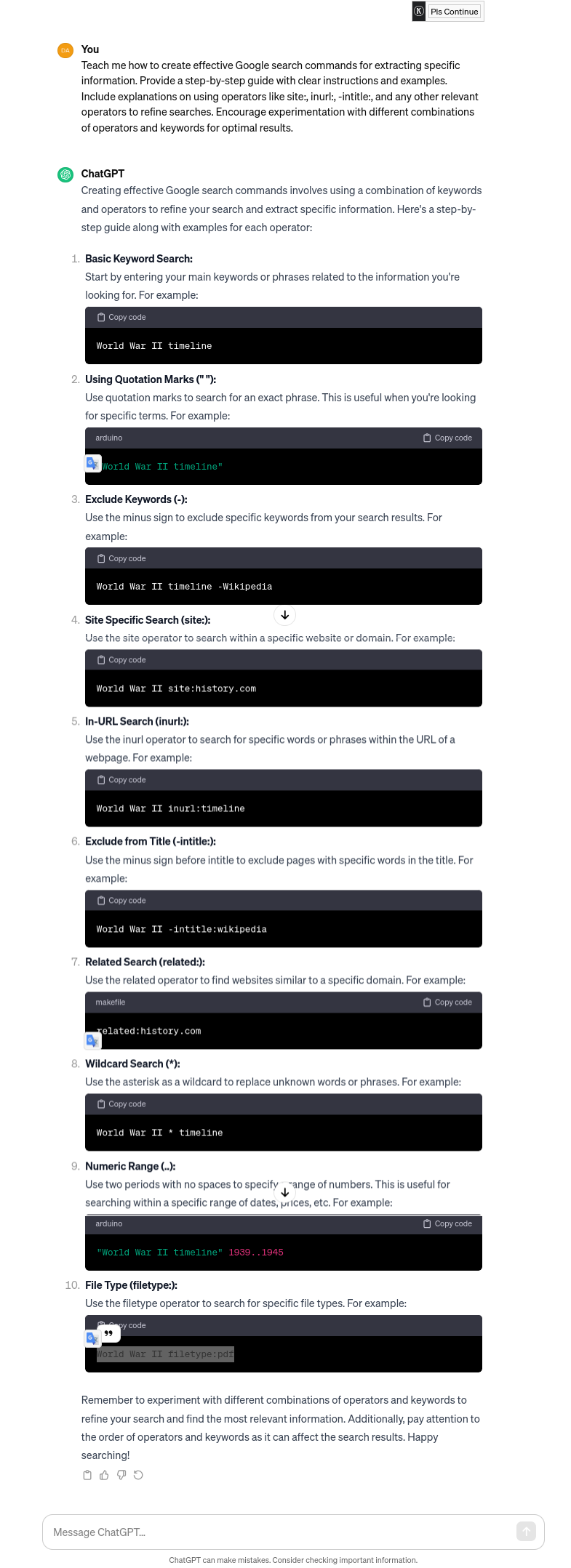
Creating Google Search Commands with ChatGPT is as easy as above!!
That’s it for this article. I hope this article might help you accelerate daily tasks, from generating code to automating documentation, from solving complex algorithms to retrieving database queries.
Remember that ChatGPT is not just a tool; it’s a gateway to endless possibilities in conversation, creativity, and problem-solving. With ChatGPT, your interactions are as limitless as your imagination!