
GICT knowledge base
Change Favicon in Magento2
Published
Favicon is the abbreviation of ‘Favorite Icon’ – is a small icon on the tab of each browser page. Favicons are generally 32×32 pixels or 16×16 pixels in size. Magento supports PNG, JPG, ICO, and SVG file types. The most widely used file format for a favicon is ICO. The steps to change the favicon in Magento 2.1+ are listed below.
1) Create a new Favicon
Create a 16×16 or 32×32 pixels graphic image of your logo and convert the image to .ico extension using any of the online conversion tools.
2) Upload the Favicon to your store
The steps to upload the Favicon to your store are listed below.
First of all, log in to Magento2 admin panel.
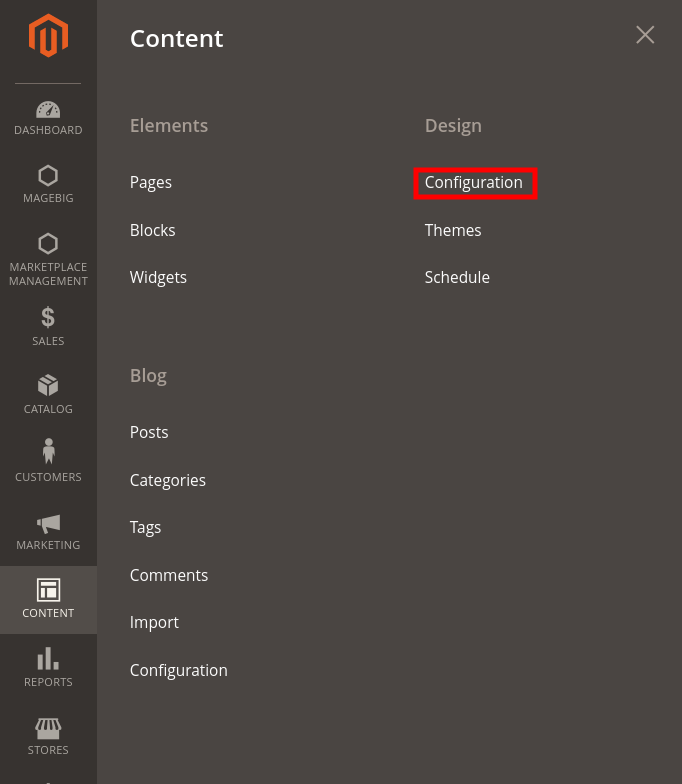
Then, Navigate to Content >> Design >> Configuration from the left sidebar of the admin panel.
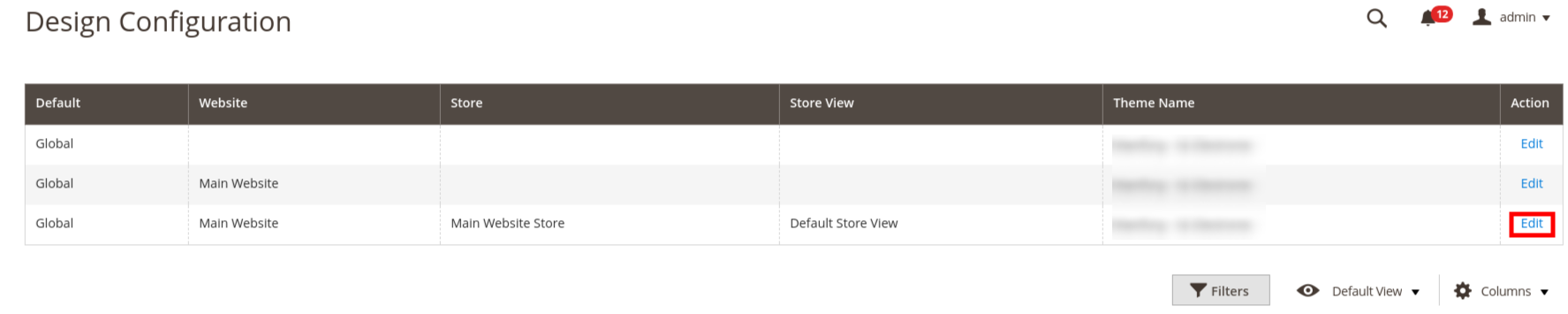
In Design Configuration, click “Edit” to edit your current website store view.
Upload the favicon image that you have prepared by clicking the “Upload” menu, after expanding the “HTML Head” section on the resulted screen.
When complete, click on the “Save Configuration” button given at the top-right corner of the page.

To view the new favicon, return to your storefront and press F5 to refresh the browser.
To change Favicon on Magento 2.0.x versions
- Select “Stores” on the Admin sidebar.
- Go to Settings >> Configuration.
- Select “Design” from the “General” section.
- Upload favicon after expanding the HTML head section.
- When complete, select “Save Configuration”.
If you need any further help, please do reach our support department.
Related guides
Top 10 Best Content Management Systems in 2021!
Follow this list to learn in detail about the 10 most popular content management systems available in the market.
E-CommerceWooCommerce vs Shopify : The best E-commerce platforms
WooCommerce and Shopify are the two most popular E-commerce platforms. Follow this tutorial to learn more about both of them.
E-CommerceBest Applications to Run E-commerce Websites
E-commerce Hosting:E-commerce is the process of selling and buying of goods or services over the world wide web. It is also known as electronic commerce or
E-CommerceEasy Digital Downloads Plugin for WordPress
Easy Digital Downloads (EDD) plugin is the second most well-known WordPress eCommerce plugin, after WooCommerce. EDD plugin is used to create an eCommerce