
GICT knowledge base
How to Add Store Logo in OpenCart
Published
Branding is important for each and every business, No matter the vertical or industry. In the case of E-commerce, if you fail to create a good brand image, you might lose your regular customers. For example, Who owns the biggest market share in E-Commerce? Amazon, simple. We all know this answer because we all know the name Amazon and it’s logo without even looking at it.
Similarly, if you want your customers to share the products on your site, and recognize you, You must have a brandable name and logo on your site. In this tutorial, I will show you How to add a store logo in OpenCart. So, Let’s get started with the tutorial.
Add Store Logo in OpenCart
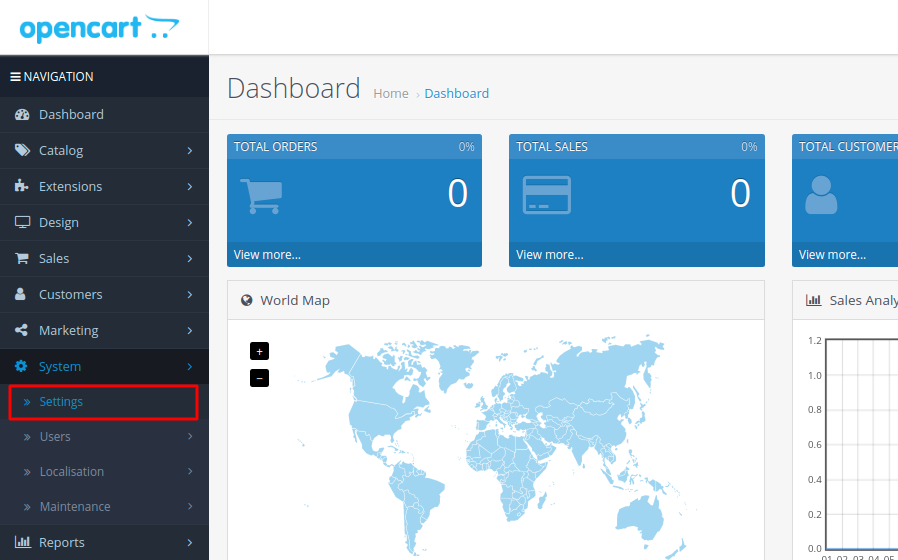
To add a store logo, login to the admin panel of your OpenCart store and then click on the System -> Settings option from the left sidebar.
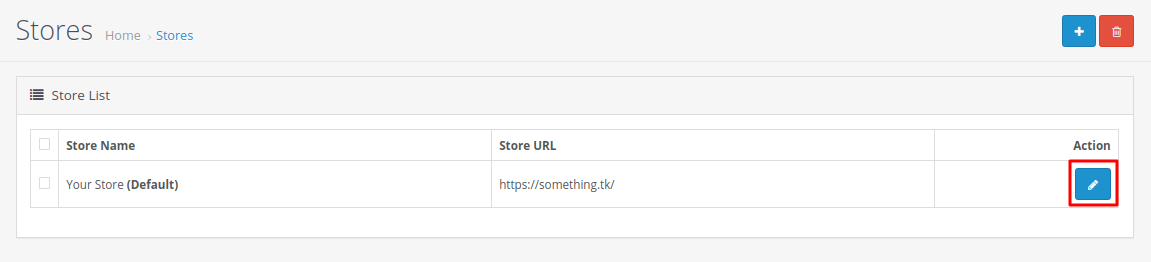
On this page, you will see a list of stores available in your OpenCart installation. Click on the Edit button corresponding to the store you want to update.
Now, you will see a lot of options you can modify for a specific store. You also have multiple tabs for multiple types of settings for your store. To add the logo, click on the Image tab, just like the following image.
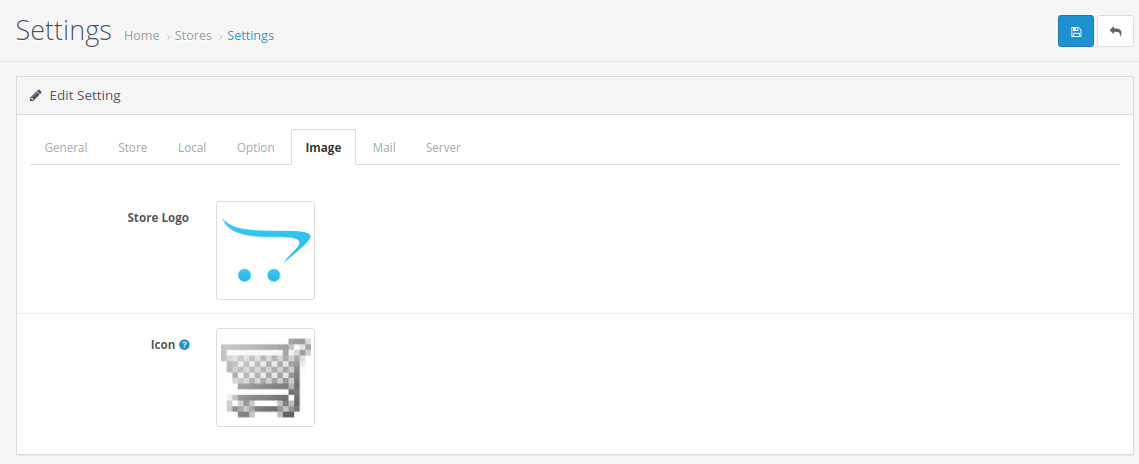
Now, Click on the Store Logo to select a new store logo and do the same thing for Icon. Once you have uploaded the images, click on the Save button given at the top-right corner of the page to apply changes.
So, this is how you can upload the Store logo in OpenCart. If you are unable to follow this tutorial due to some issue, please let us know in the following comment section. If you are an GICTServer customer, feel free to contact our support staff for the quick help!
Related guides
Top 10 Best Content Management Systems in 2021!
Follow this list to learn in detail about the 10 most popular content management systems available in the market.
E-CommerceWooCommerce vs Shopify : The best E-commerce platforms
WooCommerce and Shopify are the two most popular E-commerce platforms. Follow this tutorial to learn more about both of them.
E-CommerceBest Applications to Run E-commerce Websites
E-commerce Hosting:E-commerce is the process of selling and buying of goods or services over the world wide web. It is also known as electronic commerce or
E-CommerceEasy Digital Downloads Plugin for WordPress
Easy Digital Downloads (EDD) plugin is the second most well-known WordPress eCommerce plugin, after WooCommerce. EDD plugin is used to create an eCommerce