
GICT knowledge base
503 Valid RCPT Command Must Precede DATA
Published
If you are using Outlook as your email client and you are receiving the error ‘503 Valid RCPT command must precede DATA’, this indicates that the connection settings in your outlook are not properly authenticated by your email server.
The two most common causes for this error are:
1) Your email server requires you to check email first, before sending the email.
2) Your email client isn’t set up for SMTP Authentication.
In order to resolve this issue, you need to correct the connection settings in your outlook.
1) First, you need to open your “Account Settings’ in Outlook.
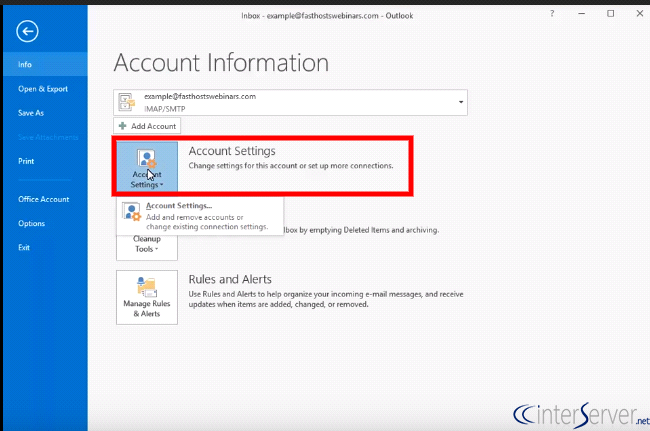
2) Then you need to select your email account that you want to change the email settings and click “Manage” or “Change” button.
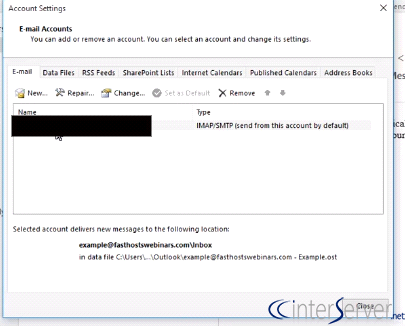
3) Once you have the settings in front of you, click “More Settings” and then on the “Outgoing Server” tab.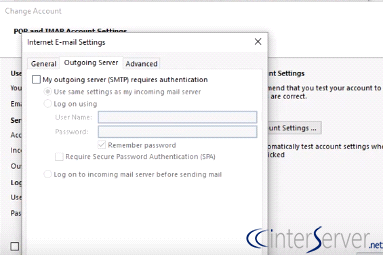
4) Click on the “Outgoing Mail Server (SMTP) requires authentication” and make sure that “Use same settings as incoming mail server” is selected.
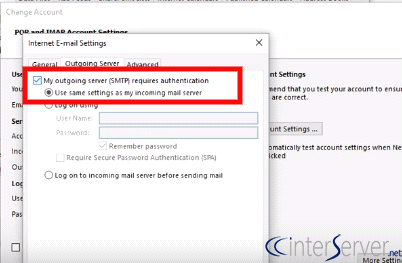
5) Then click on the “Advanced” tab and set the outgoing Port (SMTP) to 587. Then click “Ok” button.
Finally, you need to test “Account Settings”.
If you need any further help, please do reach our support department.
Related guides
End of TLS1 and TLS 1.1 support in cPanel as of version 132
The End of an Era: Why TLS 1.0 and 1.1 Are Gone, and What it Means for cPanel Users * Update: If Dovecot settings under Web Host Manager >> mailserver configuration is...
Email Client / WebmailRemove Your IP from the Hotmail/Outlook Blacklist
Remove Your IP from the Hotmail/Outlook Blacklist. A suspicious or wrong email practice can lead o serious deliverability problems, such as spam placements
Email Client / WebmailcPanel Horde Data Conversion from MySQL to SQLite
The horde_mysqltosqlite ScriptThe horde_mysqltosqlite script in cPanel is used to transfer and convert Horde user data from a single shared MySQL
Email Client / WebmailFind Verified Mail Client Settings in cPanel and Webmail
Find mailbox-specific IMAP, POP and SMTP settings, pair ports with TLS correctly and configure clients without exposing passwords or using root access.